Unity Cloud Collaboration Tools
About Unity Cloud Collaboration Tools
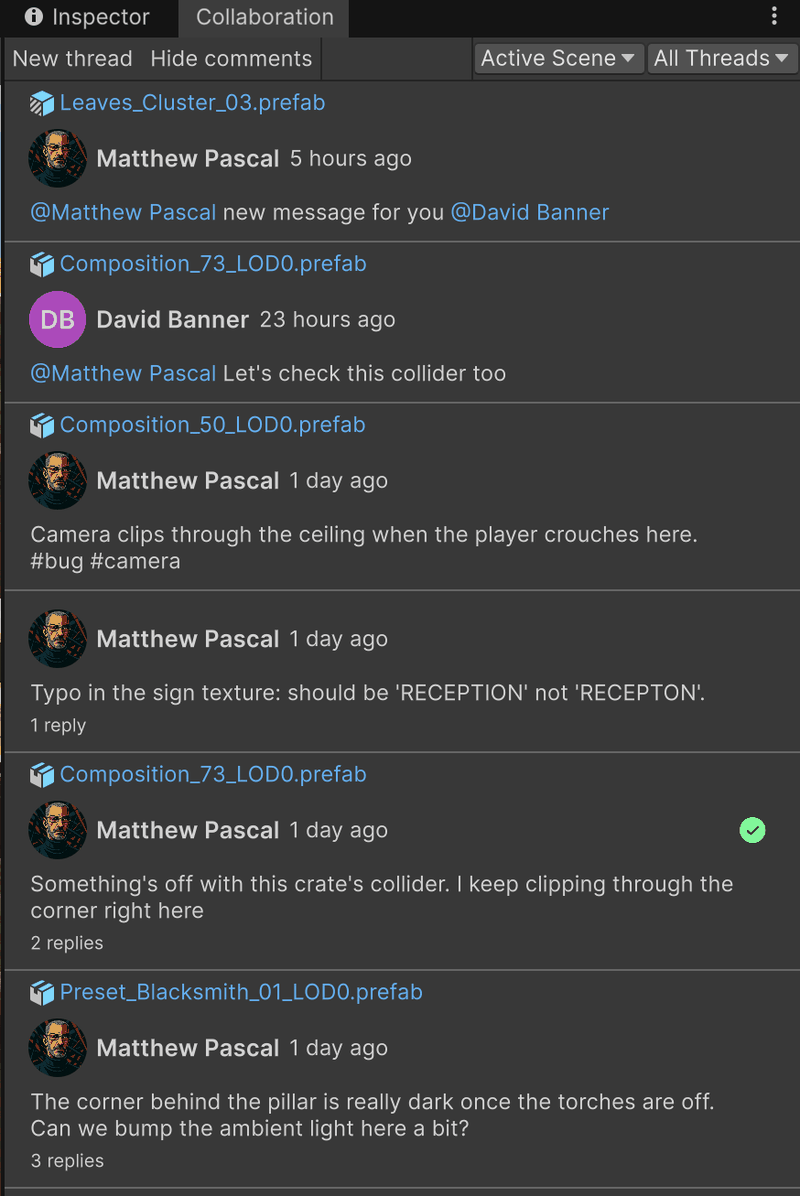
Unity Cloud Collaboration Tools adds ready-to-use collaboration UI features to the Unity Editor. These features let you discuss your project where your work happens: on scenes, GameObjects, and project assets. You can:
- Create comment threads anchored to a location in a scene, to a GameObject, or to a project asset
- See comment bubbles in the Scene View exactly where your teammates left them
- Reply to threads, mention teammates and assets, and add hashtags
- Attach images, place spatial markers, and draw sketches to illustrate your point
- Track what's new with unread indicators, and keep the list tidy by resolving finished discussions
Everything runs inside the Editor. Your comments are stored in your Unity Cloud project, so everyone who opens the project sees the same discussions.
This package is available as an experimental package, so it's not ready for production use. The features and documentation in this package might change before it's verified for release.
Installation
To install the Unity Cloud Collaboration Tools package:
- In your Unity Project, go to Window > Package Manager.
- On the status bar, select the Add (+) button.
- From the Add menu, select Add package by name.
Name and Version fields appear. - In the Name field, enter
com.unity.cloud.collaboration.tools. - Select Add.
For detailed installation instructions, see the Installation page.
Getting started
To get started:
- Ensure you meet all prerequisites for using the package.
- Follow the installation instructions to add the package to your project.
- Follow the Get started guide to create your first comment thread.
- Read the Interface overview to learn your way around the tools.
- To navigate this documentation, see the Table of contents.
Key features
Comment threads
Threads are the core of the collaboration workflow. Each thread starts with a comment on a specific target (a spot in a scene, a GameObject, or a project asset) and collects replies underneath it.
- Create threads from the Scene View, the Hierarchy, the Project window, or the Collaboration window
- Browse threads for the active scene or for the whole project, and narrow the list down to a single asset
- Filter threads by resolution state, and resolve them when the discussion is done
Learn more starting with Comment on a location in your scene.
Comment bubbles
Threads anchored in a scene show up as round comment bubbles at the exact spot where you created them, carrying the author's avatar. Select a bubble to read and join the discussion without leaving the Scene View.
See Comment bubbles in the Scene View.
Mentions and rich comments
Type @ to mention a teammate or link an asset, and # to add a hashtag. Mentions render as links; selecting an asset mention highlights that asset in your project.
See Reply to threads and mention people.
Attachments and sketches
Add context to any comment:
- Image attachments: Attach screenshots or reference images
- Spatial markers: Pinpoint an exact 3D position in the scene
- Sketches: Draw directly over the Scene View or over an asset preview, with configurable brush size, color, and opacity
See Attach files and spatial markers and Draw sketches.
Documentation structure
This documentation includes the following pages:
- Prerequisites and Installation: System requirements and installation steps
- Get started: Create your first comment thread
- Interface overview: A tour of every surface the package adds to the Editor
- Working with threads: Task guides for creating, browsing and filtering, replying to, and resolving or deleting threads
- Attachments: Guides for files and spatial markers and sketches
- Comment bubbles: Read, show, and hide comment bubbles in the Scene View
- Troubleshooting: Common issues and their solutions
Support and feedback
For issues, questions, or feedback about Unity Cloud Collaboration Tools:
- Visit Unity Discussions to engage with the community
- Submit bug reports or feature requests through the Unity Issue Tracker
- Refer to the Troubleshooting section for solutions to common issues
Additional resources
- Unity Cloud Services: Learn about the broader Unity Cloud ecosystem
- Unity Cloud Collaboration: The SDK this package is built on, for teams building their own collaboration features
- Unity Cloud Identity: Documentation for the Identity package that enables authentication