Comment bubbles in the Scene View
Threads anchored in a scene appear in the Scene View as round comment bubbles floating at the exact spot where the author created each thread. You can use these to see where discussions are happening and collaborate without leaving the Scene View.
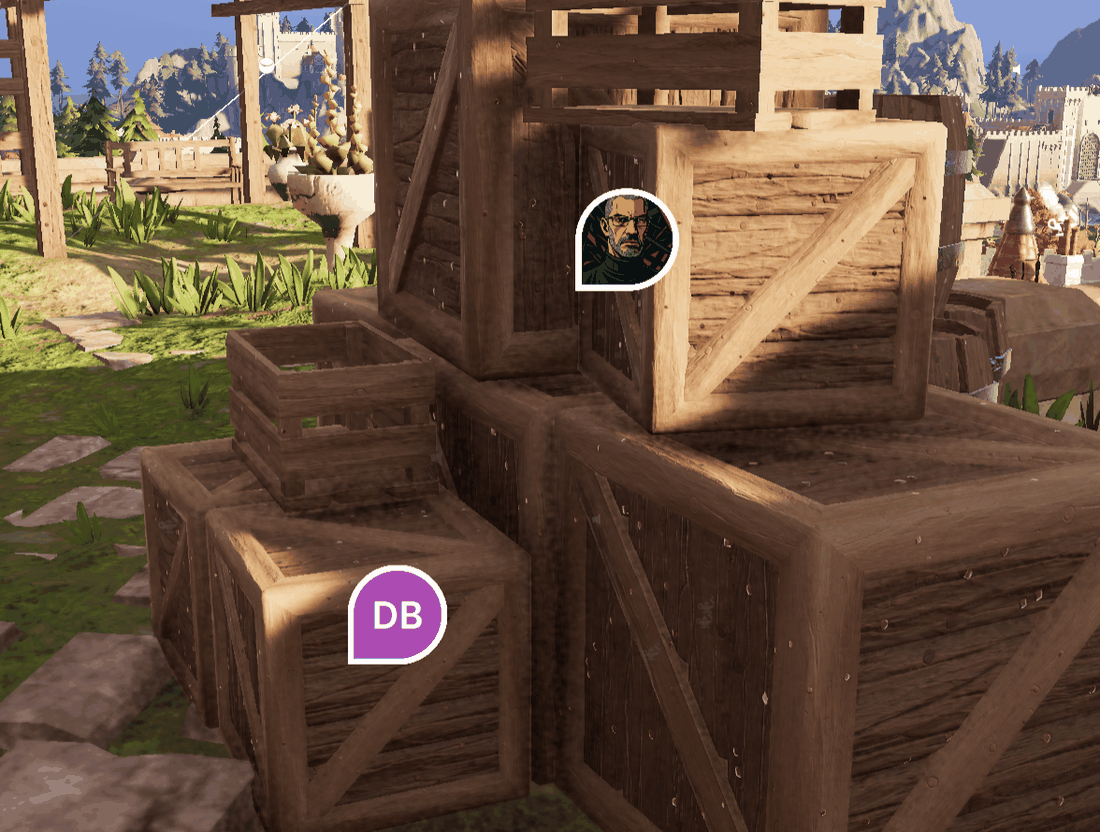
Reading the bubbles
- Each bubble shows the author's profile picture, or their initials on a colored background when they have none. The color is stable per person, so the same teammate is always the same shade.
- Bubbles have a white border. The border highlights when you hover over the bubble, and when the bubble's thread has focus elsewhere (for example, in an open thread panel).
- Select a bubble to open its thread in a floating panel and read or join the conversation.
- Nearer bubbles draw over farther ones, and bubbles are visible even through geometry, so no comment ever hides behind an object.
Only threads that live in your active scene and are anchored to a position show bubbles. Project-asset threads have no scene anchor, so they never appear as bubbles. Find them in the Collaboration window's Project mode.
Show or hide the bubbles
Bubbles are hidden by default in a fresh project. Three controls toggle them, and they all drive the same setting:
- The Show/Hide comment bubbles button in the Scene View's Collaboration overlay
- The Show comments / Hide comments buttons in the Collaboration window's header (visible in Active Scene mode)
- The Show comments entry in the Collaboration toolbar button's right-click menu (Unity 6000.3 or later; a check mark means bubbles are visible)
The Editor remembers your choice across sessions.
Note
If you expect bubbles and see none, check visibility first, especially on a machine where you're using the tools for the first time, because bubbles start hidden. For the full checklist, refer to Troubleshooting.
While you compose
When you create a new scene comment, a pending bubble appears at the anchor point while you write, so you can confirm you're commenting on the right spot before you send. Canceling the comment removes the pending bubble.