ビルトインレンダーパイプラインのリフレクションシェーダーの例
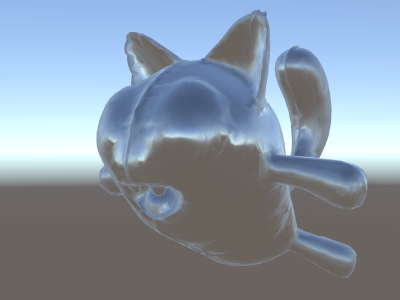
シーンで Skybox がリフレクションソースとして使用されている場合 (Lighting ウィンドウ を参照) は、基本的に、スカイボックスのデータを含む “デフォルト” のリフレクションプローブが作成されます。リフレクションプローブは、内部的にはキューブマップテクスチャです。参照できるように、上記のワールド空間の法線シェーダーを拡張します。
コードはこれから少し複雑になっていきます。もちろん、ライト、シャドウ、リフレクション、その他のライティングシステムで自動的に動作するシェーダーが必要な場合は、サーフェスシェーダーを使用する方が簡単です。この例は、ライティングシステムを部分的に “手動” で使用する方法を示しています。
Shader "Unlit/SkyReflection"
{
    SubShader
    {
        Pass
        {
            CGPROGRAM
            #pragma vertex vert
            #pragma fragment frag
            #include "UnityCG.cginc"

            struct v2f {
                half3 worldRefl : TEXCOORD0;
                float4 pos : SV_POSITION;
            };

            v2f vert (float4 vertex : POSITION, float3 normal : NORMAL)
            {
                v2f o;
                o.pos = UnityObjectToClipPos(vertex);
                // compute world space position of the vertex
                float3 worldPos = mul(_Object2World, vertex).xyz;
                // compute world space view direction
                float3 worldViewDir = normalize(UnityWorldSpaceViewDir(worldPos));
                // world space normal
                float3 worldNormal = UnityObjectToWorldNormal(normal);
                // world space reflection vector
                o.worldRefl = reflect(-worldViewDir, worldNormal);
                return o;
            }

            fixed4 frag (v2f i) : SV_Target
            {
                // sample the default reflection cubemap, using the reflection vector
                half4 skyData = UNITY_SAMPLE_TEXCUBE(unity_SpecCube0, i.worldRefl);
                // decode cubemap data into actual color
                half3 skyColor = DecodeHDR (skyData, unity_SpecCube0_HDR);
                // output it!
                fixed4 c = 0;
                c.rgb = skyColor;
                return c;
            }
            ENDCG
        }
    }
}
上記の例では、ビルトインシェーダーのインクルードファイルからいくつかのものを使用しています。
- ビルトインシェーダー変数から unity_SpecCube0、unity_SpecCube0_HDR、Object2World、UNITY_MATRIX_MVP。unity_SpecCube0 にはアクティブなリフレクションプローブのデータが含まれています。
- UNITY_SAMPLE_TEXCUBE はキューブマップをサンプリングするためのビルトインマクロです。ほとんどの通常のキューブマップは、標準の HLSL 構文 (samplerCUBE および texCUBE) を使用して宣言および使用されますが、Unity のリフレクションプローブキューブマップは、サンプラースロットを節約するために特殊な方法で宣言されます。これが何か知らなくても心配はいりません。unity_SpecCube0 キューブマップを使用するには、UNITY_SAMPLE_TEXCUBE マクロを使用する必要があることだけ知っておいてください。
- UnityCG.cginc の UnityWorldSpaceViewDir 関数と、同じファイルの DecodeHDR 関数。後者は、リフレクションプローブデータから実際の色を取得するために使用します。Unity はリフレクションプローブのキューブマップを特殊なエンコード方法で保存しているためです。
- reflect は、指定された法線の周囲のベクトルリフレクションを計算するための、ビルトイン HLSL 関数です。