从即时模式 GUI (IMGUI) 迁移到 UI 工具包
本指南适用于具有从即时模式 GUI (IMGUI) 迁移至__ UI__(即用户界面,User Interface)让用户能够与您的应用程序进行交互。Unity 目前支持三种 UI 系统。更多信息
See in Glossary 工具包经验的开发人员。本指南侧重于编辑器 UI,但其信息也适用于运行时 UI。
主要差异
代码驱动与 UI 驱动
IMGUI 由实现它的 C# 脚本中的 OnGUI 函数调用进行代码驱动。UI 工具包为编辑器 UI 创建提供了更多选项。使用 UI 工具包可以在 C# 脚本中定义行为。但是,在定义 UI 元素和样式时,除了 C# 之外,还可以在 UI Builder 中直观定义 UI 控件,或直接写入 XML 类文本文件(称为 UXML)。有关更多信息,请参阅 UI 工具包入门。
立即与保留模式
使用 IMGUI,可以在 OnGUI() 函数中重绘 UI 时描述 UI 树。当事件进入 UI 或重绘 UI 时,必须调用此函数。在不同事件之间没有与 UI 树相关的持久性信息。然而,您可以使用 UI 工具包在名为视觉树 (Visual Tree) 的树结构中创建视觉元素。视觉树中的信息将永久保留。
常量与状态变化
IMGUI 基于 OnGUI()function that runs at least once every frame. You define the look and the behaviors of the UI for every possible frame. The body ofOnGUI()`,可能包含许多条件和不同的状态。
UI 工具包在事件驱动的系统中运行。您可以定义处于默认状态的 UI 的外观,并定义 UI 响应事件的行为。在 UI 工具包中所做的任何更改都会导致 UI 状态的持续更改。
例如,IMGUI 中的按钮声明如下所示:
if (GUILayout.Button("Click me!"))
{
    //Code runs here in frames where the user clicks the button.

    //Code makes changes to the UI for frames where the user has just clicked the button.
}
else
{
    //Code specifies what happens in all other frames.
}
上方示例在 UI 工具包中如下所示:
UIDocument document = GetComponent<UIDocument>();

//Create button.
Button button = new Button();
button.text = "Click me!";

//Set up event handler.
button.RegisterCallback<ClickEvent>((ClickEvent evt) =>
{
    //Code runs here after button receives ClickEvent.
});

//Add button to UI.
document.rootVisualElement.Add(button);
有关如何使用 UI 工具包创建自定义编辑器窗口的完整示例,请参阅 UI 工具包入门。
IMGUI 支持
使用 IMGUIContainer 可将 IMGUI 代码放在 VisualElement 中。通常可在 OnGUI() 中执行的所有操作都受支持。
可以通过混合 GUILayout 和 UI 工具包布局来安排多个 IMGUIContainer 并排列它们。请注意,无法在 IMGUIContainer 中添加 VisualElement 实例。
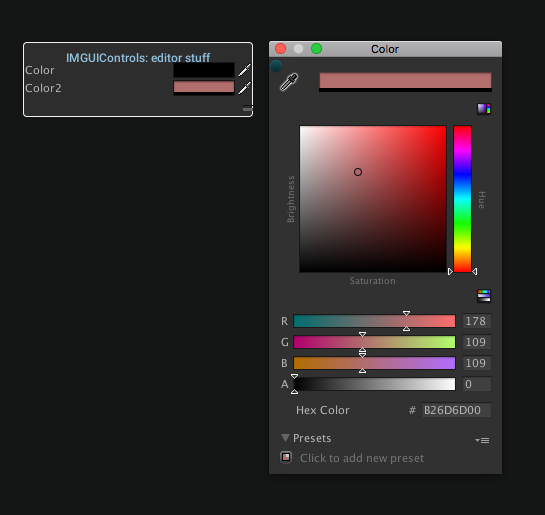
IMGUIContainer 示例从 IMGUI 转换到 UI 工具包
下表列出了 IMGUI 和 UI 工具包之间的等效函数:
| 操作 | IMGUI | UI 工具包 |
|---|---|---|
| 创建编辑器窗口 | EditorWindow.OnGUI() |
EditorWindow.CreateGUI() |
| 创建属性绘制器或属性 (Property) 属性 | PropertyDrawer.OnGUI() |
PropertyDrawer.CreatePropertyGUI() |
| 为检视面板创建自定义编辑器 | Editor.OnInspectorGUI() |
Editor.CreateInspectorGUI() |
下表列出了 IMGUI 和 UI 工具包之间的等效方法、类和属性:
| IMGUI | IMGUI 命名空间 | UI 工具包 |
|---|---|---|
AddCursorRect() |
EditorGUIUtility | 在 UI Builder 或 USS 中设置 VisualElement.style.cursor 或设置视觉元素的光标纹理。如需更详细的交互性,请使用 C# 事件。 |
AreaScope |
GUILayout | UI 工具包中通常不需要作用域。请参阅 BeginArea()。 |
BeginArea() |
GUILayout | 要定义区域本身,请创建一个视觉元素并将 style.position 设置为 Position.Absolute。要为区域创建子项,请在区域下创建子视觉元素。 |
BeginBuildTargetSelectionGrouping() |
EditorGUILayout | 无等效项。 |
BeginChangeCheck() |
EditorGUI | 在更改检查范围内的每个元素上注册回调。如果使用 PropertyField 作为自定义检视面板中序列化字段的替代字段,请使用 PropertyField.RegisterCallback<SerializedPropertyChangeEvent>() 或 PropertyField.RegisterValueChangeCallback()。在所有其他情况下,请使用 VisualElement.RegisterCallback<ChangeEvent<T>>() 或 VisualElement.RegisterValueChangedCallback<T>()。 |
BeginDisabledGroup() |
EditorGUI | VisualElement.SetEnabled(false) |
BeginFoldoutHeaderGroup() |
EditorGUI、EditorGUILayout | 请参阅 Foldout()。 |
BeginGroup() |
GUI | 请参阅 BeginArea()。 |
BeginHorizontal() |
EditorGUILayout、GUILayout | 请参阅 BeginArea()。 |
BeginProperty() |
EditorGUI | 如果使用 BeginProperty()/EndProperty() 将简单控件绑定到序列化属性,则可以在 UI 工具包中通过调用 BindProperty()、设置 bindingPath 或设置 binding-path UXML 属性来执行此操作。如果使用 BeginProperty()/EndProperty() 使用复杂的自定义 UI 创建单个属性,则 UI 工具包不支持此功能。 |
BeginScrollView() |
EditorGUILayout、GUI、GUILayout | UnityEngine.UIElements.ScrollView |
BeginToggleGroup() |
EditorGUILayout | 无等效项。 |
BeginVertical() |
EditorGUILayout、GUILayout | 请参阅 BeginArea()。 |
BoundsField() |
EditorGUI、EditorGUILayout | BoundsField |
BoundsIntField() |
EditorGUI、EditorGUILayout | BoundsIntField |
Box() |
GUI、GUILayout | Box |
BringWindowToBack() |
GUI | 请参阅 Window()。 |
BringWindowToFront() |
GUI | 请参阅 Window()。 |
Button() |
GUI、GUILayout | Button |
CanCacheInspectorGUI() |
EditorGUI | 在保留模式下不需要。 |
ChangeCheckScope |
EditorGUI | UI 工具包中通常不需要作用域。请参阅 BeginChangeCheck()。 |
ColorField() |
EditorGUI、EditorGUILayout | ColorField |
CommandEvent() |
EditorGUIUtility | 在保留模式下通常不需要。使用 C# 回调来处理事件。 |
CurveField() |
EditorGUI、EditorGUILayout | CurveField |
DelayedDoubleField() |
EditorGUI、EditorGUILayout |
isDelayed 设置为 true 的 DoubleField。 |
DelayedFloatField() |
EditorGUI、EditorGUILayout |
isDelayed 设置为 true 的 FloatField。 |
DelayedIntField() |
EditorGUI、EditorGUILayout |
isDelayed 设置为 true 的 IntegerField。 |
DelayedTextField() |
EditorGUI、EditorGUILayout |
isDelayed 设置为 true 的 TextField。 |
DisabledScope |
EditorGUI | UI 工具包中通常不需要作用域。请参阅 BeginDisabledGroup()。 |
DoubleField() |
EditorGUI、EditorGUILayout | DoubleField |
DragWindow() |
GUI | 请参阅 Window()。 |
DrawPreviewTexture() |
EditorGUI | 无等效项。 |
DrawRect() |
EditorGUI | 使用 VisualElement。将 style.position 设置为 Absolute。设置 style.top 和 style.left 以定义位置。设置 style.width 和 style.height 以定义大小。设置 style.backgroundColor 以设置颜色。 |
DrawTexture() |
GUI |
Image。设置 tintColor 代替 color。false alphaBlend 没有等效项。borderWidth、borderWidths、borderRadius 或 borderRadiuses 没有等效项。 |
DrawTextureAlpha() |
EditorGUI | 无等效项。 |
DrawTextureWithTexCoords() |
GUI |
Image。设置 uv 代替 texCoords。false alphaBlend 没有等效项。 |
DropdownButton() |
EditorGUI、EditorGUILayout | 没有确切的等效项。使用完整 DropdownField,而不仅仅是 DropdownButton()。 |
DropShadowLabel() |
EditorGUI | 在 style.textShadow 中设置了阴影值的 Label。 |
EditorToolbar() |
EditorGUILayout | 为每个工具创建一个具有一个 ToolbarButton 的 Toolbar。对于每个 ToolbarButton,在单击时注册一个回调,以分别调用 ToolManager.SetActiveTool() 或 ToolManager.RestorePreviousTool(),使该按钮激活工具或停用工具。 |
EndArea() |
GUILayout | 请参阅 BeginArea()。 |
EndBuildTargetSelectionGrouping() |
EditorGUILayout | 请参阅 BeginBuildTargetSelectionGrouping()。 |
EndChangeCheck() |
EditorGUI | 请参阅 BeginChangeCheck()。 |
EndDisabledGroup() |
EditorGUI | 请参阅 BeginDisabledGroup()。 |
EndFoldoutHeaderGroup() |
EditorGUI、EditorGUILayout | 请参阅 Foldout()。 |
EndGroup() |
GUI | 请参阅 BeginArea()。 |
EndHorizontal() |
EditorGUILayout、GUILayout | 请参阅 BeginArea()。 |
EndProperty() |
EditorGUI | 请参阅 BeginProperty()。 |
EndScrollView() |
EditorGUILayout、GUI、GUILayout | 请参阅 BeginScrollView()。 |
EndToggleGroup() |
EditorGUILayout | 请参阅 BeginToggleGroup()。 |
EndVertical() |
EditorGUILayout、GUILayout | 请参阅 BeginArea()。 |
EnumFlagsField() |
EditorGUI、EditorGUILayout | EnumFlagsField |
EnumPopup() |
EditorGUI、EditorGUILayout | EnumField |
ExpandHeight() |
GUILayout | 无等效项。 |
ExpandWidth() |
GUILayout | 无等效项。 |
FlexibleSpace() |
GUILayout | 请参阅 Space()。 |
FloatField() |
EditorGUI、EditorGUILayout | FloatField |
FocusControl() |
GUI | VisualElement.Focus() |
FocusTextInControl() |
EditorGUI | TextField.Focus() |
FocusWindow() |
GUI | 请参阅 Window()。 |
Foldout() |
EditorGUI、EditorGUILayout | Foldout |
GetControlRect() |
EditorGUILayout | 仅需要从 EditorGUILayout 转换为 EditorGUI。UI 工具包中不需要。 |
GetNameOfFocusedControl() |
GUI | VisualElement.focusController.focusedElement |
GetPropertyHeight() |
EditorGUI | PropertyField.layout.height |
GradientField() |
EditorGUI、EditorGUILayout | GradientField |
GroupScope |
GUI | UI 工具包中通常不需要作用域。请参阅 BeginArea()。 |
Height() |
GUILayout | VisualElement.style.height |
HelpBox() |
EditorGUI、EditorGUILayout | HelpBox |
HorizontalScope |
EditorGUILayout、GUILayout | UI 工具包中通常不需要作用域。请参阅 BeginArea()。 |
HorizontalScrollbar() |
GUI、GUILayout |
direction 设置为 Horizontal 的 Scroller。 |
HorizontalSlider() |
GUI、GUILayout |
direction 设置为 Horizontal 的 Slider
|
InspectorTitlebar() |
EditorGUI、EditorGUILayout | 无等效项。 |
IntField() |
EditorGUI、EditorGUILayout | IntegerField |
IntPopup() |
EditorGUI、EditorGUILayout | 无等效项。 |
IntSlider() |
EditorGUI、EditorGUILayout | SliderInt |
Label() |
GUI、GUILayout | Label |
LabelField() |
EditorGUI、EditorGUILayout |
isReadOnly 设置为 true 的 TextField。 |
LayerField() |
EditorGUI、EditorGUILayout | LayerField |
LinkButton() |
EditorGUI、EditorGUILayout | 无等效项。 |
Load() |
EditorGUIUtility | 如果使用 C#,则可以按原样使用此函数,并将其返回值分配给所需的 VisualElement.style 属性。如果使用 USS,请使用与提供给 Load() 的参数相同的函数 resource()。 |
LongField() |
EditorGUI、EditorGUILayout | LongField |
MaskField() |
EditorGUI、EditorGUILayout | MaskField |
MaxHeight() |
GUILayout | VisualElement.style.maxHeight |
MaxWidth() |
GUILayout | VisualElement.style.maxWidth |
MinHeight() |
GUILayout | VisualElement.style.minHeight |
MinMaxSlider() |
EditorGUI、EditorGUILayout | MinMaxSlider |
MinWidth() |
GUILayout | VisualElement.style.minWidth |
ModalWindow() |
GUI | 请参阅 Window()。 |
[NonReorderable] 属性 |
||
确保 ListView.reorderable 为 false。 |
||
ObjectField() |
EditorGUI、EditorGUILayout | ObjectField |
PasswordField() |
EditorGUI、EditorGUILayout、GUI、GUILayout |
isPasswordField 设置为 true 的 TextField
|
PixelsToPoints() |
EditorGUIUtility | 适用于 UI 工具包。 |
PointsToPixels() |
EditorGUIUtility | 适用于 UI 工具包。 |
Popup() |
EditorGUI、EditorGUILayout | PopupField<T0> |
ProgressBar() |
EditorGUI | ProgressBar |
PropertyField() |
EditorGUI、EditorGUILayout | PropertyField |
PropertyScope |
EditorGUI | UI 工具包中通常不需要作用域。请参阅 BeginProperty()。 |
RectField() |
EditorGUI、EditorGUILayout | RectField |
RectIntField() |
EditorGUI、EditorGUILayout | RectIntField |
RepeatButton() |
GUI、GUILayout | RepeatButton |
ScrollTo() |
GUI |
ScrollView.ScrollTo() 或 ScrollView.scrollOffset
|
ScrollViewScope |
EditorGUILayout、GUI、GUILayout | UI 工具包中通常不需要作用域。请参阅 BeginScrollView()。 |
SelectableLabel() |
EditorGUI、EditorGUILayout |
isSelectable 和 focusable 设置为 true 的 Label。 |
SelectionGrid() |
GUI、GUILayout | RadioButton |
SetNextControlName() |
GUI | VisualElement.name |
singleLineHeight |
EditorGUIUtility | 使用 USS 变量 --unity-metrics-single_line-height。 |
Slider() |
EditorGUI、EditorGUILayout | Slider |
Space() |
EditorGUILayout、GUILayout | 使用 flex 属性可配置视觉元素之间的间距。 |
TagField() |
EditorGUI、EditorGUILayout | TagField |
TextArea() |
EditorGUI、EditorGUILayout、GUI、GUILayout |
multiline 设置为 true、style.whiteSpace 设置为 Normal、ScrollView.verticalScrollerVisibility 设置为 Auto 的 TextField。 |
TextField() |
EditorGUI、EditorGUILayout、GUI、GUILayout |
multiline 设置为 true 且 style.whiteSpace 设置为 NoWrap 的 TextField。 |
Toggle() |
EditorGUI、EditorGUILayout、GUI、GUILayout | Toggle |
ToggleGroupScope |
EditorGUILayout | UI 工具包中通常不需要作用域。请参阅 BeginToggleGroup()。 |
ToggleLeft() |
EditorGUI、EditorGUILayout |
Toggle,不是设置 label,而是设置 text。 |
Toolbar() |
GUI、GUILayout | 无等效项。 |
UnfocusWindow() |
GUI | 请参阅 Window()。 |
Vector2Field() |
EditorGUI、EditorGUILayout | Vector2Field |
Vector2IntField() |
EditorGUI、EditorGUILayout | Vector2IntField |
Vector3Field() |
EditorGUI、EditorGUILayout | Vector3Field |
Vector3IntField() |
EditorGUI、EditorGUILayout | Vector3IntField |
Vector4Field() |
EditorGUI、EditorGUILayout | Vector4Field |
VerticalScope |
EditorGUILayout、GUILayout | UI 工具包中通常不需要作用域。请参阅 BeginArea()。 |
VerticalScrollbar() |
GUI、GUILayout |
direction 设置为 Vertical 的 Scroller。 |
VerticalSlider() |
GUI、GUILayout |
direction 设置为 Vertical 的 Slider。 |
Width() |
GUILayout | VisualElement.style.width |
Window() |
GUI、GUILayout | 无等效项。 |