URP でシェーダー内のワールド空間位置を再構成する
この例の Unity シェーダーは、深度テクスチャとスクリーンスペース UV 座標を使用して、ピクセルのワールド空間位置を再構成します。シェーダーでメッシュ上にチェッカーボードパターンを描画することにより、位置を可視化します。
以下の画像は、最終的な結果を示しています。
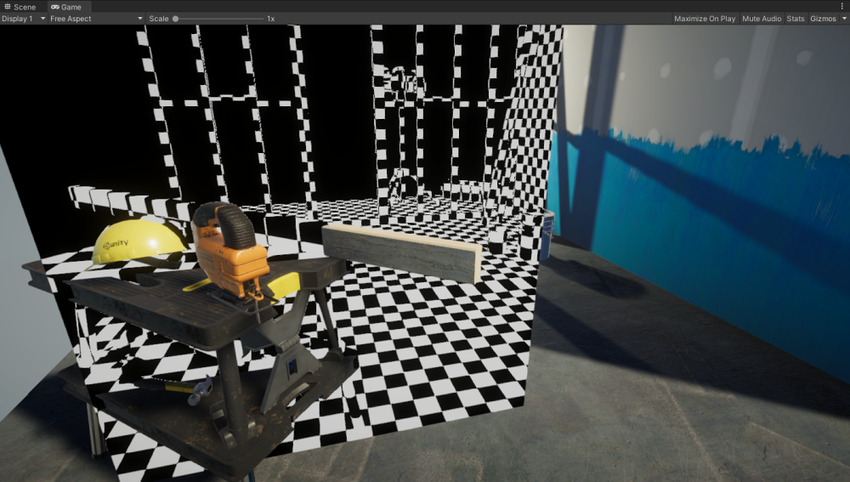
このページは以下について説明します。
サンプルシーンを作成する
サンプルシーンを作成して、このセクションのステップに従います。
URP を既存の Unity プロジェクトにインストールするか、ユニバーサルプロジェクトテンプレート を使用して、新しいプロジェクトを作成します。
-
サンプルシーンで、平面のゲームオブジェクトを作成し、いくつかのゲームオブジェクトを覆うように配置します。
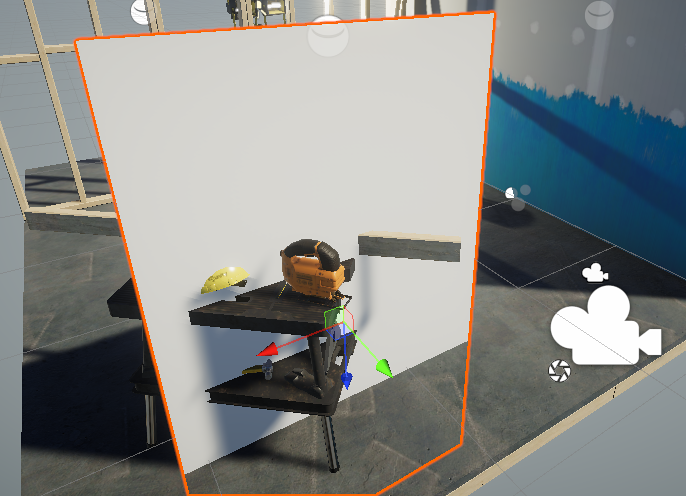
平面を作成する 新しいマテリアルを作成して、平面に割り当てます。
新しいシェーダーを作成して、マテリアルに割り当てます。Unity シェーダーのソースコードを URP の基本的な Unlit シェーダー ページからコピーして貼り付けます。
URP アセットを選択します。
-
URP アセットの General セクションで、
Depth Textureを有効にします。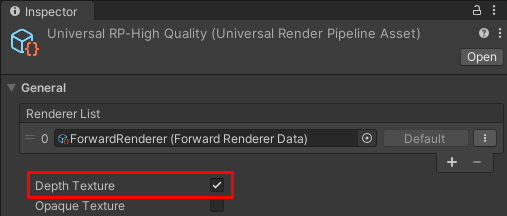
URP アセットで Depth Texture を有効にする ステップ 4 で作成したシェーダーを開きます。
ShaderLab コードを編集する
このセクションは、URP の基本的な Unlit シェーダー ページからソースコードをコピーしたことを前提としています。
ShaderLab コードに以下の変更を加えます。
-
HLSLPROGRAMブロックで、深度テクスチャのシェーダーヘッダーの include 宣言を追加します。例えば、Core.hlslの既存の include 宣言の下にそれを配置します。#include "Packages/com.unity.render-pipelines.universal/ShaderLibrary/Core.hlsl" // The DeclareDepthTexture.hlsl file contains utilities for sampling the Camera // depth texture. #include "Packages/com.unity.render-pipelines.universal/ShaderLibrary/DeclareDepthTexture.hlsl"DeclareDepthTexture.hlslファイルにはカメラ深度テクスチャのサンプリング用の関数が含まれています。この例では、ピクセルの Z 座標のサンプリングにSampleSceneDepth関数を使用します。 -
フラグメントシェーダーの定義で、
Varyings INを入力として追加します。half4 frag(Varyings IN) : SV_Targetこの例では、フラグメントシェーダーで
Varyings構造体のpositionHCSプロパティを使用してピクセルの位置を取得します。 -
フラグメントシェーダー内で、深度バッファのサンプリング用の UV 座標を算出するために、ピクセル位置をレンダーターゲットの解像度
_ScaledScreenParamsで除算します。_ScaledScreenParams.xyプロパティでは、動的解像度などのレンダーターゲットのあらゆるスケーリングが考慮されます。float2 UV = IN.positionHCS.xy / _ScaledScreenParams.xy; -
フラグメントシェーダー内で、
SampleSceneDepth関数を使用して深度バッファをサンプリングします。#if UNITY_REVERSED_Z real depth = SampleSceneDepth(UV); #else // Adjust z to match NDC for OpenGL real depth = lerp(UNITY_NEAR_CLIP_VALUE, 1, SampleSceneDepth(UV)); #endif
SampleSceneDepth 関数は DeclareDepthTexture.hlsl ファイルからのものです。[0, 1] の範囲内の Z 値を返します。
再構成関数 (ComputeWorldSpacePosition) が正常に機能するには、深度値が正規化デバイス座標 (NDC) 空間内になければなりません。D3D での Z の範囲は [0,1]、OpenGL での Z の範囲は [-1, 1] です。
この例では、UNITY_REVERSED_Z 定数を使用してプラットフォームを決め、Z 値の範囲を調整します。詳細な説明については、この例のステップ 6 を参照してください。
UNITY_NEAR_CLIP_VALUE 変数は、クリップスペースのニアクリップ面の値で、プラットフォームに依存しません。
詳細については、プラットフォーム固有のレンダリングの違い を参照してください。
-
ピクセルの UV および Z 座標からワールド空間位置を再構成します。
float3 worldPos = ComputeWorldSpacePosition(UV, depth, UNITY_MATRIX_I_VP);ComputeWorldSpacePositionは、UV 値と深度 (Z) 値からワールド空間位置を計算するユーティリティ関数です。この関数は、SRP Core パッケージのCommon.hlslファイル内に定義されています。UNITY_MATRIX_I_VPは、クリップスペースからワールド空間へと点を変換する反転ビュー射影行列です。 -
ピクセルのワールド空間位置を可視化するには、チェックボードエフェクトを作成します。
uint scale = 10; uint3 worldIntPos = uint3(abs(worldPos.xyz * scale)); bool white = (worldIntPos.x & 1) ^ (worldIntPos.y & 1) ^ (worldIntPos.z & 1); half4 color = white ? half4(1,1,1,1) : half4(0,0,0,1);scaleは、チェックボードパターンサイズの逆スケールです。abs関数は、パターンを負の座標にミラーします。worldIntPos変数のuint3宣言で、座標位置を整数にスナップします。式
<integer value> & 1のAND演算子で、値が偶数 (0) か奇数 (1) かをチェックします。この式によってコードでサーフェスを正方形に分割できます。式
<integer value> ^ <integer value>のXOR演算子で、正方形の色を反転させます。ジオメトリがレンダリングされない領域では、深度バッファに有効な値がない場合があります。以下のコードでは、そのような領域に黒色を描画します。
#if UNITY_REVERSED_Z
    if(depth < 0.0001)
        return half4(0,0,0,1);
#else
    if(depth > 0.9999)
        return half4(0,0,0,1);
#endif
プラットフォームによってファークリップ面に使用される Z 値は異なります (0 == far または 1 == far)。
UNITY_REVERSED_Z定数により、このコードですべてのプラットフォームに正しく対応できます。シェーダーのコードを保存すれば、例をいつでも実行できます。
以下の画像は、最終的な結果を示しています。
完成した ShaderLab コード
以下は、この例の完成した ShaderLab コードです。
// This Unity shader reconstructs the world space positions for pixels using a depth
// texture and screen space UV coordinates. The shader draws a checkerboard pattern
// on a mesh to visualize the positions.
Shader "Example/URPReconstructWorldPos"
{
    Properties
    { }

    // The SubShader block containing the Shader code.
    SubShader
    {
        // SubShader Tags define when and under which conditions a SubShader block or
        // a pass is executed.
        Tags { "RenderType" = "Opaque" "RenderPipeline" = "UniversalPipeline" }

        Pass
        {
            HLSLPROGRAM
            // This line defines the name of the vertex shader.
            #pragma vertex vert
            // This line defines the name of the fragment shader.
            #pragma fragment frag

            // The Core.hlsl file contains definitions of frequently used HLSL
            // macros and functions, and also contains #include references to other
            // HLSL files (for example, Common.hlsl, SpaceTransforms.hlsl, etc.).
            #include "Packages/com.unity.render-pipelines.universal/ShaderLibrary/Core.hlsl"

            // The DeclareDepthTexture.hlsl file contains utilities for sampling the
            // Camera depth texture.
            #include "Packages/com.unity.render-pipelines.universal/ShaderLibrary/DeclareDepthTexture.hlsl"

            // This example uses the Attributes structure as an input structure in
            // the vertex shader.
            struct Attributes
            {
                // The positionOS variable contains the vertex positions in object
                // space.
                float4 positionOS   : POSITION;
            };

            struct Varyings
            {
                // The positions in this struct must have the SV_POSITION semantic.
                float4 positionHCS  : SV_POSITION;
            };

            // The vertex shader definition with properties defined in the Varyings
            // structure. The type of the vert function must match the type (struct)
            // that it returns.
            Varyings vert(Attributes IN)
            {
                // Declaring the output object (OUT) with the Varyings struct.
                Varyings OUT;
                // The TransformObjectToHClip function transforms vertex positions
                // from object space to homogenous clip space.
                OUT.positionHCS = TransformObjectToHClip(IN.positionOS.xyz);
                // Returning the output.
                return OUT;
            }

            // The fragment shader definition.
            // The Varyings input structure contains interpolated values from the
            // vertex shader. The fragment shader uses the `positionHCS` property
            // from the `Varyings` struct to get locations of pixels.
            half4 frag(Varyings IN) : SV_Target
            {
                // To calculate the UV coordinates for sampling the depth buffer,
                // divide the pixel location by the render target resolution
                // _ScaledScreenParams.
                float2 UV = IN.positionHCS.xy / _ScaledScreenParams.xy;

                // Sample the depth from the Camera depth texture.
                #if UNITY_REVERSED_Z
                    real depth = SampleSceneDepth(UV);
                #else
                    // Adjust Z to match NDC for OpenGL ([-1, 1])
                    real depth = lerp(UNITY_NEAR_CLIP_VALUE, 1, SampleSceneDepth(UV));
                #endif

                // Reconstruct the world space positions.
                float3 worldPos = ComputeWorldSpacePosition(UV, depth, UNITY_MATRIX_I_VP);

                // The following part creates the checkerboard effect.
                // Scale is the inverse size of the squares.
                uint scale = 10;
                // Scale, mirror and snap the coordinates.
                uint3 worldIntPos = uint3(abs(worldPos.xyz * scale));
                // Divide the surface into squares. Calculate the color ID value.
                bool white = ((worldIntPos.x) & 1) ^ (worldIntPos.y & 1) ^ (worldIntPos.z & 1);
                // Color the square based on the ID value (black or white).
                half4 color = white ? half4(1,1,1,1) : half4(0,0,0,1);

                // Set the color to black in the proximity to the far clipping
                // plane.
                #if UNITY_REVERSED_Z
                    // Case for platforms with REVERSED_Z, such as D3D.
                    if(depth < 0.0001)
                        return half4(0,0,0,1);
                #else
                    // Case for platforms without REVERSED_Z, such as OpenGL.
                    if(depth > 0.9999)
                        return half4(0,0,0,1);
                #endif

                return color;
            }
            ENDHLSL
        }
    }
}