URP での Unlit 基本シェーダーの記述
この例は、URP 互換の基本的なシェーダーを示しています。このシェーダーは、シェーダーコード内に事前定義されている色でメッシュ形状を塗りつぶします。
シェーダーの動作を確認するには、以下の ShaderLab コードをコピーしてシェーダーアセット内に貼り付けます。
// This shader fills the mesh shape with a color predefined in the code.
Shader "Example/URPUnlitShaderBasic"
{
    // The properties block of the Unity shader. In this example this block is empty
    // because the output color is predefined in the fragment shader code.
    Properties
    { }

    // The SubShader block containing the Shader code.
    SubShader
    {
        // SubShader Tags define when and under which conditions a SubShader block or
        // a pass is executed.
        Tags { "RenderType" = "Opaque" "RenderPipeline" = "UniversalPipeline" }

        Pass
        {
            // The HLSL code block. Unity SRP uses the HLSL language.
            HLSLPROGRAM
            // This line defines the name of the vertex shader.
            #pragma vertex vert
            // This line defines the name of the fragment shader.
            #pragma fragment frag

            // The Core.hlsl file contains definitions of frequently used HLSL
            // macros and functions, and also contains #include references to other
            // HLSL files (for example, Common.hlsl, SpaceTransforms.hlsl, etc.).
            #include "Packages/com.unity.render-pipelines.universal/ShaderLibrary/Core.hlsl"

            // The structure definition defines which variables it contains.
            // This example uses the Attributes structure as an input structure in
            // the vertex shader.
            struct Attributes
            {
                // The positionOS variable contains the vertex positions in object
                // space.
                float4 positionOS   : POSITION;
            };

            struct Varyings
            {
                // The positions in this struct must have the SV_POSITION semantic.
                float4 positionHCS  : SV_POSITION;
            };

            // The vertex shader definition with properties defined in the Varyings
            // structure. The type of the vert function must match the type (struct)
            // that it returns.
            Varyings vert(Attributes IN)
            {
                // Declaring the output object (OUT) with the Varyings struct.
                Varyings OUT;
                // The TransformObjectToHClip function transforms vertex positions
                // from object space to homogenous clip space.
                OUT.positionHCS = TransformObjectToHClip(IN.positionOS.xyz);
                // Returning the output.
                return OUT;
            }

            // The fragment shader definition.
            half4 frag() : SV_Target
            {
                // Defining the color variable and returning it.
                half4 customColor = half4(0.5, 0, 0, 1);
                return customColor;
            }
            ENDHLSL
        }
    }
}
フラグメントシェーダーによってゲームオブジェクトがダークレッド (RGB 値 (0.5, 0, 0)) に塗られます。
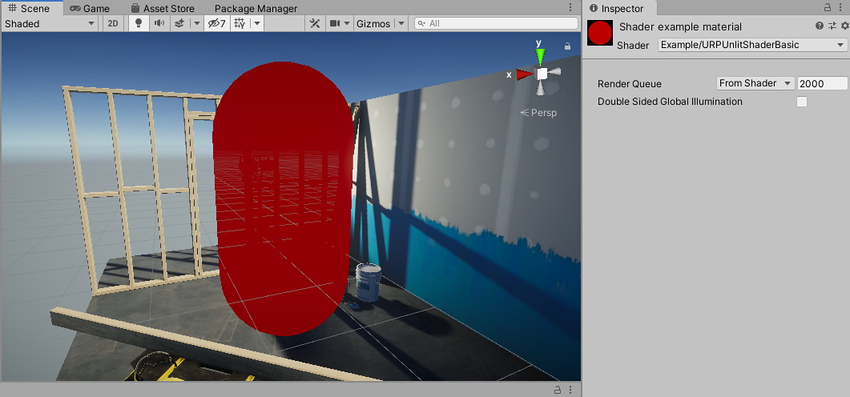
以下のセクションでは、この基本的な Unity シェーダーの構造を紹介します。
ShaderLab の基本構造体
Unity のシェーダーは、ShaderLab という Unity 固有の言語で記述します。
この例の Unity シェーダーには、以下のブロックが含まれています。
Shader ブロック
ShaderLab コードは、Shader 宣言から始まります。
Shader "Example/URPUnlitShaderBasic"
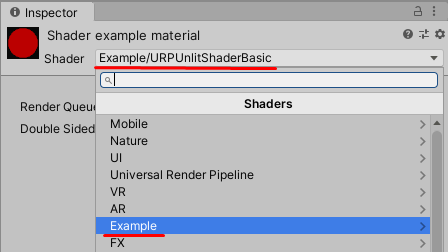
この宣言内のパスにより、マテリアルの Shader メニューにおける Unity シェーダーの表示名と場所が決まります。Shader.Find メソッドにもこのパスが使用されます。
Properties ブロック
Properties ブロックには、ユーザーがマテリアルの Inspector ウィンドウで設定できるプロパティの宣言が含まれます。
この例の場合、この Unity シェーダーではユーザーが定義できるマテリアルのプロパティが公開されないので、Properties ブロックは空です。
SubShader ブロック
Unity シェーダーのソースファイルには、1 つ以上の SubShader ブロックが含まれています。メッシュのレンダリング時に、Unity によって対象デバイスの GPU と互換性のある最初の SubShader が選択されます。
SubShader ブロックには、必要に応じて SubShader Tags ブロックを含めることができます。SubShader Tags ブロックを宣言するには、Tags キーワードを使用します。
Tags { "RenderType" = "Opaque" "RenderPipeline" = "UniversalPipeline" }
RenderPipeline という SubShader タグには、どのレンダーパイプラインでこの SubShader を使用するかを Unity に伝える役割があります。UniversalPipeline という値は、Unity が URP でこの SubShader を使用する必要があることを示しています。
同じシェーダーを異なるレンダーパイプラインで実行するには、RenderPipeline タグ値が異なる複数の SubShader ブロックを作成します。SubShader ブロックを HDRP で実行するには、RenderPipeline タグを HDRenderPipeline に設定し、ビルトインレンダーパイプラインで実行するには、RenderPipeline を空の値に設定します。
SubShader タグの詳細については、ShaderLab: SubShader タグ を参照してください。
Pass ブロック
この例には、1 つの Pass ブロックがあり、HLSL プログラムのコードが含まれています。Pass ブロックの詳細については、ShaderLab: パス を参照してください。
Pass ブロックには、必要に応じて Pass Tags ブロックを含めることができます。詳細については、URP ShaderLab のパスタグ を参照してください。
HLSLPROGRAM ブロック
このブロックには HLSL プログラムのコードが含まれます。
ノート: HLSL 言語は URP シェーダーの推奨言語です。
ノート: URP は CG 言語に対応しています。CGPROGRAM/ENDCGPROGRAM ブロックをシェーダーに追加すると、Unity ではビルトインレンダーパイプラインライブラリのシェーダーが自動的に含まれます。SRP シェーダーライブラリのシェーダーを含めた場合は、SRP シェーダーのマクロや関数の一部がビルトインレンダーパイプラインシェーダーの関数と競合することがあります。CGPROGRAM ブロックのあるシェーダーは SRP Batcher との互換性がありません。
このブロックには、Core.hlsl ファイルへの参照を使用した #include 宣言が含まれています。
#include "Packages/com.unity.render-pipelines.universal/ShaderLibrary/Core.hlsl"
Core.hlsl ファイルには、よく使用される HLSL マクロおよび関数の定義が含まれており、他の HLSL ファイル (Common.hlsl や SpaceTransforms.hlsl など) への #include 参照も含まれています。
例えば、HLSL コード内の頂点シェーダーでは、SpaceTransforms.hlsl ファイルの TransformObjectToHClip 関数を使用します。この関数によって頂点位置がオブジェクト空間から同種の空間に変換されます。
Varyings vert(Attributes IN)
{
    Varyings OUT;
    OUT.positionHCS = TransformObjectToHClip(IN.positionOS.xyz);
    return OUT;
}
この基本的な HLSL コード内のフラグメントシェーダーからは、コード内に事前定義されている単一の色が出力されます。
half4 frag() : SV_Target
{
    half4 customColor;
    customColor = half4(0.5, 0, 0, 1);
    return customColor;
}
色の入力を備えた URP Unlit シェーダー セクションには、マテリアルの Inspector ウィンドウで編集可能な色プロパティを追加する方法が記載されています。