当任何绑定的属性发生更改时接收回调
版本:2021.3+
这些示例将演示了当绑定的序列化对象的任何属性发生更改时如何接收回调。
示例概述
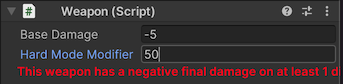
此示例创建了一个包含两个字段的自定义检视面板。如果字段的值超出特定范围,会向用户发出警告。
您可以在此 GitHub 代码仓库中找到示例的完整文件。
先决条件
本指南适用于熟悉 Unity 编辑器、UI 工具包和 C# 脚本的开发者。在开始之前,请熟悉以下内容:
创建武器对象
创建一个 C# 脚本,将 Weapon 类定义为 MonoBehaviour,并且它具有两个属性:m_BaseDamage 和 m_HardModeModifier。
使用任何模板在 Unity 中创建项目。
在项目 (Project) 窗口中,创建一个名为
callback-any-SerializedProperty-changes的文件夹来存储文件。-
创建一个名为
Weapon.cs的 C# 脚本,并将其内容替换为以下代码:using UnityEngine; namespace UIToolkitExamples { public class Weapon : MonoBehaviour { public const float maxDamage = 9999f; [SerializeField] float m_BaseDamage; [SerializeField] float m_HardModeModifier; public float GetDamage(bool hardMode) { return hardMode ? m_BaseDamage * m_HardModeModifier : m_BaseDamage; } } }
创建绑定以接收回调
创建一个 C# 脚本,为 Weapon 定义自定义检视面板,并使用 TrackSerializedObjectValue() 方法检查 m_BaseDamage 和 m_HardModeModifier 属性中的变更。
在 callback-any-SerializedProperty-changes 文件夹中,创建一个名为
Editor的文件夹。-
在 Editor 文件夹中创建一个名为
WeaponCustomEditor.cs的 C# 脚本,并将其内容替换为以下代码:using UnityEngine; using UnityEditor; using UnityEngine.UIElements; using UnityEditor.UIElements; namespace UIToolkitExamples { [CustomEditor(typeof(Weapon))] public class WeaponCustomEditor : Editor { // This is text used for the warning labels. const string k_NegativeWarningText = "This weapon has a negative final damage on at least 1 difficulty level."; static readonly string k_DamageCapWarningText = "This weapon has an excessive final damage that is capped to " + Weapon.maxDamage + " on at least 1 difficulty level."; // These are labels to warn users about negative damage and excessive damage. Label m_NegativeWarning, m_DamageCapWarning; public override VisualElement CreateInspectorGUI() { VisualElement root = new(); // Create FloatFields for serialized properties. var baseDamageField = new FloatField("Base Damage") { bindingPath = "m_BaseDamage" }; var modifierField = new FloatField("Hard Mode Modifier") { bindingPath = "m_HardModeModifier" }; root.Add(baseDamageField); root.Add(modifierField); // Create warning labels and style them so they stand out. var warnings = new VisualElement(); m_NegativeWarning = new(k_NegativeWarningText); m_DamageCapWarning = new(k_DamageCapWarningText); warnings.style.color = Color.red; warnings.style.unityFontStyleAndWeight = FontStyle.Bold; warnings.Add(m_NegativeWarning); warnings.Add(m_DamageCapWarning); root.Add(warnings); // Determine whether to show the warnings at the start. CheckForWarnings(serializedObject); // Whenever any serialized property on this serialized object changes its value, call CheckForWarnings. root.TrackSerializedObjectValue(serializedObject, CheckForWarnings); return root; } // Check the current values of the serialized properties to either display or hide the warnings. void CheckForWarnings(SerializedObject serializedObject) { // For each possible damage values of the weapon, determine whether it's negative and whether it's above the // maximum damage value. var weapon = serializedObject.targetObject as Weapon; var damages = new float[] { weapon.GetDamage(true), weapon.GetDamage(false) }; var foundNegativeDamage = false; var foundCappedDamage = false; foreach (var damage in damages) { foundNegativeDamage = foundNegativeDamage || damage < 0; foundCappedDamage = foundCappedDamage || damage > Weapon.maxDamage; } // Display or hide warnings depending on the values of the damages. m_NegativeWarning.style.display = foundNegativeDamage ? DisplayStyle.Flex : DisplayStyle.None; m_DamageCapWarning.style.display = foundCappedDamage ? DisplayStyle.Flex : DisplayStyle.None; } } }
测试绑定
在场景中创建空游戏对象。
选择游戏对象。
在检视面板 (Inspector) 中添加 Weapon 组件。
-
在 Weapon 组件中,更改字段中的值:
- 如果 Base Damage 或 Base Damage 乘以 Hard Mode Modifier 为负,则会显示警告消息。
- 如果 Base Damage 或 Base Damage 乘以 Hard Mode Modifier 大于 9999,则会显示不同的警告消息。