Create a shader variant collection
A shader variant collection is effectively a list of shader variantsA verion of a shader program that Unity generates according to a specific combination of shader keywords and their status. A Shader object can contain multiple shader variants. More info
See in Glossary. Use shader variant collections to prewarm shader variants, or to ensure that shader variants that are required at runtime but not referenced in a scene are not excluded (“stripped”) from your build.
Create a shader variant collection asset
You can create a shader variant collection asset in the following ways:
- In the Create Asset menu, choose Shader > Shader Variant Collection.
- The Unity Editor can track which shader variants your application uses when it runs, and automatically create a shader variant collection asset that contains them. For more information, see Graphics Settings: Shader loading.
View and edit a shader variant collection
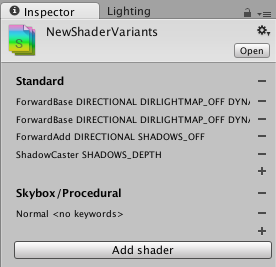
When you select a shader variant collection asset in your project, you can view and edit it in the Inspector.
Use the controls to build a list of Pass types and shader keyword combinations to load in advance.
You can also configure a shader variant collection asset using the ShaderVariantCollection API.
Prewarm a shader variant collection
To avoid visible stalls at performance-intensive times, Unity can ask the graphics driver to create GPU representations of shader variants before they are first needed. This is called prewarming. For more information on prewarming the shader variants in a shader variant collection, see Other methods to warm up shaders.