Troubleshooting reflections
Box projection
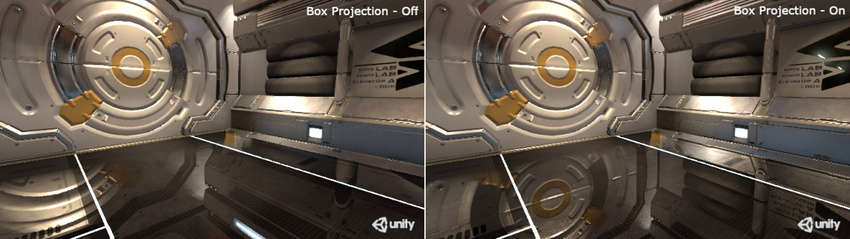
Normally, the reflection cubemap is assumed to be at an infinite distance from any given object. Different angles of the cubemap will be visible as the object turns but it is not possible for the object to move closer or farther away from the reflected surroundings. This often works very well for outdoor scenes but its limitations show in an indoor scene; the interior walls of a room are clearly not an infinite distance away and the reflection of a wall should get larger the closer the object gets to it.
The Box Projection option allows you to create a reflection cubemap at a finite distance from the probe, thus allowing objects to show different-sized reflections according to their distance from the cubemap’s walls. The size of the surrounding cubemap is determined by the probes zone of effect, as determined by its Box Size property. For example, with a probe that reflects the interior of a room, you should set the size to match the dimensions of the room.
Important: The Built-In Render Pipeline is deprecated and will be made obsolete in a future release.
It remains supported, including bug fixes and maintenance, through the full Unity 6.7 LTS lifecycle.
For more information on migration, refer to Migrating from the Built-In Render Pipeline to the Universal Render Pipeline and Render pipeline feature comparison.
In the Built in Render Pipeline, you can enable global Box Projection for a given Graphics tier in Project SettingsA broad collection of settings which allow you to configure how Physics, Audio, Networking, Graphics, Input and many other areas of your project behave. More info
See in Glossary > Graphics > Tier Settings. You can disable this setting for individual Reflection Probes in the Reflection Probe inspector if you want to create infinite projection.