色の入力を備えた URP の Unlit シェーダーの記述
この例の Unity シェーダーは、マテリアルに Base Color プロパティを追加します。そのプロパティを使用して色を選択でき、選択した色がシェーダーによってメッシュ形状に塗られます。
URP の基本的な Unlit シェーダーセクションの Unity シェーダーソースファイルを使用し、ShaderLab コードに以下の変更を加えます。
-
_BaseColorプロパティの定義を Properties ブロックに追加します。Properties { [MainColor] _BaseColor("Base Color", Color) = (1, 1, 1, 1) }この宣言によって Base Color というラベルが設定された
_BaseColorプロパティがマテリアルに追加されます。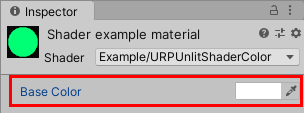
マテリアルの Base Color プロパティ [MainColor]属性のプロパティを宣言すると、Unity ではそのプロパティがマテリアルのメインカラーとして使用されます。ノート: 互換性を確保するため、
_Colorというプロパティ名は予約されています。Unity では、[MainColor]属性がなくても_Colorという名前のプロパティがメインカラーとして使用されます。 -
Properties ブロックでプロパティを宣言するときは、それを HLSL コードで宣言することも必要です。
ノート: Unity シェーダーと SRP Batcher の互換性を確保するため、マテリアルのすべてのプロパティを単一の
CBUFFERブロック内でUnityPerMaterialという名前で宣言します。SRP Batcher について詳しくは、SRP (スクリプタブルレンダーパイプライン) Batcher のドキュメントを参照してください。頂点シェーダーの前に以下のコードを追加します。
CBUFFER_START(UnityPerMaterial) half4 _BaseColor; CBUFFER_END -
フラグメントシェーダーのコードを
_BaseColorプロパティを返すように変更します。half4 frag() : SV_Target { return _BaseColor; }
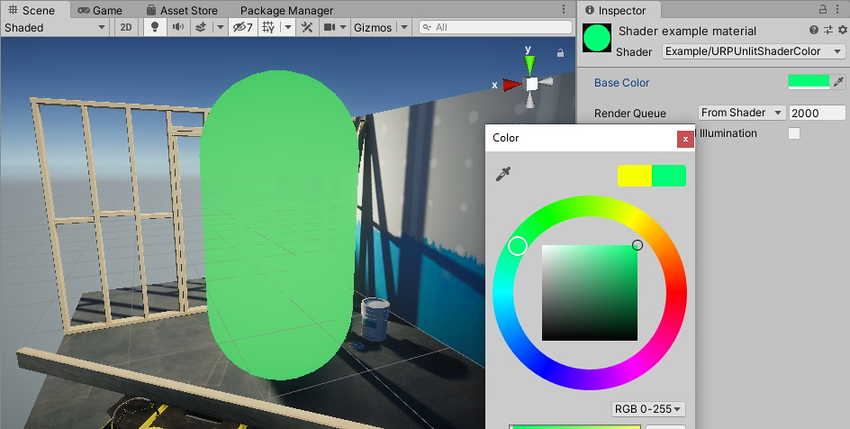
これで、Inspector ウィンドウの Base Color フィールドで色を選択できるようになりました。ここで選択した色がフラグメントシェーダーによってメッシュに塗られます。
以下は、この例の完成した ShaderLab コードです。
// This shader fills the mesh shape with a color that a user can change using the
// Inspector window on a Material.
Shader "Example/URPUnlitShaderColor"
{
// The _BaseColor variable is visible in the Material's Inspector, as a field
// called Base Color. You can use it to select a custom color. This variable
// has the default value (1, 1, 1, 1).
Properties
{
    [MainColor] _BaseColor("Base Color", Color) = (1, 1, 1, 1)
}
SubShader
{
Tags { "RenderType" = "Opaque" "RenderPipeline" = "UniversalPipeline" }
Pass
{
HLSLPROGRAM
#pragma vertex vert
#pragma fragment frag
#include "Packages/com.unity.render-pipelines.universal/ShaderLibrary/Core.hlsl"
struct Attributes
{
float4 positionOS : POSITION;
};
struct Varyings
{
float4 positionHCS : SV_POSITION;
};
// To make the Unity shader SRP Batcher compatible, declare all
// properties related to a Material in a a single CBUFFER block with
// the name UnityPerMaterial.
CBUFFER_START(UnityPerMaterial)
// The following line declares the _BaseColor variable, so that you
// can use it in the fragment shader.
half4 _BaseColor;
CBUFFER_END
Varyings vert(Attributes IN)
{
Varyings OUT;
OUT.positionHCS = TransformObjectToHClip(IN.positionOS.xyz);
return OUT;
}
half4 frag() : SV_Target
{
// Returning the _BaseColor value.
return _BaseColor;
}
ENDHLSL
}
}
}
テクスチャの描画セクションには、メッシュ上にテクスチャを描画する方法が記載されています。