在 URP 中将着色器中的法线矢量可视化
此示例中的 Unity 着色器将使网格上的法线矢量值可视化。
使用 URP 无光照基本着色器一节中的 Unity 着色器源文件,并对__ ShaderLab__Unity 用于定义着色器对象结构的语言。更多信息
See in Glossary 代码进行以下更改:
-
在此示例的顶点着色器的输入结构
struct Attributes中,声明包含每个顶点的法线矢量的变量。struct Attributes { float4 positionOS : POSITION; // Declaring the variable containing the normal vector for each vertex. half3 normal : NORMAL; }; -
在此示例的片元着色器的输入结构
struct Varyings中,声明存储每个片元的法线矢量值的变量:struct Varyings { float4 positionHCS : SV_POSITION; // The variable for storing the normal vector values. half3 normal : TEXCOORD0; };此示例使用法线矢量的三个分量作为每个片元的 RGB 颜色值。
-
要在网格上渲染法线矢量值,请使用以下代码作为片元着色器:
half4 frag(Varyings IN) : SV_Target { half4 color = 0; color.rgb = IN.normal; return color; } -
Unity 在网格上渲染法线矢量值:
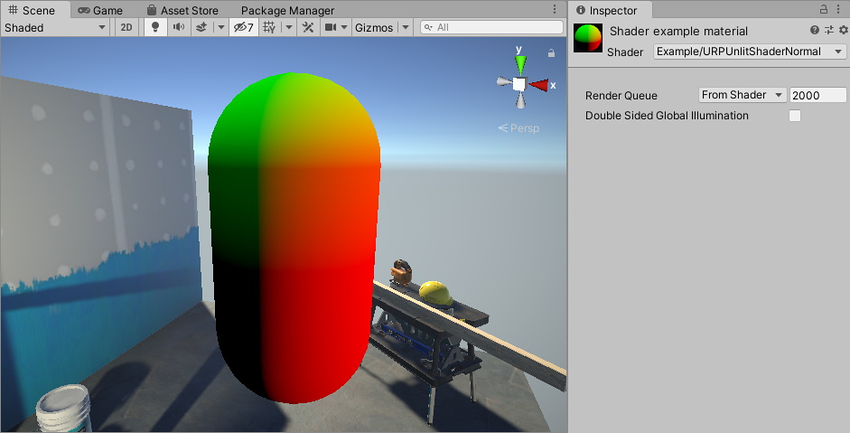
不使用压缩技术渲染法线 胶囊体的一部分为黑色。这是因为这些点中的法线矢量的所有三个分量都是负值。下一步将展示如何在这些区域中也渲染值。
-
要渲染负法线矢量分量,请使用压缩技术。要将法线分量值的范围
(-1..1)压缩为颜色值范围(0..1),请更改以下行:color.rgb = IN.normal;将其更改为以下行:
color.rgb = IN.normal * 0.5 + 0.5;
现在 Unity 会在网格上将法线矢量值渲染为颜色。
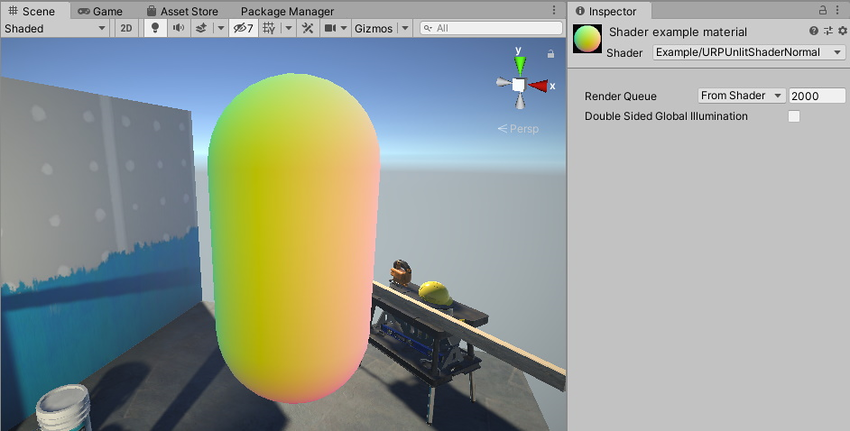
以下是此示例的完整 ShaderLab 代码。
// This shader visuzlizes the normal vector values on the mesh.
Shader "Example/URPUnlitShaderNormal"
{
    Properties
    { }

    SubShader
    {
        Tags { "RenderType" = "Opaque" "RenderPipeline" = "UniversalPipeline" }

        Pass
        {
            HLSLPROGRAM
            #pragma vertex vert
            #pragma fragment frag

            #include "Packages/com.unity.render-pipelines.universal/ShaderLibrary/Core.hlsl"

            struct Attributes
            {
                float4 positionOS   : POSITION;
                // Declaring the variable containing the normal vector for each
                // vertex.
                half3 normal        : NORMAL;
            };

            struct Varyings
            {
                float4 positionHCS  : SV_POSITION;
                half3 normal        : TEXCOORD0;
            };

            Varyings vert(Attributes IN)
            {
                Varyings OUT;
                OUT.positionHCS = TransformObjectToHClip(IN.positionOS.xyz);
                // Use the TransformObjectToWorldNormal function to transform the
                // normals from object to world space. This function is from the
                // SpaceTransforms.hlsl file, which is referenced in Core.hlsl.
                OUT.normal = TransformObjectToWorldNormal(IN.normal);
                return OUT;
            }

            half4 frag(Varyings IN) : SV_Target
            {
                half4 color = 0;
                // IN.normal is a 3D vector. Each vector component has the range
                // -1..1. To show all vector elements as color, including the
                // negative values, compress each value into the range 0..1.
                color.rgb = IN.normal * 0.5 + 0.5;
                return color;
            }
            ENDHLSL
        }
    }
}