内置渲染管线中的网格法线着色器示例
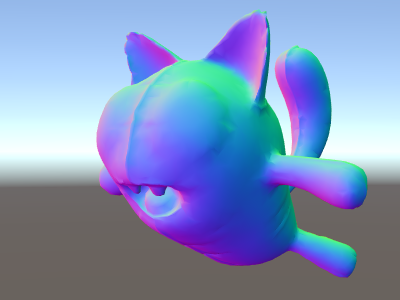
Shader "Unlit/WorldSpaceNormals"
{
    // no Properties block this time!
    SubShader
    {
        Pass
        {
            CGPROGRAM
            #pragma vertex vert
            #pragma fragment frag
            // include file that contains UnityObjectToWorldNormal helper function
            #include "UnityCG.cginc"

            struct v2f {
                // we'll output world space normal as one of regular ("texcoord") interpolators
                half3 worldNormal : TEXCOORD0;
                float4 pos : SV_POSITION;
            };

            // vertex shader: takes object space normal as input too
            v2f vert (float4 vertex : POSITION, float3 normal : NORMAL)
            {
                v2f o;
                o.pos = UnityObjectToClipPos(vertex);
                // UnityCG.cginc file contains function to transform
                // normal from object to world space, use that
                o.worldNormal = UnityObjectToWorldNormal(normal);
                return o;
            }

            fixed4 frag (v2f i) : SV_Target
            {
                fixed4 c = 0;
                // normal is a 3D vector with xyz components; in -1..1
                // range. To display it as color, bring the range into 0..1
                // and put into red, green, blue components
                c.rgb = i.worldNormal*0.5+0.5;
                return c;
            }
            ENDCG
        }
    }
}
除了产生漂亮的颜色外,法线还用于各种图形效果:光照、反射、轮廓等。
在上面的着色器中,我们开始使用 Unity 的内置着色器 include 文件之一。这里使用的 UnityCG.cginc 包含一个方便的函数 UnityObjectToWorldNormal。我们还使用了实用函数 __UnityObjectToClipPos__,该函数将顶点从对象空间转换到屏幕。这使得代码更易于阅读,并且在某些情况下更有效。
在所谓的“插值器”(有时称为“变化”)中,我们已经看到数据可从顶点传入片元着色器。在 HLSL 着色语言中,它们通常用 TEXCOORDn 语义进行标记,其中每一个最多可以是一个 4 分量矢量(有关详细信息,请参阅将顶点数据输入到着色器中页面)。
此外,我们学习了如何使用一种简单的技术将标准化矢量(在 –1.0 到 +1.0 范围内)可视化为颜色:只需将它们乘以二分之一并加二分之一。有关更多顶点数据可视化示例,请参阅可视化顶点数据。