Create a material variant
Create a material that inherits properties from a parent material. For more information, refer to Material variants.
You can create a material variant from any material, including Shader Graph materials and Asset StoreA growing library of free and commercial assets created by Unity and members of the community. Offers a wide variety of assets, from textures, models and animations to whole project examples, tutorials and Editor extensions. More info
See in Glossary materials.
Create a new material variant
- In the Project window, right-click on a material. This material becomes the parent material.
- Select Create > Rendering > Material Variant.
Unity gives the material variant the same name as the parent material followed by Variant.
Add a parent material to an existing material
- In the Project window, select the material you want to use as a parent.
- Drag the material onto the material you want to convert into a material variant.
The receiving material becomes a variant of the parent material.
Parent materials can have multiple child materials.
Change the parent of a material variant
To change the parent of a material variant, also known as reparenting, use one of the following methods:
In the Project window, drag the new parent material onto the material variant.
-
Select the material variant, then use the foldout (triangle) at the top-right to open the Material Hierarchy window. To set the parent material, select the Parent picker (⊙).
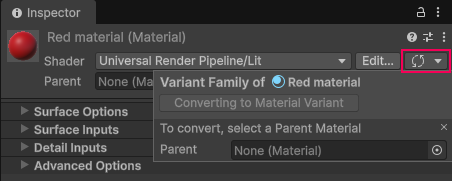
The Inspector window of a material with the foldout at the top-right selected, and the Material Hierarchy window open with the Parent property.
A dialog appears to warn you if you try to create a circular dependency.
Convert a material variant back to a material
To remove the parent from a material variant so it becomes a regular material again, follow these steps:
- In the Project window, select the material variant.
- In the Inspector window, open the More (⋮) menu next to the material name.
- Select Flatten Material Variant.
You can also open the Material Hierarchy window, then select Material in the dropdown.
Delete a material variant
To delete a material variant, follow these steps:
- In the Project window, select the material variant.
- Press the Delete key.
If the material variant has child materials, a dialog appears. Select one of the following options:
- Delete and reparent children to automatically reassign the child materials to their closest ancestor, unless the material variant was at the top of the hierarchy.
- Delete only to delete the material variant without reassigning its child materials. Any child material left without a parent is invalid and will not load correctly at runtime.