Create variations of prefabs
If you want to reuse a prefab with different settings and configurations, Unity saves it as a prefab variant. For example, you can use prefab variants to create different types of enemy characters. You can base the characters on the same basic prefab, but then vary the speed, add different objects, or adjust sound effects.
A prefab variant inherits properties from a base prefab. Overrides in the variant take precedence over the base values. A variant can use any prefab as its base, including other variants.
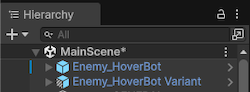
In the Unity Editor, prefab variants are indicated by a blue cube icon with one hashed side, to distinguish them from prefab instances.
Create a prefab variant
You can create a prefab variant in the Project window, or from the Hierarchy view.
To create a prefab variant from the Project window:
- Navigate to the prefab in the Project windowA window that shows the contents of your
Assetsfolder (Project tab) More info
See in Glossary. - Right click on the prefab and select Create > Prefab Variant.
Unity creates a variant of the prefab in the same folder as the original prefab. You can then edit the prefab variant to adjust and override its settings.
To create a prefab variant from the Hierarchy view:
- Select the prefab instance you want to create a variant of.
- Drag the prefab instance into a folder in the Project window.
Unity then displays a dialog that asks if you want to create a new prefab, or a prefab variant. When you select Prefab Variant, Unity creates a prefab variant based on that prefab instance and applies any overrides on the instance to the new prefab variant. You can then edit the prefab variant to adjust and override its settings.
Prefab variant hierarchies
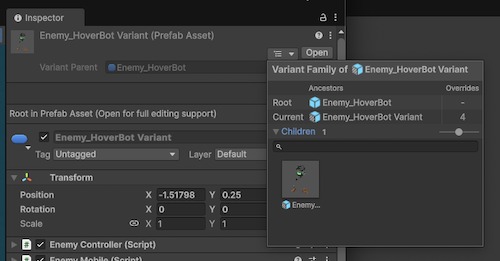
When you select a prefab variant, the Inspector displays its parent prefab, so you can locate the origin of the prefab variant. You can also select the menu button to display further details of the variant’s inheritence. It displays the root prefab asset for the variant, plus any child prefab variants of it. It also displays the number of overrides that the variant has.
Edit a prefab variant
When you open a prefab variant in prefab editing mode, the root of the variant appears as a prefab instance which represents the base prefab that the variant inherits from. Any edits you make to the prefab variant override this base prefab.
You can also use overrides to modify property values, add or remove components, or add or remove child GameObjects.
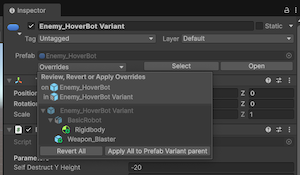
Whenever you edit a prefab variant, Unity applies the changes as overrides. To view the overrides applied to the variant:
- Open the prefab variant in prefab editing mode.
- Select the root prefab instance.
- In the Inspector, under Prefabs, select the Overrides dropdown.
The menu displays a list of all the overrides applied to the variant. Select Revert All to reset all the changes to the prefab variant, or Apply all to Prefab Variant parent to apply the changes to the parent prefab asset.