Introduction to the Material Validator in the Built-In Render Pipeline
Important: The Built-In Render Pipeline is deprecated and will be made obsolete in a future release.
It remains supported, including bug fixes and maintenance, through the full Unity 6.7 LTS lifecycle.
For more information on migration, refer to Migrating from the Built-In Render Pipeline to the Universal Render Pipeline and Render pipeline feature comparison.
The Physically Based Rendering Material Validator is a draw mode in the Scene View. It allows you to make sure your materials use values which fall within the recommended reference values for physically-based shaders. If pixel values in a particular material fall outside of the reference ranges, the Material Validator highlights the pixels in different colors to indicate failure.
Note: You can also check the recommended values with Unity’s Material Charts. You still need to use these charts when authoring Materials to decide your albedo and metal specular values. However, the Material Validator provides you with a visual, in-editor way of quickly checking whether your Materials’ values are valid once your Assets are in the Scene.
Also note: The validator only works in Linear color space. Physically Based Rendering is not intended for use with Gamma color space, so if you are using Physically Based Rendering and the PBR Material Validator, you should also be using Linear color space.
Open the Material Validator
To use the Material Validator, select the Scene View’s draw mode drop-down menu, which is is usually set to Shaded by default.

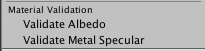
Navigate to the Material Validation section. The Material Validator has two modes: Validate Albedo and Validate Metal Specular.