Set the lighting model in a Surface Shader in the Built-In Render Pipeline
Important: The Built-In Render Pipeline is deprecated and will be made obsolete in a future release.
It remains supported, including bug fixes and maintenance, through the full Unity 6.7 LTS lifecycle.
The Universal Render Pipeline (URP) doesn’t support surface shaders. For more information on how to replace surface shaders in URP, refer to Convert custom shaders for URP compatibility.
In the Built-in Render Pipeline, when writing Surface ShadersA streamlined way of writing shaders for the Built-in Render Pipeline. More info
See in Glossary, you describe the properties of a surface (such as albedo color and normal), and a Lighting Model computes the lighting interaction.
There are two built-in lighting models: Lambert for diffuse lighting, and BlinnPhong for specular lighting. The Lighting.cginc file inside Unity defines these models (Windows: <unity install path>/Data/Resources/CGIncludes/Lighting.cginc; macOS: /Applications/Unity/Unity.app/Contents/Resources/CGIncludes/Lighting.cginc).
Sometimes you might want to use a custom lighting model. You can do this with Surface Shaders. A lighting model is simply a couple of Cg/HLSL functions that match some conventions.
Render pipeline compatibility
| Feature name | Universal Render Pipeline (URP) | High Definition Render Pipeline (HDRP) | Custom SRP | Built-in Render Pipeline |
|---|---|---|---|---|
| Surface Shaders | No For a streamlined way of creating Shader objects in URP, see Shader Graph. |
No For a streamlined way of creating Shader objects in HDRP, see Shader Graph. |
No | Yes |
Declaring lighting models
A lighting model consists of regular functions with names that begin Lighting. You can declare them anywhere in your shader file, or one of the included files. The functions are:
half4 Lighting<Name> (SurfaceOutput s, UnityGI gi);Use this in forward rendering paths for light models that are not dependent on the view direction.half4 Lighting<Name> (SurfaceOutput s, half3 viewDir, UnityGI gi);Use this in forward rendering paths for light models that are dependent on the view direction.half4 Lighting<Name>_Deferred (SurfaceOutput s, UnityGI gi, out half4 outDiffuseOcclusion, out half4 outSpecSmoothness, out half4 outNormal);Use this in deferred shading paths.
Note that you don’t need to declare all functions. A lighting model either uses view direction or it does not. Similarly, if the lighting model only works in forward rendering, do not declare the _Deferred function. This ensures that Shaders that use it only compile to forward rendering.
Custom GI
Declare the following function to customize the decoding lightmap data and probes:
void Lighting<Name>_GI (SurfaceOutput s, UnityGIInput data, inout UnityGI gi);
Note that to decode standard Unity lightmaps and SH probes, you can use the built-in DecodeLightmap and ShadeSHPerPixel functions, as seen in UnityGI_Base in the UnityGlobalIllumination.cginc file inside Unity (Windows: <unity install path>/Data/Resources/CGIncludes/UnityGlobalIllumination.cginc; macOS: /Applications/Unity/Unity.app/Contents/Resources/CGIncludes/UnityGlobalIllumination.cginc_).
Example
The following is an example of a shader that uses the built-in Lambert lighting model:
  Shader "Example/Diffuse Texture" {
    Properties {
      _MainTex ("Texture", 2D) = "white" {}
    }
    SubShader {
      Tags { "RenderType" = "Opaque" }
      CGPROGRAM
      #pragma surface surf Lambert

      struct Input {
          float2 uv_MainTex;
      };

      sampler2D _MainTex;

      void surf (Input IN, inout SurfaceOutput o) {
          o.Albedo = tex2D (_MainTex, IN.uv_MainTex).rgb;
      }
      ENDCG
    }
    Fallback "Diffuse"
  }
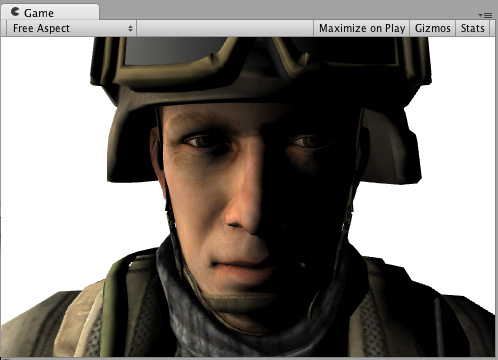
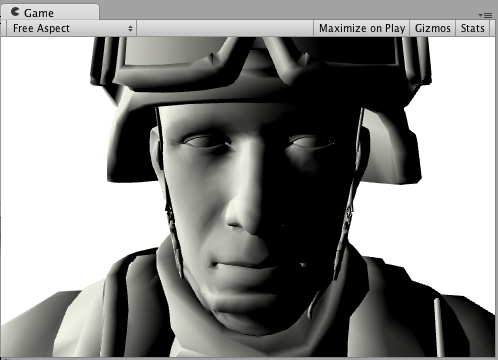
Here’s how it looks like with a Texture and without a Texture, with one directional Light in the Scene: