Create a surface shader in the Built-In Render Pipeline
Important: The Built-In Render Pipeline is deprecated and will be made obsolete in a future release.
It remains supported, including bug fixes and maintenance, through the full Unity 6.7 LTS lifecycle.
The Universal Render Pipeline (URP) doesn’t support surface shaders. For more information on how to replace surface shaders in URP, refer to Convert custom shaders for URP compatibility.
Follow these steps:
- Add a
CGPROGRAMblock to theSubShaderblock in your shader code, not thePassblock. Unity automatically creates multiple passes when it compiles the surface shader. - Add a
#pragma surface [surfaceFunction] [lightModel]directive.
Surface shaders aren’t compatible with HLSLPROGRAM blocks, but you can use HLSL inside a CGPROGRAM block. For more information, refer to Shader code blocks in ShaderLab reference.
Example
Shader "Example/Diffuse Simple" {
  SubShader {
    Tags { "RenderType" = "Opaque" }

    CGPROGRAM

    #pragma surface surf Lambert

    struct Input {
        float4 color : COLOR;
    };

    void surf (Input IN, inout SurfaceOutput o) {
        o.Albedo = 1;
    }

    ENDCG
  }
  Fallback "Diffuse"
}
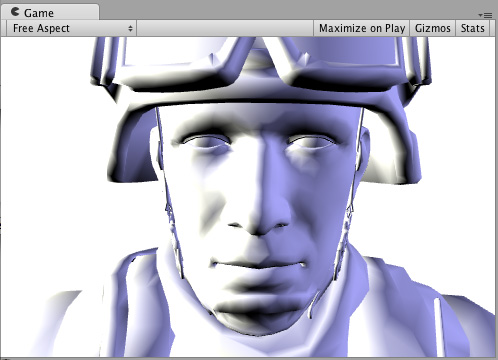
Here’s how it looks like on a model with two Lights set up: