Introduction to Gate Fit
The Camera component’s Gate Fit property determines what happens when the Game view and the physical camera sensor have different aspect ratios.
In Physical Camera mode, a camera has two “gates.”
The area rendered in the Game view, according to the resolution you set in the Aspect drop-down menu, is called the “resolution gate”.
The area that the camera actually sees, as defined by the Sensor Size properties, is called the “film gate”.
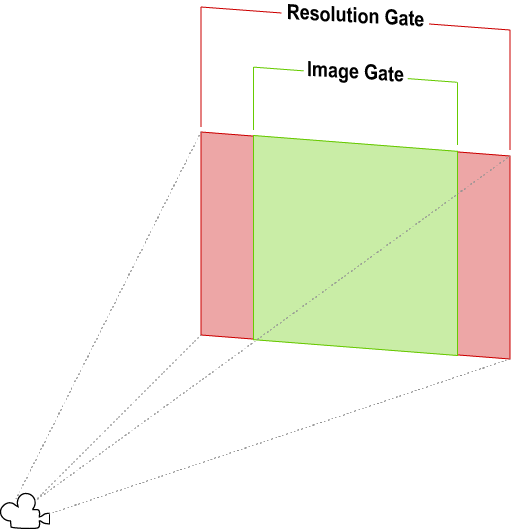
When the two gates have different aspect ratios, Unity “fits” the resolution gate to the film gate. There are several fit modes, but they all yield one of three results.
- Cropping: When the film gate exceeds the resolution gate after fitting, the Game view renders as much of the camera image as fits within its aspect ratio, and cuts off the rest.
- Overscanning: When the film gate exceeds the resolution gate after fitting, the Game view still performs rendering calculations for parts of the Scene that fall outside the camera’s field of view.
- Stretching: The Game view renders the full camera image, stretched either horizontally or vertically to fit its aspect ratio.
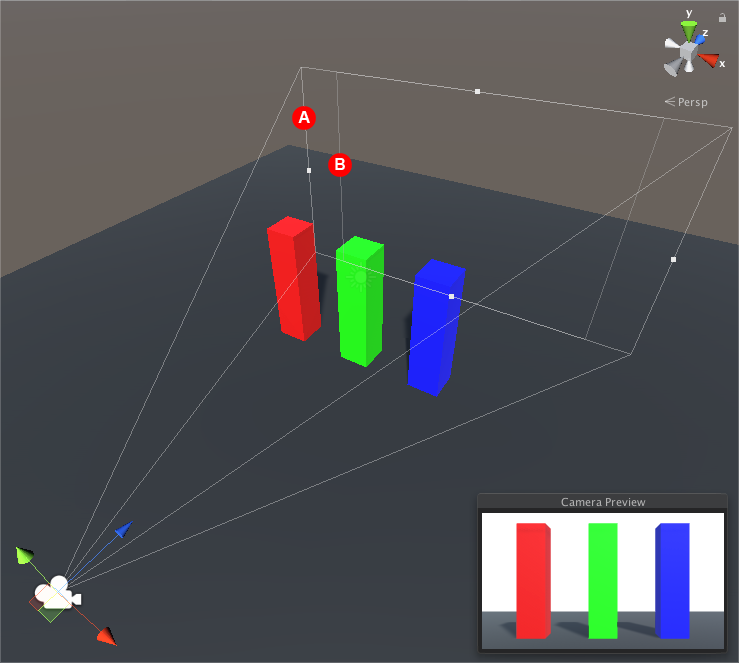
To view the gates in the Scene view, and see how they fit together, select the camera and look at its view frustum. The resolution gate is the camera’s far clipping plane. The film gate is the second rectangle at the base of the frustum.