Per-pixel and per-vertex lights in the Built-In Render Pipeline
Important: The Built-In Render Pipeline is deprecated and will be made obsolete in a future release.
It remains supported, including bug fixes and maintenance, through the full Unity 6.7 LTS lifecycle.
For more information on migration, refer to Migrating from the Built-In Render Pipeline to the Universal Render Pipeline and Render pipeline feature comparison.
If you use the default Forward rendering path, Unity sets each realtime Light component as one of the following types:
- Per-pixel light
- Per-vertex light
- Spherical harmonics (SH) per-vertex light
For more information, refer to Per-pixel and per-vertex lights.
The Built-In Render Pipeline renders each GameObject once for each per-pixel light that affects it.
SH lights are fast, and have little or no performance impact. However, SH lights don’t support cookies, normal maps, or specular highlights. They also have sharp lighting transitions, and might look incorrect.
How Unity classifies lights
By default, Unity groups lights using the following criteria:
- The brightest light is always a per-pixel light. This is usually the main Directional Light.
- The 4 next most important lights are per-vertex lights.
- The remaining lights are SH lights.
During rendering, Unity finds all lights surrounding a mesh and calculates which of those lights affect it most.
For example, in the following image where a sphere GameObject is lit by 8 lights with the same color and intensity, Unity sets the four closest lights (A to D) as per-pixel lights, lights D to G to per-vertex lights, and lights G and H as SH lights. Each per-pixel light creates a separate render pass.
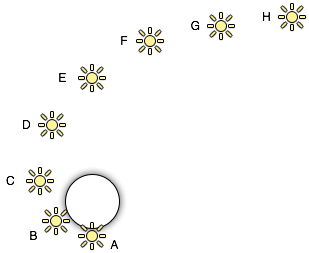
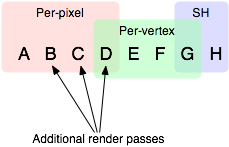
To help avoid visible light transitions when GameObjects and lights move, Unity blends lights from one mode to another. In the preceding example, Unity blends light D from a per-pixel light to a per-vertex light.
For information about optimizing how Unity classifies lights, refer to Optimize lighting in the Built-In Render Pipeline.