Introduction to components
Components are the functional pieces of every GameObject. Components contain properties which you can edit to define the behavior of a GameObject. For more information on the relationship between components and GameObjects, see GameObjectsThe fundamental object in Unity scenes, which can represent characters, props, scenery, cameras, waypoints, and more. A GameObject’s functionality is defined by the Components attached to it. More info
See in Glossary.
To view a list of the components attached to a GameObject in the Inspector window, select a GameObject in either the Hierarchy window or the Scene view.
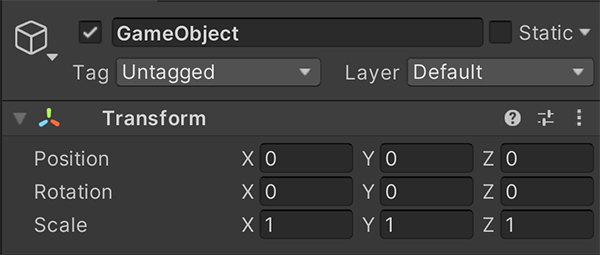
You can attach many components to a GameObject, but every GameObject must have one and only one Transform component. This is because the Transform component dictates the GameObject’s location, rotation, and scale. To create an empty GameObject, select GameObject > Create Empty. When you select the new GameObject, the Inspector displays the Transform component with default values.
A component must be in the same project as the GameObject you want to attach it to. A component can be specific to a package or created by a script. The Unity Editor can’t search for components from:
- Other projects.
- Scripts that are not attached to the project.
- PackagesA container that stores various types of features and assets for Unity, including Editor or Runtime tools and libraries, Asset collections, and project templates. Packages are self-contained units that the Unity Package Manager can share across Unity projects. Most of the time these are called packages, but occasionally they are called Unity Package Manager (UPM) packages. The Unity Package Manager (UPM) can display, add, and remove packages from your project. These packages are native to the Unity Package Manager and provide a fundamental method of delivering Unity functionality. However, the Unity Package Manager can also display Asset Store packages that you downloaded from the Asset Store. More info
See in Glossary that haven’t been added to the project.