Create a default Inspector
Default Inspector is a standard way to display serialized object properties without any custom modifications. When you use FillDefaultInspector method of the InspectorElement class, it automatically creates the default hierarchy with the default property fields.
Example overview
This example extend the CreateInspectorGUI() method in the Create a Custom Inspector example to create a default Inspector for the Car component. The example creates a Foldout control in the Car_Inspector_UXML.uxml file and attaches the default Inspector UI to it.
Prerequisites
このガイドは、Unity エディター、UI Toolkit、および C# スクリプトに精通している開発者を対象としています。始める前に、以下の点を理解しておいてください。
Create the default Inspector container
Create a Foldout control to display the default Inspector UI.
Double-click the
Car_Inspector_UXML.uxmlfile to open it in UI Builder.-
Add a Foldout control to your UI, name it
Default_Inspector, and set a label text: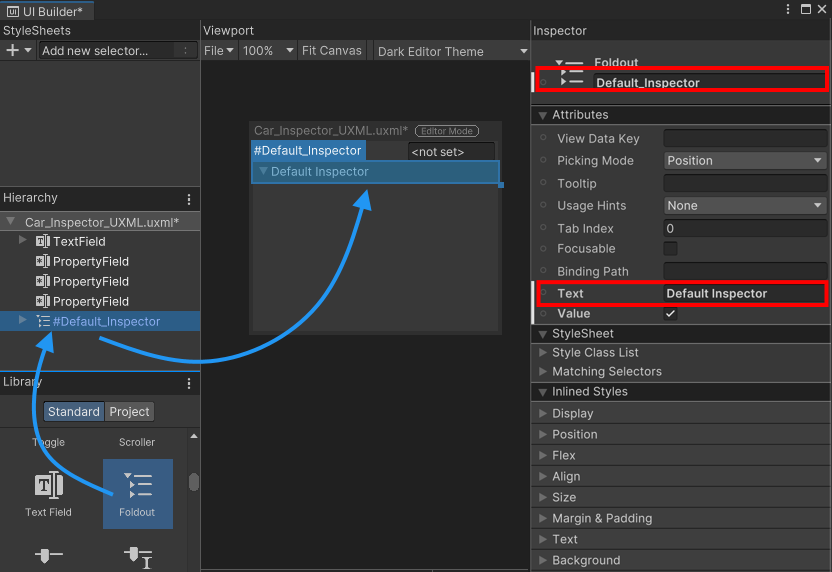
Foldout for the default Inspector
Attach the default Inspector UI
To attach the default Inspector UI to the Foldout, you must obtain a reference to it. You can retrieve the visual element of the Foldout from the visual tree of your Inspector using UQuery, and use the FillDefaultInspector method of the InspectorElement class to attach the default Inspector UI to the Foldout control.
-
In the
Car_Inspector.csfile, update theCreateInspectorGUI()method to get a reference to theDefault_InspectorFoldout and attach the default Inspector UI to it:public override VisualElement CreateInspectorGUI() { ... // Get a reference to the default Inspector Foldout control. VisualElement InspectorFoldout = myInspector.Q("Default_Inspector"); // Attach a default Inspector to the Foldout. InspectorElement.FillDefaultInspector(InspectorFoldout, serializedObject, this); // Return the finished Inspector UI. return myInspector; } -
Select the GameObject that has the
Carcomponent to it. The Inspector for thecarcomponent now displays theDefault InspectorFoldout with the default Inspector UI inside.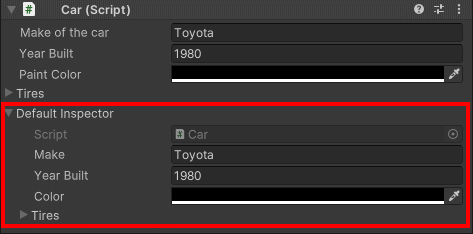
Inspector with a default Inspector