创建可编程画笔
创建一个继承自 GridBrushBase(或 GridBrushBase 的任何有用子类,如 GridBrush)的新类。重写新的画笔类所需的所有方法。以下是将要重写的常用方法:
-
Paint允许画笔将项添加到目标网格上。 -
Erase允许画笔从目标网格上移除项。 -
FloodFill允许画笔将项填充到目标网格上。 -
Rotate可旋转画笔中设置的项。 -
Flip可翻转画笔中设置的项。
使用 ScriptableObject.CreateInstance<(Your Brush Class>() 创建该新类的实例。可通过调用 AssetDatabase.CreateAsset() 将此新实例转换为 Editor 中的资源以便重复使用。
还可以为画笔创建自定义编辑器。这与脚本化对象的自定义编辑器的工作方式相同。以下是在创建自定义编辑器时要重写的主要方法:
- 可重写
OnPaintInspectorGUI以便在选择画笔时在调色板上显示检视视图 (Inspector) 窗口,从而在绘制时提供其他行为。 - 还可以重写
OnPaintSceneGUI以便在SceneView上绘制时添加其他行为。 - 还可以重写
validTargets以便获得画笔可进行交互的自定义目标列表。此目标列表将显示为面板 (Palette) 窗口内的下拉选单。
创建可编程画笔后,画笔将列在面板 (Palette) 窗口的画笔 (Brushes) 下拉菜单中。默认情况下,可编程画笔脚本实例将进行实例化并存储在项目的库 (Library) 文件夹中。对画笔属性的任何修改都会存储在该实例中。如果希望该画笔有多个具备不同属性的副本,可在项目中将画笔实例化为资源。这些画笔资源将在画笔 (Brush) 下拉菜单中单独列出。
可将一个 CustomGridBrush 属性添加到可编程画笔类。这样就能在面板 (Palette) 窗口中配置画笔行为。CustomGridBrush 属性具有以下属性:
-
HideAssetInstances- 将此属性设置为 true 会在面板 (Palette) 窗口中隐藏所创建的画笔资源的所有副本。如果仅希望默认实例显示在瓦片面板 (Tile Palette) 窗口的画笔 (Brush) 下拉菜单中,请设置此属性。 -
HideDefaultInstances- 将此属性设置为 true 会在面板 (Palette) 窗口中隐藏画笔的默认实例。如果仅希望创建的资源显示在瓦片面板 (Tile Palette) 窗口的画笔 (Brush) 下拉菜单中,请设置此属性。 -
DefaultBrush- 将此属性设置为 true 会将画笔的默认实例设置为项目中的默认画笔。如此一来,每当项目启动时,此画笔始终是默认选择的画笔。注意:仅可将一个可编程画笔设置为默认画笔。设置多于一个默认画笔可能会导致可编程画笔出现错误行为。 -
DefaultName- 为此属性设置名称,则画笔下拉菜单可使用设置名称作为画笔的名称,而不是画笔类的名称。
如果希望可编程画笔类仅使用特定工具,则可使用可兼容 TilemapEditorTools 类型列表为该类添加一个 BrushTools 属性。此操作可确保仅可使用瓦片面板 (Tile Palette) 工具栏中的特定工具激活可编程画笔。
可编程画笔示例
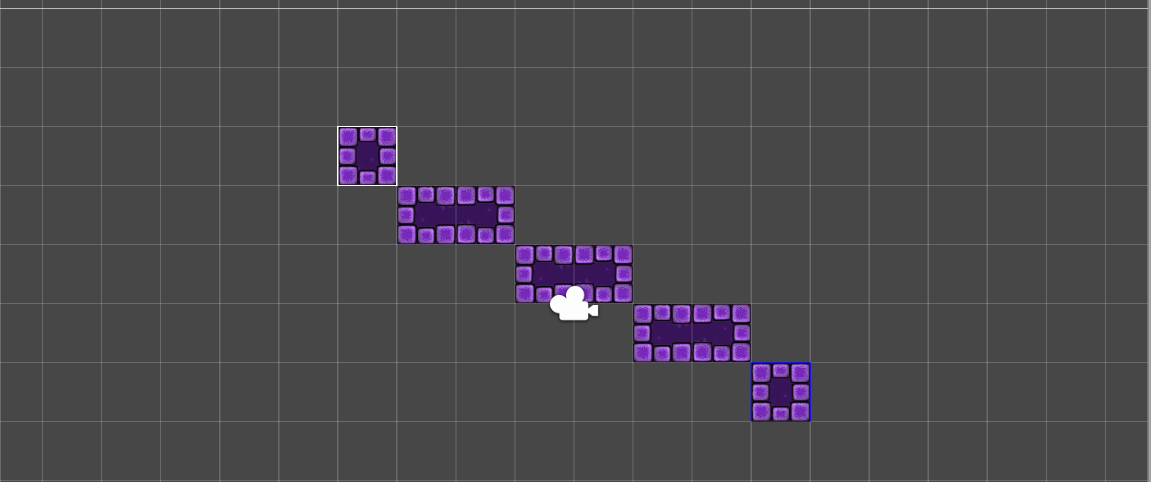
LineBrush 允许通过指定起点和终点在瓦片地图上轻松绘制多行瓦片。通过重写 LineBrush 的 Paint 方法,允许用户在绘画模式下第一次单击鼠标来指定行的起点,然后在绘画模式下第二次单击鼠标来绘制该行。通过重写 OnPaintSceneGUI 方法,可生成在第一次和第二次单击鼠标之间绘制的行的预览效果。以下是一个用于创建画笔的脚本。
using System;
using System.Collections;
using System.Collections.Generic;
using UnityEngine;
using UnityEngine.Tilemaps;

namespace UnityEditor.Tilemaps
{
    [CustomGridBrush(true, false, false, "Line Brush")]
    public class LineBrush : GridBrush {
        public bool lineStartActive = false;
        public Vector3Int lineStart = Vector3Int.zero;
        public override void Paint(GridLayout grid, GameObject brushTarget, Vector3Int position)
        {
            if (lineStartActive)
            {
                Vector2Int startPos = new Vector2Int(lineStart.x, lineStart.y);
                Vector2Int endPos = new Vector2Int(position.x, position.y);
                if (startPos == endPos)
                    base.Paint(grid, brushTarget, position);
                else
                {
                    foreach (var point in GetPointsOnLine(startPos, endPos))
                    {
                        Vector3Int paintPos = new Vector3Int(point.x, point.y, position.z);
                        base.Paint(grid, brushTarget, paintPos);
                    }
                }
                lineStartActive = false;
            }
            else
            {
                lineStart = position;
                lineStartActive = true;
            }
        }
        [MenuItem("Assets/Create/Line Brush")]
        public static void CreateBrush()
        {
            string path = EditorUtility.SaveFilePanelInProject("Save Line Brush", "New Line Brush", "Asset", "Save Line Brush", "Assets");
            if (path == "")
                return;
AssetDatabase.CreateAsset(ScriptableObject.CreateInstance<LineBrush>(), path);
        }
        // http://ericw.ca/notes/bresenhams-line-algorithm-in-csharp.html
        public static IEnumerable<Vector2Int> GetPointsOnLine(Vector2Int p1, Vector2Int p2)
        {
            int x0 = p1.x;
            int y0 = p1.y;
            int x1 = p2.x;
            int y1 = p2.y;
            bool steep = Math.Abs(y1 - y0) > Math.Abs(x1 - x0);
            if (steep)
            {
                int t;
                t = x0; // swap x0 and y0
                x0 = y0;
                y0 = t;
                t = x1; // swap x1 and y1
                x1 = y1;
                y1 = t;
            }
            if (x0 > x1)
            {
                int t;
                t = x0; // swap x0 and x1
                x0 = x1;
                x1 = t;
                t = y0; // swap y0 and y1
                y0 = y1;
                y1 = t;
            }
            int dx = x1 - x0;
            int dy = Math.Abs(y1 - y0);
            int error = dx / 2;
            int ystep = (y0 < y1) ? 1 : -1;
            int y = y0;
            for (int x = x0; x <= x1; x++)
            {
                yield return new Vector2Int((steep ? y : x), (steep ? x : y));
                error = error - dy;
                if (error < 0)
                {
                    y += ystep;
                    error += dx;
                }
            }
            yield break;
        }
    }
    [CustomEditor(typeof(LineBrush))]
    public class LineBrushEditor : GridBrushEditor
    {
        private LineBrush lineBrush { get { return target as LineBrush; } }
        public override void OnPaintSceneGUI(GridLayout grid, GameObject brushTarget, BoundsInt position, GridBrushBase.Tool tool, bool executing)
        {
            base.OnPaintSceneGUI(grid, brushTarget, position, tool, executing);
            if (lineBrush.lineStartActive)
            {
                Tilemap tilemap = brushTarget.GetComponent<Tilemap>();
                if (tilemap != null)
                    tilemap.ClearAllEditorPreviewTiles();
                // Draw preview tiles for tilemap
                Vector2Int startPos = new Vector2Int(lineBrush.lineStart.x, lineBrush.lineStart.y);
                Vector2Int endPos = new Vector2Int(position.x, position.y);
                if (startPos == endPos)
                    PaintPreview(grid, brushTarget, position.min);
                else
                {
                    foreach (var point in LineBrush.GetPointsOnLine(startPos, endPos))
                    {
                        Vector3Int paintPos = new Vector3Int(point.x, point.y, position.z);
                        PaintPreview(grid, brushTarget, paintPos);
                    }
                }
                if (Event.current.type == EventType.Repaint)
                {
                    var min = lineBrush.lineStart;
                    var max = lineBrush.lineStart + position.size;
                    // Draws a box on the picked starting position
                    GL.PushMatrix();
                    GL.MultMatrix(GUI.matrix);
                    GL.Begin(GL.LINES);
                    Handles.color = Color.blue;
                    Handles.DrawLine(new Vector3(min.x, min.y, min.z), new Vector3(max.x, min.y, min.z));
                    Handles.DrawLine(new Vector3(max.x, min.y, min.z), new Vector3(max.x, max.y, min.z));
                    Handles.DrawLine(new Vector3(max.x, max.y, min.z), new Vector3(min.x, max.y, min.z));
                    Handles.DrawLine(new Vector3(min.x, max.y, min.z), new Vector3(min.x, min.y, min.z));
                    GL.End();
                    GL.PopMatrix();
                }
            }
        }
    }
}