脚本化导入器 (Scripted Importer)
Scripted Importer 是 Unity Scripting API 的一部分。您可以通过 Scripted Importer 使用 C# 为 Unity 本身不支持的文件格式编写自定义资源导入器,从而添加支持。
应通过专门定义抽象类 ScriptedImporter 并应用 ScriptedImporter 属性来创建自定义导入器。这样会注册您的自定义导入器以处理一个或多个文件扩展名。当资源管线检测到一个与注册的文件扩展名匹配的文件为新文件或已更改的文件时,Unity 会调用自定义导入器的 OnImportAsset 方法。
注意:Scripted Importer 无法处理已由 Unity 本身处理的文件扩展名。
示例
下面是 Scripted Importer 的一个简单示例:它使用立方体图元作为主资源,将扩展名为“cube”的资源文件导入一个 Unity 预制件,并从资源文件中读取默认材质和颜色并指定其位置:
using UnityEngine;
using UnityEditor.AssetImporters;
using System.IO;

[ScriptedImporter(1, "cube")]
public class CubeImporter : ScriptedImporter
{
    public float m_Scale = 1;

    public override void OnImportAsset(AssetImportContext ctx)
    {
        var cube = GameObject.CreatePrimitive(PrimitiveType.Cube);
        var position = JsonUtility.FromJson<Vector3>(File.ReadAllText(ctx.assetPath));

        cube.transform.position = position;
        cube.transform.localScale = new Vector3(m_Scale, m_Scale, m_Scale);

        // 'cube' is a GameObject and will be automatically converted into a prefab
        // (Only the 'Main Asset' is eligible to become a Prefab.)
        ctx.AddObjectToAsset("main obj", cube);
        ctx.SetMainObject(cube);

        var material = new Material(Shader.Find("Standard"));
        material.color = Color.red;

        // Assets must be assigned a unique identifier string consistent across imports
        ctx.AddObjectToAsset("my Material", material);

        // Assets that are not passed into the context as import outputs must be destroyed
        var tempMesh = new Mesh();
        DestroyImmediate(tempMesh);
    }
}
注意:
- 导入器在 Unity 的资源管线中注册,是通过在CubeImporter类上放置
ScriptedImporter属性。 - CubeImporter 类实现了抽象的
ScriptedImporter基类。 -
OnImportAsset的 ctx 参数包含导入事件的输入和输出数据。 - 每个导入事件必须生成对
SetMainAsset的一次(且仅一次)调用。 - 每个导入事件可以根据需要生成对
AddSubAsset的任意次调用。 - 请参阅脚本 API 文档以了解更多详细信息。
您还可以实现自定义的导入设置编辑器 (Import Settings Editor),为此需要专门定义 ScriptedImporterEditor 类,并使用 CustomEditor 类属性对其进行修饰以告知其用于哪种类型的导入器。
例如:
using UnityEditor;
using UnityEditor.AssetImporters;
using UnityEditor.SceneManagement;
using UnityEngine;

[CustomEditor(typeof(CubeImporter))]
public class CubeImporterEditor: ScriptedImporterEditor
{
    public override void OnInspectorGUI()
    {
        var colorShift = new GUIContent("Color Shift");
        var prop = serializedObject.FindProperty("m_ColorShift");
        EditorGUILayout.PropertyField(prop, colorShift);
        base.ApplyRevertGUI();
    }
}
使用 Scripted Importer
将 Scripted Importer 类添加到项目后,可以像使用 Unity 支持的任何其他本机文件类型一样使用它:
- 将一个受支持文件拖放到资源目录层级视图中可导入该文件。
- 重新启动 Unity Editor 会重新导入自上次更新以来发生更改的所有文件。
- 在磁盘上编辑资源文件并返回 Unity Editor 会触发重新导入。
- 使用 Asset > Import New Asset… 导入新资源。
- 通过以下菜单显式触发重新导入:__Asset__ > Reimport。
- 单击资源可在 Inspector 窗口中查看其设置。要修改其设置,请在 Inspector 窗口中编辑这些设置,然后单击 Apply。
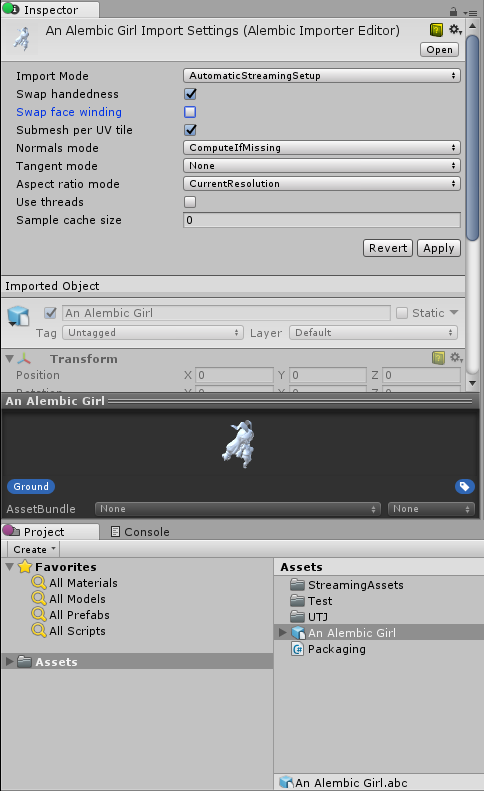
Scripted Importer 的实际使用
__Alembic__:Alembic Importer 插件已更新为使用 Scripted Importer。有关更多信息,请访问 Unity github:AlembicImporter。
__USD__:USD Importer 插件使用 Scripted Importer。有关更多信息,请参阅 USD Importer 包文档。