反向动力学
在大多数角色动画中,动画是通过将骨骼关节的角度旋转到预定值来生成的。子关节的位置会根据其父关节的旋转而变化。而关节链的末端位置则由链上各个关节的角度和相对位置决定。这种骨骼姿态的构建方式被称为正向动力学。
然而,从相反的角度来设置关节姿态通常会更有用。从空间中的一个目标位置出发,然后反向计算关节的旋转,使得关节链的末端能够到达目标位置。这种方法在角色需要抓取物体或站在不平整表面上时非常有用。这种方法被称为反向运动学 (IK)。Mecanim 支持具有正确配置__ Avatar__用于将动画从一个骨架重定向到另一个骨架的接口。更多信息
See in Glossary 的人形角色。
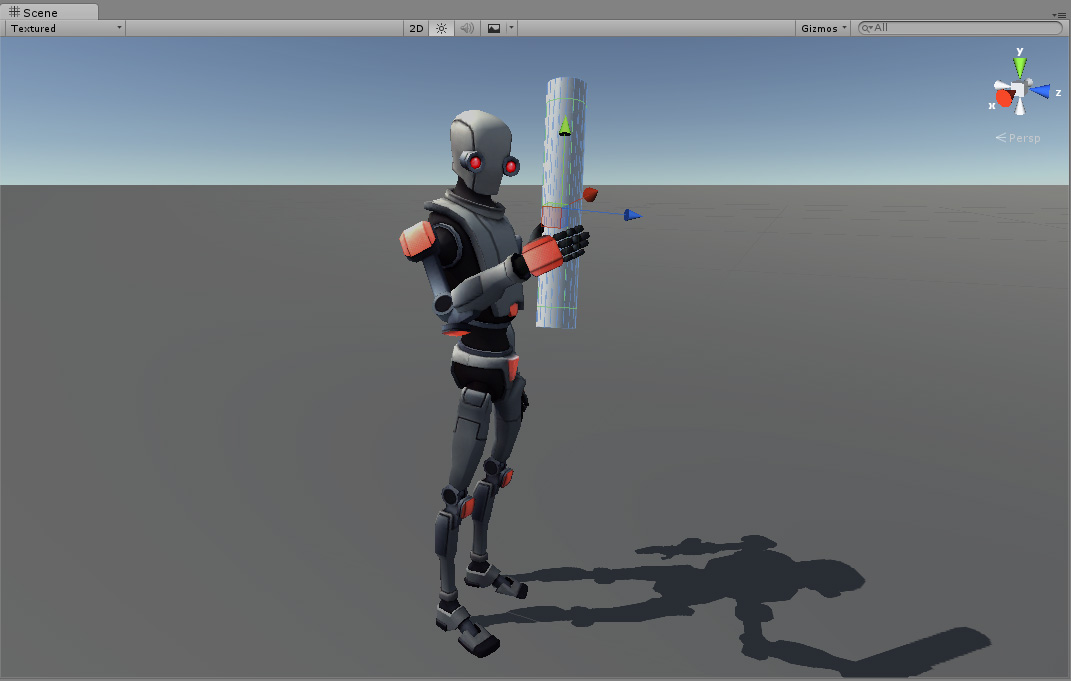
要为角色设置 IK,通常需要场景中有一些角色可以交互的对象。你您可以通过脚本利用这些对象和角色来实现 IK。以下是可以使用的 Animator 函数:
- SetIKPositionWeight
- SetIKRotationWeight
- SetIKPosition
- SetIKRotation
- SetLookAtPosition
- bodyPosition
- bodyRotation
例如,上图展示了一个角色接触圆柱体对象的场景。要通过 IK 和脚本实现这一效果,请按照以下步骤操作:
- 为角色创建一个有效的 Avatar。
- 创建一个动画控制器,并为其添加至少一个动画。
- 在动画器 (Animator) 窗口的图层 (Layers) 面板中,点击基础图层 (Base Layer) 的齿轮图标,从上下文菜单中启用 IK Pass。启用后,IK Pass 会发送
OnAnimatorIK回调。在后续步骤中,你将利用这个回调在脚本中实现 IK 功能。
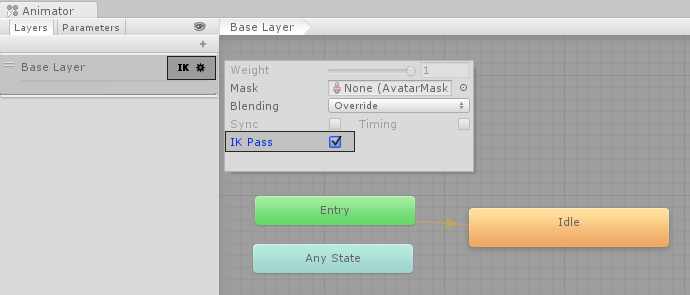
- 确保已将动画控制器分配给角色的动画器组件。
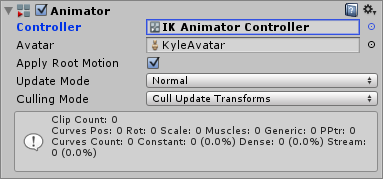
- 接下来,向角色添加脚本。在此示例中,脚本名为
IKControl。此脚本为角色的右手设置 IK 目标。此脚本还会更改注视位置,使其在抓取圆柱体时面向该对象。完整脚本如下所示:
using UnityEngine;
using System;
using System.Collections;

[RequireComponent(typeof(Animator))]
public class IKControl : MonoBehaviour {

    protected Animator animator;

    public bool ikActive = false;
    public Transform rightHandObj = null;
    public Transform lookObj = null;

    void Start ()
    {
        animator = GetComponent<Animator>();
    }

    //a callback for calculating IK
    void OnAnimatorIK()
    {
        if(animator) {

            //if the IK is active, set the position and rotation directly to the goal.
            if(ikActive) {

                // Set the look target position, if one has been assigned
                if(lookObj != null) {
                    animator.SetLookAtWeight(1);
                    animator.SetLookAtPosition(lookObj.position);
                }

                // Set the right hand target position and rotation, if one has been assigned
                if(rightHandObj != null) {
                    animator.SetIKPositionWeight(AvatarIKGoal.RightHand,1);
                    animator.SetIKRotationWeight(AvatarIKGoal.RightHand,1);
                    animator.SetIKPosition(AvatarIKGoal.RightHand,rightHandObj.position);
                    animator.SetIKRotation(AvatarIKGoal.RightHand,rightHandObj.rotation);
                }

            }

            //if the IK is not active, set the position and rotation of the hand and head back to the original position
            else {
                animator.SetIKPositionWeight(AvatarIKGoal.RightHand,0);
                animator.SetIKRotationWeight(AvatarIKGoal.RightHand,0);
                animator.SetLookAtWeight(0);
            }
        }
    }
}
为避免右手穿过圆柱体游戏对象,请将一个空的子游戏对象添加到
Cylinder游戏对象。为此,请在层级视图窗口中右键单击圆柱体游戏对象,然后选择创建空对象 (Create Empty)。将此空子游戏对象命名为Cylinder Grab Handle。定位并旋转
Cylinder Grab Handle游戏对象,使角色的右手能够接触但不会穿过圆柱体。
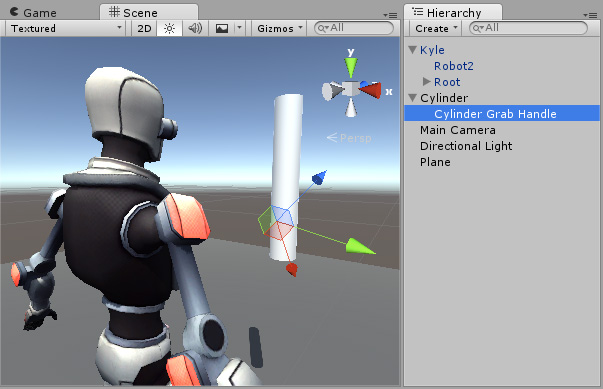
- 在脚本中,将
Cylinder Grab Handle游戏对象分配给IKControl脚本的 Right Hand Obj 属性。 - 将
Cylinder游戏对象指定为 Look Obj,以便在启用 IK Active 时,角色能够面向圆柱体的中心。
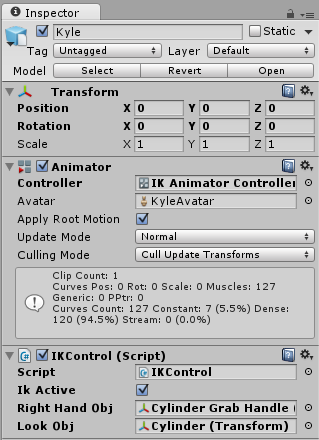
- 进入运行模式。
角色应在启用并禁用 IK Active 复选框时触摸并释放圆柱体游戏对象。在运行模式下,可以更改 Cylinder 游戏对象的位置和旋转,观察角色的右手和注视方向的反应。