Enable the Rendering Debugger in URP
The Rendering Debugger window is available in the following modes:
| Mode | Platform | Availability | How to Open the Rendering Debugger |
|---|---|---|---|
| Editor | All | Yes (window in the Editor) | Select Window > Analysis > Rendering Debugger |
| Play mode | All | Yes (overlay in the Game view) | On a desktop or laptop computer, press LeftCtrl+Backspace (LeftCtrl+Delete on macOS) On a console controller, press L3 and R3 (Left Stick and Right Stick) |
| Runtime | Desktop/Laptop | Yes (only in builds with Managed Code Variant set to Debug or Checked in Player Settings) | Press LeftCtrl+Backspace (LeftCtrl+Delete on macOS) |
| Runtime | Console | Yes (only in builds with Managed Code Variant set to Debug or Checked in Player Settings) | Press L3 and R3 (Left Stick and Right Stick) |
| Runtime | Mobile | Yes (only in builds with Managed Code Variant set to Debug or Checked in Player Settings) | Use a three-finger double tap |
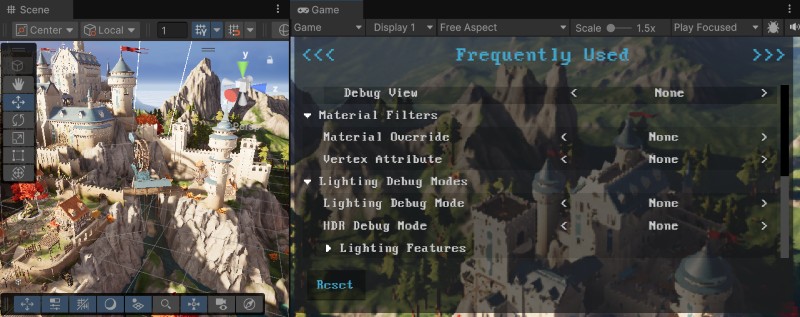
To enable all the sections of the Rendering Debugger in your built application, set Managed Code Variant to Debug or Checked in Player Settings, and disable Strip Runtime Debug Shaders in Project Settings > Graphics > URP Global Settings. Otherwise, you can only use the Display Stats section.
To disable the runtime UI, use the enableRuntimeUI property.
Navigation at runtime
Keyboard
| Action | Control |
|---|---|
| Change the current active item | Use the arrow keys |
| Change the current tab | Use the Page up and Page down keys (Fn + Up and Fn + Down keys respectively for MacOS) |
| Display the current active item independently of the debug window | Press the right Shift key |
XBOX Controller
| Action | Control |
|---|---|
| Change the current active item | Use the Directional pad (D-Pad) |
| Change the current tab | Use the Left Bumper and Right Bumper |
| Display the current active item independently of the debug window | Press the X button |
PlayStation Controller
| Action | Control |
|---|---|
| Change the current active item | Use the Directional buttons |
| Change the current tab | Use the L1 button and R1 button |
| Display the current active item independently of the debug window | Press the Square button |