Layer-based collision detection
Layer-based collision detection is a way to make a GameObject collide with another GameObject that’s set up on a specific layer or layers.
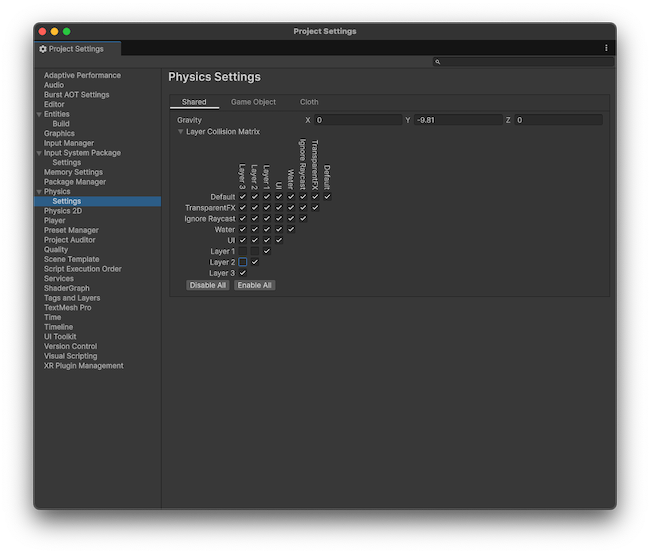
The Layer Collision Matrix defines which GameObjects can collide with which Layers. To open the Layer Collision Matrix go to Edit > Project Settings > Physics.
In the image, the Layer Collision Matrix is set up so that only GameObjects that belong to the same layer can collide:
- Layer 1 is checked for Layer 1 only
- Layer 2 is checked for Layer 2 only
- Layer 3 is checked for Layer 3 only
If, for example, you want Layer 1 to collide with Layer 2 and 3, but not with Layer 1, find the row for Layer 1, then check the boxes for the Layer 2 and Layer 3 columns, and leave the Layer 1 column checkbox blank.
Set up layer-based collision detection
Select the GameObject you want to assign a layer to.
-
In the Inspector, select the Layer dropdown at the top, and either choose a Layer or add a new Layer. Repeat for each GameObject until you have finished assigning your GameObjects to Layers.
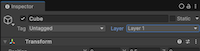
Cube selected in the Inspector, with Layer 1 assigned to it. In the Unity menu bar, go to Edit > Project Settings, then select the Physics category to open the Physics window.
Select the layers on the Collision Matrix that you want to interact with the other layers.
Additional resources
- Essential Unity concepts
- Tags and layers
- Collision detectionAn automatic process performed by Unity which determines whether a moving GameObject with a Rigidbody and collider component has come into contact with any other colliders. More info
See in Glossary - LayersLayers in Unity can be used to selectively opt groups of GameObjects in or out of certain processes or calculations. This includes camera rendering, lighting, physics collisions, or custom calculations in your own code. More info
See in Glossary