Introduction to Adaptive Probe Volumes
An Adaptive Probe Volume is a group of Light ProbesLight probes store information about how light passes through space in your scene. A collection of light probes arranged within a given space can improve lighting on moving objects and static LOD scenery within that space. More info
See in Glossary that Unity places automatically based on the geometry density in your Scene, to create baked indirect lighting. You can use Adaptive Probe Volumes instead of manually placing and configuring Light Probes.
Advantages and limitations
| Feature | Light Probe Groups | Adaptive Probe Volumes |
|---|---|---|
| Selection of surrounding probes | Per GameObject | Per pixel |
| Optimize memory use with streaming | No | Yes |
| Place probes automatically | No | Yes |
| Blend between different bakes | No | Yes |
| Place probes manually | Yes | No |
Adaptive Probe Volumes have the following advantages:
- Unity samples surrounding probes per-pixel rather than per GameObject. This sampling approach results in better lighting consistency, and fewer seams between adjacent GameObjects.
- You can adjust Light Probe layouts across a scene, for example using a denser set of Light Probes in an interior area with more detailed lighting or geometry. Refer to Configure the size and density of Adaptive Probe Volumes for more information.
- Adaptive Probe Volumes work well if you work with multiple scenes. Refer to Baking Sets for more information.
- Adaptive Probe Volumes include streaming functionality to support large open worlds.
- You can use Adaptive Probe Volumes to update light from the sky at runtime with sky occlusion.
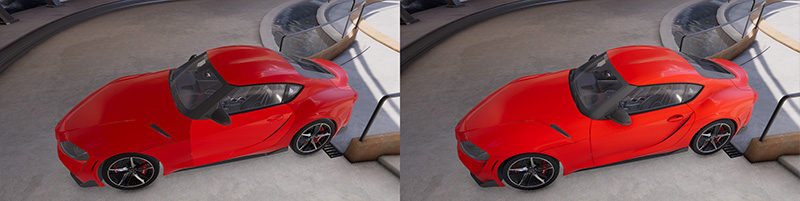
Adaptive Probe Volumes have the following limitations:
- You can’t adjust the locations of Light Probes inside an Adaptive Probe Volume. You can use settings and overrides to try to fix visible artifacts, but it might not be possible to make sure Light Probes follow walls or are at the exact boundary between different lighting areas. Refer to Fix issues with Adaptive Probe Volumes for more information.
- You can’t convert Light Probe GroupsA component that enables you to add Light Probes to GameObjects in your scene. More info
See in Glossary into an Adaptive Probe Volume.
How Adaptive Probe Volumes work
The Universal Render Pipeline (URP) automatically fills an Adaptive Probe Volume with a 3D structure of ‘bricks’. Each brick contains 64 Light Probes, arranged in a 4 × 4 × 4 grid.
URP uses bricks with different sizes to match the amount of geometry in different areas of your scene. For example, in areas with more geometry, URP uses small bricks with a short distance between Light Probes. The Light Probes capture lighting at a higher resolution, so lighting is more accurate.
The default Light Probe spacing is 1, 3, 9, or 27 m.
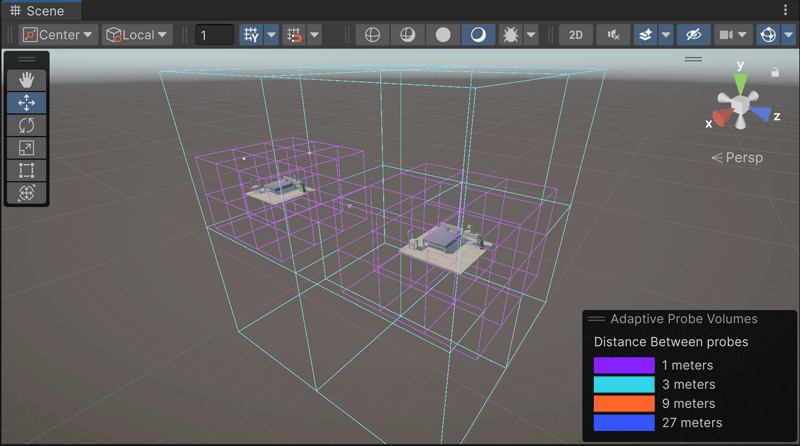
Each pixel of a GameObject samples lighting data from the eight closest Light Probes around it.
You can do the following:
- Use the Rendering Debugger to visualize the layout of bricks and Light Probes. Refer to Display Adaptive Probe Volumes.
- Configure the size and density of Adaptive Probe Volumes.
- Add a Volume to your scene to adjust which Light Probes GameObjects sample.
Baking Sets
To store lighting from a scene in an Adaptive Probe Volume, the scene must be part of a Baking Set.
A Baking Set contains the following:
- One or more scenes, which optionally include Adaptive Probe Volumes.
- A single collection of settings.
By default, URP uses Single Scene mode, and places each scene in its own Baking Set automatically. However, only one Baking Set can be active at any time, so if you work with multiple scenes, you must add these scenes to a single Baking Set if you want to bake them together. Refer to Bake multiple scenes together with Baking Sets for more information.
Lighting Scenarios
A Lighting Scenario asset contains the baked lighting data for a scene or Baking Set. You can bake different lighting setups into different Lighting Scenario assets, and change which one URP uses at runtime, or blend between them.
Refer to Bake different lighting setups with Lighting Scenarios for more information.
How Lighting Scenarios store data
Adaptive Probe Volumes splits Lighting Scenario data into two parts, to avoid duplicating data:
- The shared data, which contains mainly the scene subdivision information and probe placement.
- The per scenario data, which contains the probe lighting information.
URP can’t share the data or blend between Lighting Scenarios if you move geometry between bakes, because the Light Probe positions might change. Refer to Keep Light Probes the same in different Lighting Scenarios for more information.