Custom physics body tags
Learn how to use custom physics body tags to flag rigid bodies for custom behavior without the boilerplate of empty components.
To define custom behavior with Entities, you can add a custom component to an entity. A system that models the custom behavior can then check whether an entity contains such a component. If you use custom components only as a flag (when the added IComponentData is empty), this approach has the following downsides:
- Creating an empty authoring component and baker for empty component data adds more boilerplate code.
- Adding and removing component data needs sync points and causes structural changes.
You can use a custom physics body tag to work around these restrictions, and flag up to eight custom behaviors for each rigid body. Some modifiable intermediate simulation data, like ModifiableContactHeader, already contains custom physics body tag values. In other cases, game logic can get the Rigidbody.CustomTag value by pulling Rigidbody data from the CollisionWorld.Bodies array:
NativeArray<RigidBody> allBodies = SystemAPI.GetSingleton<PhysicsWorldSingleton>().CollisionWorld.Bodies;
byte bodyTags = allBodies[bodyIndex].CustomTags;
Custom physics body tag authoring
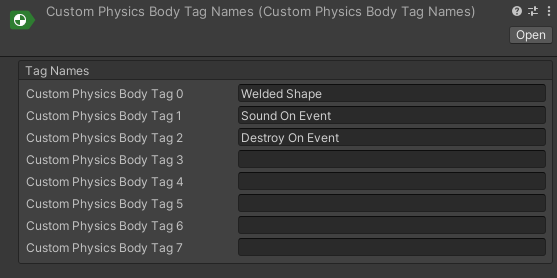
You can set custom physics body tags through code as flags. However, it's more convenient to do so through the Unity Editor. To assign a name for each of the custom physics body tags in the Unity Editor, right-click the folder where you want to save the definition file and select Create > Unity Physics > Custom Physics Body Tag Names.
Tags don't need names.
Author through built-in physics authoring
If you use the built-in Rigidbody, create an authoring component for the custom physics body tags and its baker. The baker's only job is to add a new PhysicsCustomTags component to the corresponding entity.
Author through custom physics authoring
Assign a custom physics body tag to a Rigidbody component through the PhysicsBodyAuthoring component, as the following screenshot shows:
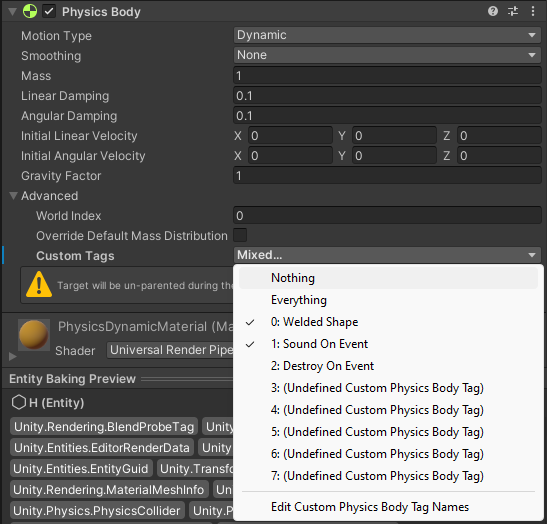
Built-in baking converts the authoring data to runtime data.