Rigid bodies as entities and data components
Learn how Unity Physics represents rigid bodies as entities with specific data components, and which transform components dynamic and static bodies need.
Unity Physics builds on the Entity component system (ECS). In this framework, you define rigid bodies by adding specific data components to the corresponding entities in your project. During the automatic entity baking process in the Unity Editor, Unity Physics converts the built-in RigidBody and Collider authoring components into rigid body entities with multiple data components. It also converts the simplified custom Physics Body and Physics Shape authoring components on your GameObjects in the same way. Refer to the Authoring section.
This is also how rigid bodies appear at runtime: as entities with specific, optimized data components rather than as GameObjects with authoring components. This approach allows for smaller, optimized memory footprints, leading to higher performance through faster data access speeds. Static bodies, for instance, need fewer data components than dynamic bodies.
The data components that define rigid bodies are as follows:
| Component | Description |
|---|---|
PhysicsCollider |
The shape of the rigid body. Needed for bodies that can collide. |
PhysicsColliderKeyEntityPair |
A buffer element that associates an original entity with a collider key in a compound collider. Only present when the rigid body contains a compound collider. |
PhysicsCustomTags |
Optional component that applies custom flags to the body. You can use these flags for certain collision-event applications. Assumed to be zero if not present. |
PhysicsDamping |
Optional component that specifies the amount of damping to apply to the motion of a dynamic body. Assumed to be zero if not present. Each step scales down the velocities of a body with this component. This slows objects down, makes them more stable, and provides a simple approximation of aerodynamic drag. |
PhysicsGravityFactor |
A scalar multiplication factor that defines how strongly gravity acts on a dynamic body. This is an optional component, with the factor assumed to be 1 if not present. Some objects look more realistic if they appear to fall faster. Other objects (for example, hot air balloons) can rise, which you can emulate with a negative gravity factor. |
PhysicsMass |
The current mass properties (center of mass and moment of inertia) of a dynamic body. Assumed to be infinite mass if not present. |
PhysicsSolverType |
Optional component that specifies which solver resolves collisions between this and other rigid bodies. Without it, Unity Physics uses the default Iterative Solver, which is fast, approximate, and ideal when many rigid bodies collide. To get more accurate contact resolution and friction modeling, select the more computationally demanding Direct Solver with this component. Refer to the Constraint solvers section for more details. |
PhysicsVelocity |
The current linear and angular velocities of a dynamic body. Needed for any body that can move. |
PhysicsWorldIndex |
Shared component required on any entity involved in physics simulation (body or joint). Its value denotes the index of the physics world the entity belongs to (0 by default). |
All physics bodies need components from Unity.Transforms to represent their position, orientation, and scale in world space.
The transform components you need on the body entity depend on whether the body is dynamic or static. The following sections provide more details.
Dynamic bodies
A dynamic body entity needs a PhysicsVelocity component and a Unity.Transforms.LocalTransform component. For improved performance, Unity Physics assumes the body's LocalTransform component is in world space. The LocalTransform therefore fully defines the body's world space position, orientation, and scale.
When baking a dynamic body authored as a GameObject into an entity, Unity Physics detaches the resultant entity from the entity hierarchy. It then transfers the GameObject's world-space position, orientation, and uniform scale into the LocalTransform component. For information on how Unity Physics bakes non-uniform scales, refer to Non-uniform scale and shear.
Static bodies
Static bodies have a PhysicsCollider component but no PhysicsVelocity component. They're stationary, don't collide with other static bodies, and are optimal for representing environmental obstacles such as terrain surfaces, buildings, trees, or rock formations. Such bodies need at least one of either the LocalTransform or the Unity.Transforms.LocalToWorld component.
The transformation baking process of static bodies works the same as for dynamic bodies described in Dynamic bodies, with one notable exception. Unity Physics doesn't detach static body entities baked from GameObjects with identity scale (no scale at all) from the entity hierarchy during the baking process. Children in the resultant hierarchy get a Unity.Transforms.Parent component that points to their parent entity. At runtime, Unity Physics reads their world space position and orientation directly from their LocalToWorld component. This assumes such static body entities don't move at runtime. The following section provides further details of this approach and discusses its implications.
Static bodies and Parents
Unity Physics reads the world-space transformations of static bodies without a Parent component directly from their LocalTransform component values. These entities sit outside an entities hierarchy, so the local-space transformation matches the world-space transformation.
However, if a static body has a Parent component, Unity Physics reads its world-space transformation from the current value of its LocalToWorld component. The transform systems (specifically, the LocalToWorldSystem) update this component at the end of every frame. If such static bodies move, Unity Physics can't guarantee that their LocalToWorld value is up-to-date the next time Unity Physics runs. This can lead to unexpected differences between the supposed state of these bodies in the scene and their state in the physics system. The differences can cause incorrect collisions and wrong results in collision queries such as ray casts or collider casts. Furthermore, the transform systems that update the LocalToWorld component don't run as part of the FixedStepSimulationSystemGroup in which Unity Physics runs. Specifically, in cases where the FixedStepSimulationSystemGroup (and thereby Unity Physics) runs multiple times per frame, Unity doesn't update the LocalToWorld component at the same frequency as the physics systems run. This leads to discrepancies. One example is when the FixedRateCatchUpManager triggers multiple physics runs per frame.
To make sure Unity Physics receives the most up-to-date world-space transformation of static bodies with a parent, either don't move them, or manually update their LocalToWorld transformation after the move. To do this, run the LocalToWorldSystem as part of the FixedStepSimulationSystemGroup. However, this takes time. Alternatively, update the LocalToWorld component manually in time for the next physics systems update.
Scale and shear bodies
You can scale or shear the shape of a rigid body, represented by its PhysicsCollider component, together with its mass properties.
Uniform scale
In the Unity Editor
Baking transfers any pure, world-space uniform scale of the GameObject that represents the rigid body at edit time into the Scale property of the LocalTransform component. Figure 1 shows an example.
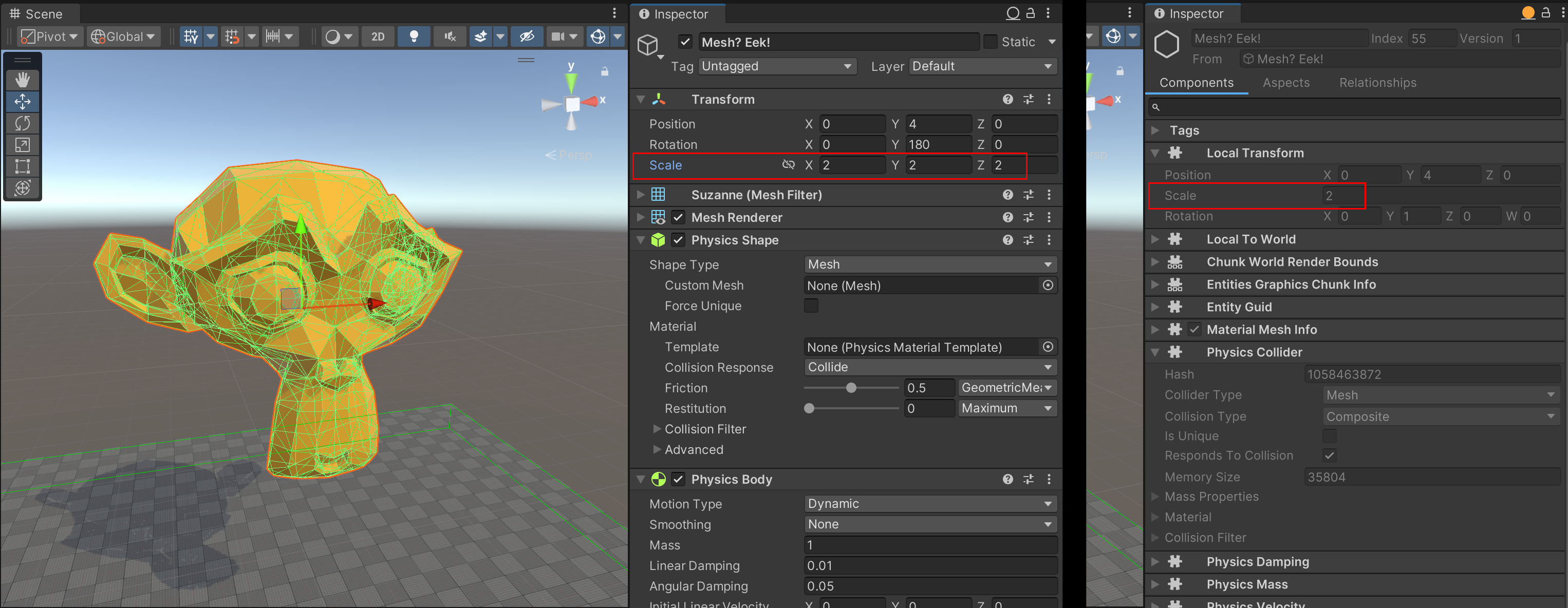
Figure 1: This example shows how baking transfers the uniform scale vector (2,2,2) of a GameObject into the entity's LocalTransform component as a Scale of 2.
This scale automatically applies to the collider geometry contained in the entity if present (for example, in its PhysicsCollider component), regardless of the geometry type. It also applies to the moment of inertia (defined by its PhysicsMass component if present).
At runtime
To uniformly scale dynamic bodies at runtime, modify the Scale property of their LocalTransform component. Unity Physics automatically considers the resultant change in collider scale during collision detection and resolution. It also accounts for the change in mass properties in the rigid body's dynamics simulation.
Non-uniform scale and shear
In the Unity Editor
If a GameObject has any non-uniform scale or shear, baking transfers the scale and shear part of its world-space transformation matrix into a PostTransformMatrix component. Unity Physics adds this component to the resultant entity during baking. At runtime, Unity Physics automatically applies this post-transform matrix to the entity's LocalTransform matrix and uses it to calculate the final local-to-world matrix. This process makes sure that any render mesh associated with the GameObject is correctly scaled and sheared and appears as expected.
Baking also applies the same scale and shear to the body's collider geometry if present. This affects the mass distribution (the moment of inertia). This occurs regardless of the collider type. Some types of collider geometries can only represent certain non-uniform scales and shears exactly. For example, baking can apply any non-uniform scale to a box collider if the scale occurs along the box's principal axes. However, this isn't the case for a cylinder, capsule, or sphere. Conversely, baking can apply any scale and shear to mesh-based colliders, such as mesh colliders or convex colliders.
This baking process applies the GameObject's edit-time non-uniform scale and shear to the rigid body's collider geometry as best as possible. It can't fully represent the scale and shear if the collider geometry type doesn't support it.
After this process, the entity's LocalTransform.Scale is 1 because baking has already applied the full scale and shear to the collider geometry.
At runtime
You can apply non-uniform scale and shear to the shape of a rigid body at runtime by directly modifying the Collider blob located in the body's PhysicsCollider component. For more information, refer to the subsection on modifying colliders in the PhysicsCollider component section.