The simulation pipeline
Understand the stages that Unity Physics runs each step to detect collisions, solve constraints, and integrate dynamic bodies.
The Unity Physics simulation pipeline runs the following stages in order:
Physics World Building: The physics system gets the current state from the components on the body entities. It then builds the underlying physics world, which contains integral parts for the following stages. This must happen first because the simulation is stateless and doesn't cache anything between frames. The physics world consists of two parts:
- The collision world stores information used for the collision detection stages and for user collider queries such as ray casts or distance queries.
- The dynamics world stores information used for the constraint solver, such as joints and mass properties for dynamic rigid bodies.
In the Physics World Building stage, Unity Physics constructs both parts.
Collision Detection Broadphase: The physics system runs the broadphase of the collision detection. In this phase, the simulation uses high-level collider information of all active rigid bodies in the scene. It quickly identifies which pairs of colliders might collide. Through fast overlap checks of the colliders' bounding volumes (axis-aligned bounding boxes, or AABBs), this phase efficiently tests for collisions and discards all other colliders in the scene.
Collision Detection Narrowphase: The physics system runs the narrowphase of the collision detection. Given the pairs of potentially colliding colliders computed in the broadphase, the simulation uses precise intersection tests to determine which pairs actually collide. For each colliding pair, Unity Physics calculates the exact points of contact (the intersections) between the corresponding colliders.
Constraint Solver: Based on the collisions determined in the narrowphase, the physics system calculates a collision response for each colliding dynamic rigid body. The calculation takes the following information into account:
- Rigid body mass properties (such as scalar mass and moment of inertia)
- Material friction
- Material restitution (bounciness)
- Points of contact
The constraint solver corrects the interpenetrations of all dynamically controlled colliders (dynamic rigid bodies) by applying contact impulses for the identified contact points. It performs similar corrections for joints, correspondingly restricting the motion of any jointed dynamic rigid body. This stage produces new linear and angular velocities for the affected rigid bodies.
Two types of constraint solvers are available: an Iterative Solver and a Direct Solver. Each has advantages and disadvantages:
- Use the Iterative Solver to simulate massive numbers of colliding rigid bodies quickly and approximately.
- Use the Direct Solver to accurately simulate long joint chains, stiff joints, large mass ratios, or frictional contacts. The accuracy reduces performance.
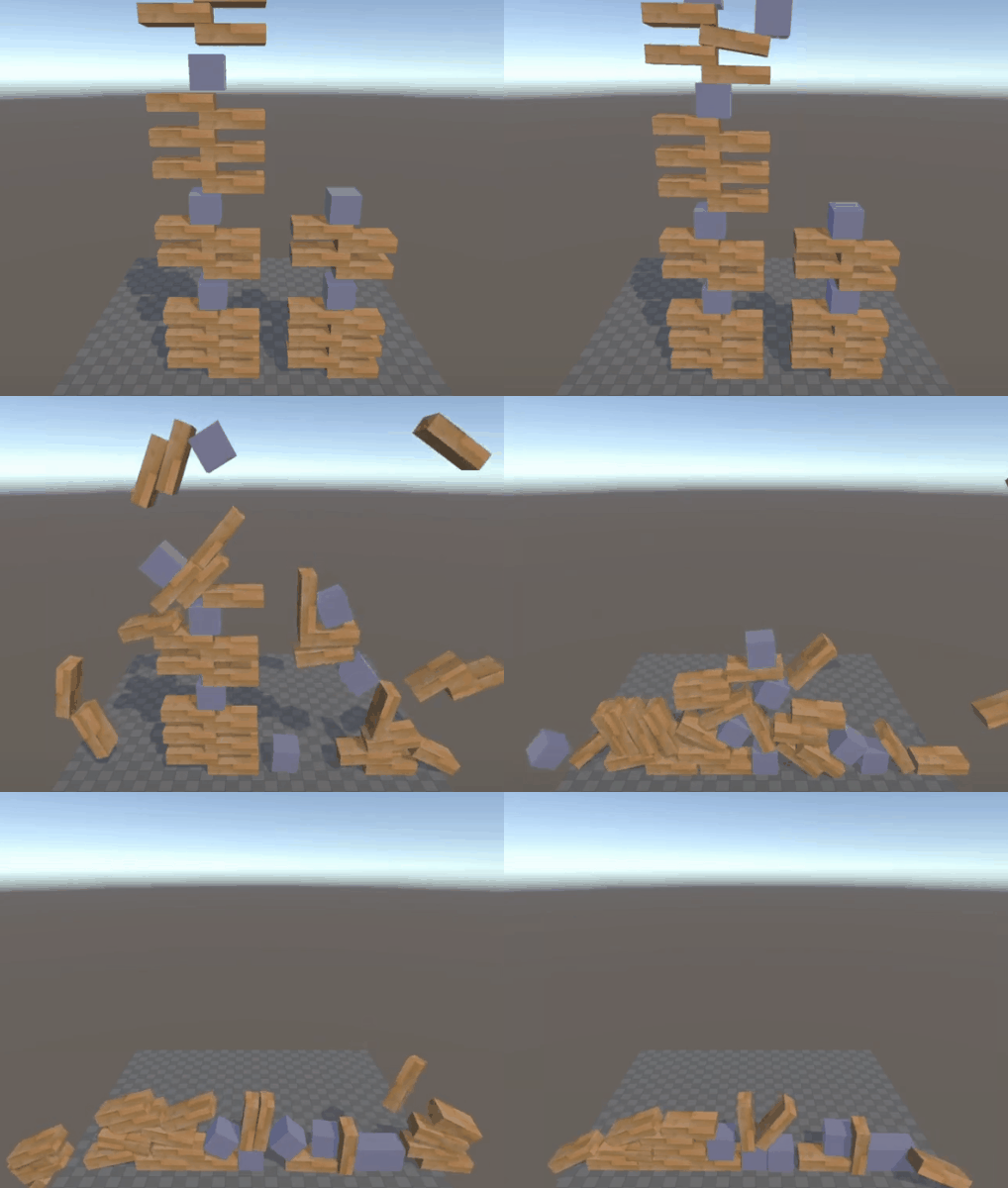
Direct Solver in Unity Physics: Challenging scenario with stable stacking and large mass ratios. The Direct Solver produces high fidelity collisions with accurate friction and avoids the stability issues that the Iterative Solver might cause in the same simulation.
To combine both solvers in a single scene, assign them to different joints and colliders. When you combine solvers, you can create game physics effects that aren't possible with the iterative or direct solver alone. For more details, refer to the Constraint solvers section.
Integration: The physics system integrates all dynamic bodies forward in time by moving the dynamic rigid bodies according to their newly calculated linear and angular velocities and the current time step. This creates new positions and orientations.
Export: Finally, the physics system applies each rigid body's new position and orientation to the entity that represents that rigid body.
The collision world
The collision world, created during the Physics World Building stage, contains all rigid bodies that have a collider. It also contains dedicated spatial acceleration structures needed to efficiently determine overlapping collider pairs during the Collision Detection Broadphase stage. This structure, a bounding volume hierarchy (BVH), spatially organizes the bounding volumes of all colliders into a tree for fast collision detection and user collider queries.
Unity Physics uses axis-aligned bounding boxes (AABBs) as rigid body bounding volumes in the BVH. AABBs reduce memory consumption and speed up overlap tests, while still approximating the space a rigid body occupies. The following figure shows how this bounding volume type compares to other types.
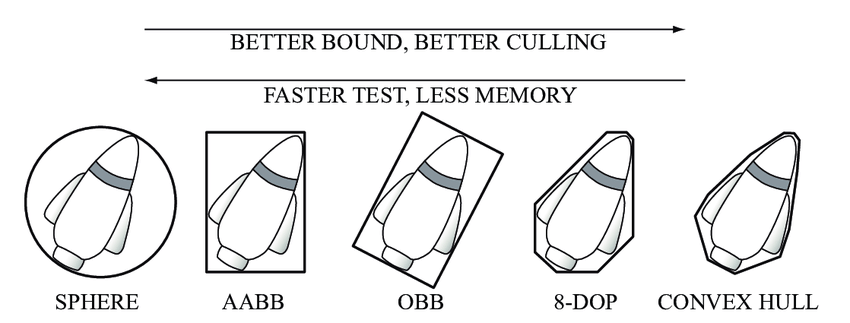
Types of bounding volumes: bounding sphere, axis-aligned bounding box (AABB), oriented bounding box (OBB), eight-direction discrete orientation polytope (8-DOP), and convex hull. Reference source.
Unity Physics can either recalculate the BVH in the broadphase from scratch or update it incrementally. When updating the broadphase incrementally, Unity Physics incorporates only the rigid body collider changes (such as changes in transformation or size) detected between simulation steps into the BVH. This approach can significantly reduce the time consumption for the broadphase update in cases where most colliders don't change in any given simulation step. By default, the broadphase updates from scratch. Enable incremental broadphase updates using the Physics Step authoring component.
Unity Physics constructs two independent BVHs during the Physics World Building stage: one for static and one for dynamic rigid bodies. For static rigid bodies, Unity Physics only updates the BVH (the static broadphase) when it detects a change to any static rigid body. This is true whether the static broadphase updates incrementally. Unity Physics always updates the BVH for dynamic rigid bodies because these bodies usually move. This approach supports scenes with many static rigid bodies. However, the static broadphase update can take a long time during the Physics World Building stage if any static rigid bodies move in a given step. To prevent a performance hit in such cases, set the static broadphase update to incremental as described in this section.