Physics Step component reference
Explore the properties to control Unity Physics settings, gravity, solver iterations, and broadphase behavior.
To control Unity Physics settings, add a Physics Step component. When you work with Entities, add the component to a subscene. Add only one Physics Step component per scene because it applies to the whole physics simulation.
Physics Step component properties
Use this component to configure the following physics simulation settings.
| Property | Description |
|---|---|
| Simulation Type | Selects between Unity Physics or None as the physics system. Unity Physics is the default. |
| Gravity | Sets the global gravity applied to all dynamic rigid bodies in the physics world. You can use the PhysicsGravityFactor ECS data component to modify the gravity applied to individual rigid bodies, as a multiple of the global gravity specified here. |
| Enable Gyroscopic Torque | Enables simulation of gyroscopic torque, which increases the realism of the simulation and enhances the stability of rotating dynamic bodies. |
| Substep Count | Specifies the number of substep iterations the physics system performs. The duration of a substep equals the physics frame time divided by the number of substep iterations. Higher values mean smaller timesteps per frame. This can improve stability up to a point where the timestep becomes so small that computational numerical errors arise. Higher values can provide more accuracy and stability when solving constraints, but can reduce simulation performance. In each substep, the solver runs as many iterations as defined by Solver Iteration Count to compute the joint and contact forces. This setting applies only when you select Unity Physics as the Simulation Type. |
| Solver Iteration Count | Specifies the number of solver iterations the physics system performs to correct contact penetrations and joint errors. Higher values provide more accuracy and stability, but can reduce simulation performance. |
| Direct Solver Settings | Sets properties for the direct solver. Refer to Direct solver settings. Enable the direct solver by adding the PhysicsSolverType ECS data component to rigid body and joint entities. |
| Multi Threaded | Enables multithreading. When enabled, the physics system maximizes the number of threads it uses to calculate the simulation results. When disabled, the physics system reduces the number of threads to a minimum, running most operations on a single thread. |
| Collision Tolerance | Sets the collision tolerance. The collision tolerance specifies the minimum distance required between rigid bodies for the physics system to create contacts. Increase this value if you observe undesired collision tunneling in the simulation. |
| Max Dynamic Depenetration Velocity | Sets the maximum relative velocity that can occur when separating intersecting dynamic rigid bodies. Useful when contacts lead to deep intersections between colliders, causing aggressive ejecting motions. |
| Max Static Depenetration Velocity | Sets the maximum relative velocity that can occur when separating dynamic rigid bodies that intersect static rigid bodies. Useful when contacts lead to deep intersections between colliders, causing aggressive ejecting motions. |
| Synchronize Collision World | Specifies whether to update the collision world after the step for more precise ray cast, collider, and distance query results. |
| Incremental Dynamic Broadphase | Enables the incremental dynamic broadphase. When enabled, this option updates the dynamic broadphase incrementally whenever changes between simulation steps occur, which can save time when many dynamic rigid bodies don't move or otherwise change. |
| Incremental Static Broadphase | Enables the incremental static broadphase. When enabled, this option updates the static broadphase incrementally whenever changes between simulation steps occur, which can save time when many static rigid bodies don't move or otherwise change. |
| Enable Contact Solver Stabilization Heuristic | Improves simulation stability when stacking objects with low solver iteration counts by preventing undesired sliding artifacts. Can reduce simulation performance and produce implausible results in certain physical interactions involving friction forces. |
Direct solver settings
The direct solver comes with an additional set of properties.
| Property | Description |
|---|---|
| Contact Stiffness | Sets the stiffness of a contact that the direct solver simulates. |
| Contact Damping | Sets the damping of a contact that the direct solver simulates. |
| Contact Slip | Sets the slip that a contact experiences in the friction plane when the direct solver simulates it. |
| Maximum Joint Stiffness | Sets the maximum stiffness a joint can have when the direct solver simulates it. |
| Maximum Joint Damping | Sets the maximum damping a joint can have when the direct solver simulates it. |
| Minimum Motor Slip | Sets the minimum slip a motor joint experiences when the direct solver simulates it. |
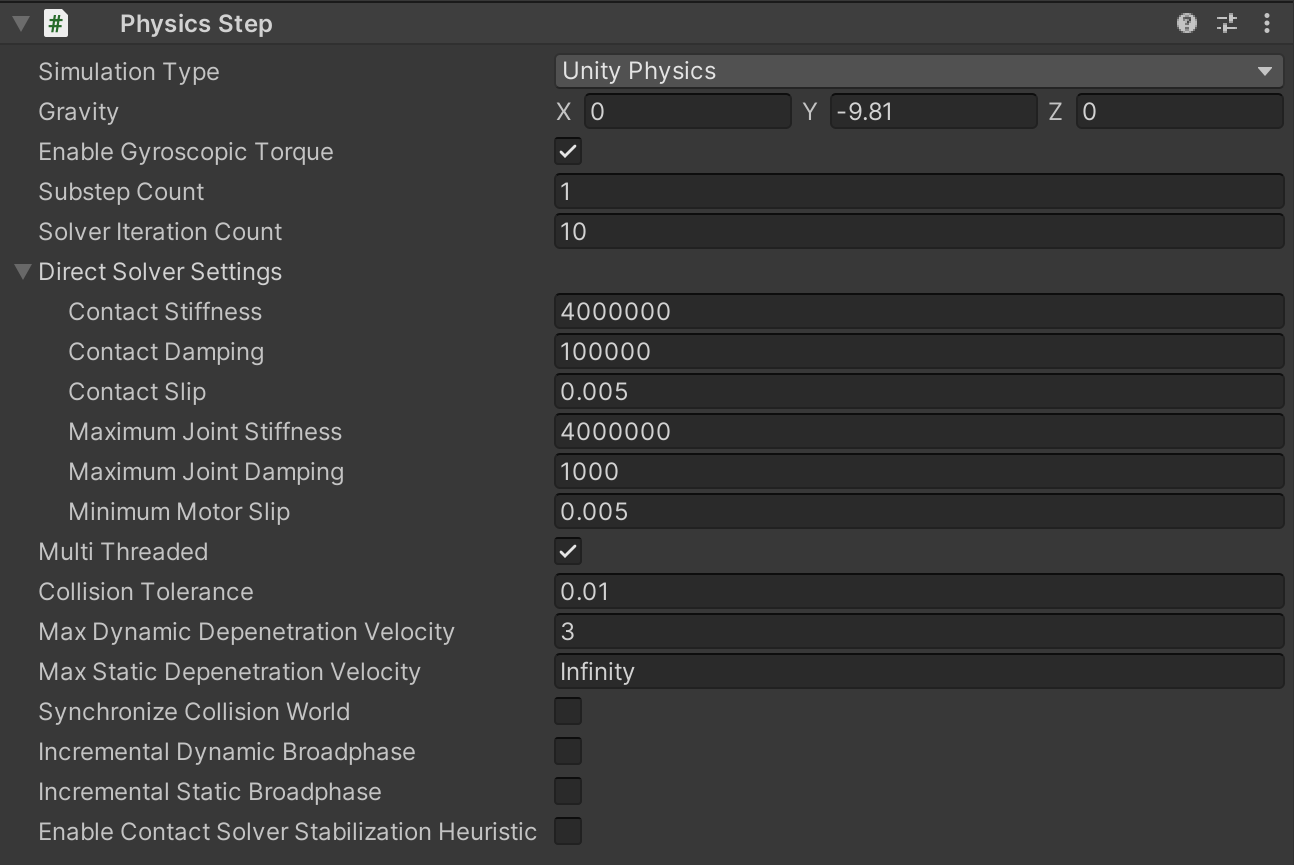
The Physics Step authoring component provides access to various simulation configuration settings.