Details panel reference (samples)
In the Package Manager window, when you select a sample from the list panel, the details panel on the right displays details for the selected sample.
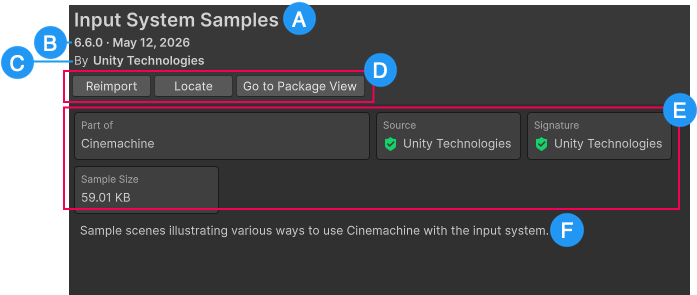
These details include the following information:
(A) The name of the sample.
(B) The version number and release date of the package that hosts this sample.
(C) The author of the package that hosts this sample.
(D) Action buttons to Import, Reimport, or Update the sample. Go to Package View switches the context to All Packages, so you can view the details of the package that hosts this sample. If the sample is imported, the Locate button appears, which shows you where the sample’s folder exists in the Project window.
(E) Metadata about the sample, such as its host package, size, and more.
(F) The description of the sample.