Trace and manage PSO data collections
Trace a new PSO data collection and manage existing collections.
PSO tracing means recording which pipeline state objects (PSO) your app uses, and the associated data to be able to prewarm PSOs. Modern graphics APIs compile shaders as part of PSO creation, so they require tracing additional graphics states and the shader variant used.
The GraphicsStateCollection API enables you to trace and prewarm PSOs in your project. Tip: Refer to the GraphicsStateCollection API documentation for more information about the GraphicsStateCollection API and for code samples.
The following sections explain how to trace a PSO collection and manage PSO collections in your project.
Requirements for tracing
Tracing with the GraphicsStateCollection API is only supported on development builds, not release builds.
Note: In a release build, you can use the VariantsUploadedToGpuLastFrame API instead. The API returns the shader variants Unity uploads to the GPU each frame.
Trace a new PSO data collection
Trace PSOs in your project and create a GraphicsStateCollection asset (a PSO data collection), which stores information about the combinations of shader variants and graphics state your application uses.
To trace a new PSO data collection, follow these steps:
- In the menu, select Assets > Create, then choose Shader > Graphics State Collection. You can also create a new GraphicsStateCollection in a C# script. This new collection will contain information about traced PSOs from your application or scene.
- To begin tracing PSOs into your PSO data collection, call the GraphicsStateCollection.BeginTrace method. You should begin tracing during scene or application startup to avoid missing any PSOs.
- To end tracing, call the GraphicsStateCollection.EndTrace method. End tracing during scene or application end.
Unity can also start tracing PSOs in your application before the first scene loads, and automatically save to an existing or new graphics state collection asset. For more information, refer to Shader loading (Graphics Settings).
Tip: The recommended best practice is to trace a separate collection per graphics API and build platform, because GPU states can vary per API.
Save a collection
Once tracing is complete, save the PSO data collection to disk using GraphicsStateCollection.SaveToFile.
When you save the PSO data collection, the collection saves as a .graphicsstate file at the path you provide.
Retrieve a collection
If you deploy the Player on a different device, you need to manually retrieve the .graphicsstate file back to the Editor’s machine. This varies depending on your platform. On Android, use adb pull.
Alternatively, you can also use GraphicsStateCollection.SendToEditor to save and retrieve the PSO collection using PlayerConnection. To use PlayerConnection, enable Development Build and Autoconnect Profiler in your project’s Build Profile settings.
Manage a collection
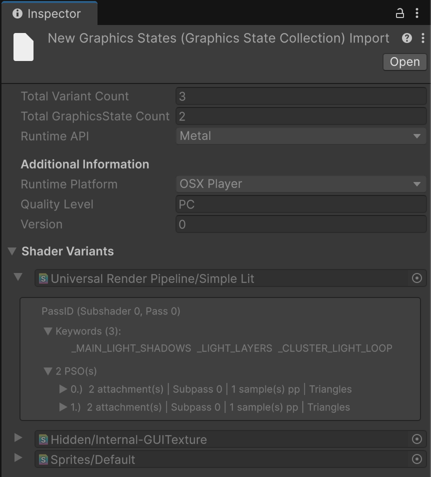
When you select a graphics state collection asset in your project, you can view details about its contents in the Inspector.
The GraphicsStateCollection API also provides several methods that you can use to manage a collection and the shader variants within it. For more information, refer to the GraphicsStateCollection API documentation.
Append missing PSOs to a collection
If you modify the shaders used by your application or scene, the collection might not contain the new PSO data. To check whether a collection contains a specific shader variant, call ContainsVariant.
To trace missing PSOs, you can use the tracing workflow with the same collection to begin and end a trace around a subset of your scene that uses the missing shader variants. Unity appends any new shader variants encountered during tracing to the existing collection data when it’s saved.
You can also enable the traceCacheMisses option when calling a prewarm method to automatically trace any missing PSO data to a separate cacheMissCollection.
To append new PSO data from other collections, call Append on the original collection.