Introduction to the Physics Core 2D API
Note: This documentation is about writing C# scripts using the Unity.U2D.Physics API. To use 2D physics in the Unity Editor using components like the Rigidbody 2D component, refer to 2D physics instead.
The Physics Core 2D API lets you create and control 2D physics objects in C# scripts. The API is based on version 3 of the Box2D physics system.
The API doesn’t interact with or affect the built-in Unity 2D physics components such as Rigidbody 2D and Collider 2D. The two systems are separate.
Requirements
The API works on platforms that support compute shaders.
The API is compatible with the Universal Render Pipeline (URP), the High Definition Render Pipeline (HDRP), and the Built-In Render Pipeline.
About the API
The API has the following advantages over the standard 2D physics components such as Rigidbody 2D and Collider 2D:
- Create physics in your scene with or without using GameObjects. You can create an unlimited number of objects, and create batches of multiple objects.
- Performance is better, because Unity stores data contiguously in memory, and the simulation runs on up to 64 CPU cores simultaneously.
- The system is more deterministic, so you get the same results each time you run the simulation.
- The API supports using 64 layers for collision detection, instead of the standard 32.
- Most APIs are thread-safe, so you can use the job system to run physics code on multiple threads.
- The API returns objects as structs, so you can use them in Unity’s Data-Oriented Technology Stack (DOTS).
The API lets you do the following for example:
- Combine shapes into your own physics shapes, for example a gear with teeth.
- Create multiple, isolated physics worlds in the same scene that run in parallel.
- Run 2D physics in 3D space, for example to create a 2D world that lies flat on the ground.
- Use multiple threads to cast rays that query intersections and overlaps.
There are no built-in components. You create physics objects directly in your scene. However you can use the API to expose sets of properties in the Inspector window of the Unity Editor that act like components. This allows you to configure properties similarly to Rigidbody 2D and Collider 2D components.
Debug drawing
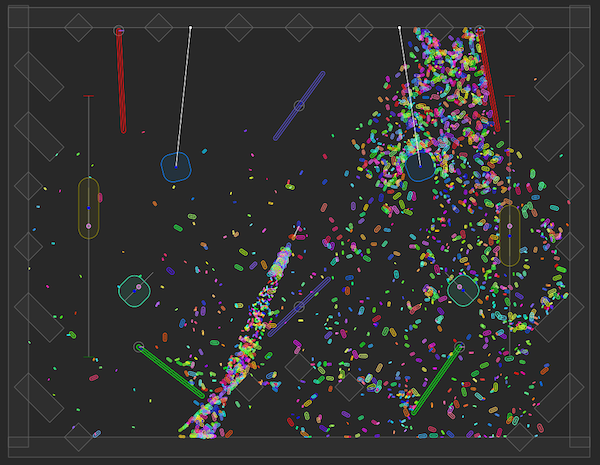
The Physics Core 2D API automatically draws a debug visualization of physics objects in the Scene view, Game view, and in development builds. You can also draw your own debug shapes. For more information, refer to Draw a debug visualization of Physics Core 2D API objects.
Example projects
For example projects that use the Physics Core 2D API, refer to the PhysicsCore2D repository on GitHub.
Additional resources
- PhysicsCore2D repository on GitHub