Declaration
public static void BeginVertical(params GUILayoutOption[] options);Parameters
| Parameter | Description |
|---|---|
| options | An optional list of layout options that specify extra layouting properties. Any values passed in here will override settings defined by the style.GUILayout.MaxHeight, GUILayout.ExpandWidth, GUILayout.ExpandHeight |
Description
Begin a vertical control group.
All controls rendered inside this element will be placed vertically below each other. The group must be closed with a call to EndVertical.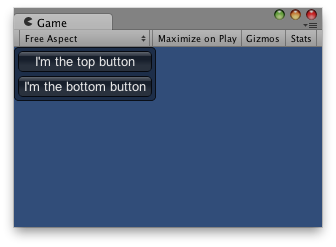
Vertical Layout.
Additional resources: GUILayout.Width, GUILayout.Height, GUILayout.MinWidth, GUILayout.MaxWidth, GUILayout.MinHeight
using UnityEngine;

public class ExampleScript : MonoBehaviour
{
    void OnGUI()
    {
        // Starts a vertical group
        GUILayout.BeginVertical("box");

        GUILayout.Button("I'm the top button");
        GUILayout.Button("I'm the bottom button");

        GUILayout.EndVertical();
    }
}
Parameters
| Parameter | Description |
|---|---|
| style | The style to use for background image and padding values. If left out, the background is transparent. |
| options | An optional list of layout options that specify extra layouting properties. Any values passed in here will override settings defined by the style.GUILayout.MaxHeight, GUILayout.ExpandWidth, GUILayout.ExpandHeight |
Description
Begin a vertical control group.
All controls rendered inside this element will be placed vertically below each other. The group must be closed with a call to EndVertical.
Vertical Layout.
Additional resources: GUILayout.Width, GUILayout.Height, GUILayout.MinWidth, GUILayout.MaxWidth, GUILayout.MinHeight
using UnityEngine;

public class ExampleScript : MonoBehaviour
{
    void OnGUI()
    {
        // Starts a vertical group
        GUILayout.BeginVertical("box");

        GUILayout.Button("I'm the top button");
        GUILayout.Button("I'm the bottom button");

        GUILayout.EndVertical();
    }
}
Declaration
public static void BeginVertical(string text, GUIStyle style, params GUILayoutOption[] options);Parameters
| Parameter | Description |
|---|---|
| text | Text to display on group. |
| style | The style to use for background image and padding values. If left out, the background is transparent. |
| options | An optional list of layout options that specify extra layouting properties. Any values passed in here will override settings defined by the style.GUILayout.MaxHeight, GUILayout.ExpandWidth, GUILayout.ExpandHeight |
Description
Begin a vertical control group.
All controls rendered inside this element will be placed vertically below each other. The group must be closed with a call to EndVertical.
Vertical Layout.
Additional resources: GUILayout.Width, GUILayout.Height, GUILayout.MinWidth, GUILayout.MaxWidth, GUILayout.MinHeight
using UnityEngine;

public class ExampleScript : MonoBehaviour
{
    void OnGUI()
    {
        // Starts a vertical group
        GUILayout.BeginVertical("box");

        GUILayout.Button("I'm the top button");
        GUILayout.Button("I'm the bottom button");

        GUILayout.EndVertical();
    }
}
Parameters
| Parameter | Description |
|---|---|
| image | Texture to display on group. |
| style | The style to use for background image and padding values. If left out, the background is transparent. |
| options | An optional list of layout options that specify extra layouting properties. Any values passed in here will override settings defined by the style.GUILayout.MaxHeight, GUILayout.ExpandWidth, GUILayout.ExpandHeight |
Description
Begin a vertical control group.
All controls rendered inside this element will be placed vertically below each other. The group must be closed with a call to EndVertical.
Vertical Layout.
Additional resources: GUILayout.Width, GUILayout.Height, GUILayout.MinWidth, GUILayout.MaxWidth, GUILayout.MinHeight
using UnityEngine;

public class ExampleScript : MonoBehaviour
{
    void OnGUI()
    {
        // Starts a vertical group
        GUILayout.BeginVertical("box");

        GUILayout.Button("I'm the top button");
        GUILayout.Button("I'm the bottom button");

        GUILayout.EndVertical();
    }
}
Declaration
public static void BeginVertical(GUIContent content, GUIStyle style, params GUILayoutOption[] options);Parameters
| Parameter | Description |
|---|---|
| content | Text, image, and tooltip for this group. |
| style | The style to use for background image and padding values. If left out, the background is transparent. |
| options | An optional list of layout options that specify extra layouting properties. Any values passed in here will override settings defined by the style.GUILayout.MaxHeight, GUILayout.ExpandWidth, GUILayout.ExpandHeight |
Description
Begin a vertical control group.
All controls rendered inside this element will be placed vertically below each other. The group must be closed with a call to EndVertical.
Vertical Layout.
Additional resources: GUILayout.Width, GUILayout.Height, GUILayout.MinWidth, GUILayout.MaxWidth, GUILayout.MinHeight
using UnityEngine;

public class ExampleScript : MonoBehaviour
{
    void OnGUI()
    {
        // Starts a vertical group
        GUILayout.BeginVertical("box");

        GUILayout.Button("I'm the top button");
        GUILayout.Button("I'm the bottom button");

        GUILayout.EndVertical();
    }
}