Parameters
| Parameter | Description |
|---|---|
| image | Texture to display on the button. |
| options | An optional list of layout options that specify extra layouting properties. Any values passed in here will override settings defined by the style.GUILayout.MaxHeight, GUILayout.ExpandWidth, GUILayout.ExpandHeight |
Returns
bool true when the users clicks the button.
Description
Make a single press button.
Create a GUILayout.Button that can be pressed and released as
a normal button. When this GUILayout.Button is released the Button returns the
expected true value. If the mouse is moved off the button it is not clicked.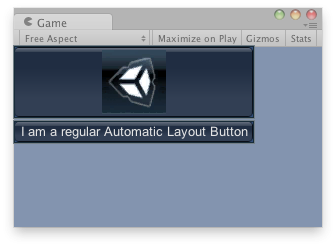
Buttons in the Game View.
Additional resources: GUILayout.Width, GUILayout.Height, GUILayout.MinWidth, GUILayout.MaxWidth, GUILayout.MinHeight
using UnityEngine;

public class ExampleScript : MonoBehaviour
{
    // Draws a button with an image and a button with text
    Texture tex;

    void OnGUI()
    {
        if (!tex)
        {
            Debug.LogError("No texture found, please assign a texture on the inspector");
        }

        if (GUILayout.Button(tex))
        {
            Debug.Log("Clicked the image");
        }
        if (GUILayout.Button("I am a regular Automatic Layout Button"))
        {
            Debug.Log("Clicked Button");
        }
    }
}
Declaration
public static bool Button(string text, params GUILayoutOption[] options);Parameters
| Parameter | Description |
|---|---|
| text | Text to display on the button. |
| options | An optional list of layout options that specify extra layouting properties. Any values passed in here will override settings defined by the style.GUILayout.MaxHeight, GUILayout.ExpandWidth, GUILayout.ExpandHeight |
Returns
bool true when the users clicks the button.
Description
Make a single press button.
Create a GUILayout.Button that can be pressed and released as
a normal button. When this GUILayout.Button is released the Button returns the
expected true value. If the mouse is moved off the button it is not clicked.
Buttons in the Game View.
Additional resources: GUILayout.Width, GUILayout.Height, GUILayout.MinWidth, GUILayout.MaxWidth, GUILayout.MinHeight
using UnityEngine;

public class ExampleScript : MonoBehaviour
{
    // Draws a button with an image and a button with text
    Texture tex;

    void OnGUI()
    {
        if (!tex)
        {
            Debug.LogError("No texture found, please assign a texture on the inspector");
        }

        if (GUILayout.Button(tex))
        {
            Debug.Log("Clicked the image");
        }
        if (GUILayout.Button("I am a regular Automatic Layout Button"))
        {
            Debug.Log("Clicked Button");
        }
    }
}
Parameters
| Parameter | Description |
|---|---|
| content | Text, image and tooltip for this button. |
| options | An optional list of layout options that specify extra layouting properties. Any values passed in here will override settings defined by the style.GUILayout.MaxHeight, GUILayout.ExpandWidth, GUILayout.ExpandHeight |
Returns
bool true when the users clicks the button.
Description
Make a single press button.
Create a GUILayout.Button that can be pressed and released as
a normal button. When this GUILayout.Button is released the Button returns the
expected true value. If the mouse is moved off the button it is not clicked.
Buttons in the Game View.
Additional resources: GUILayout.Width, GUILayout.Height, GUILayout.MinWidth, GUILayout.MaxWidth, GUILayout.MinHeight
using UnityEngine;

public class ExampleScript : MonoBehaviour
{
    // Draws a button with an image and a button with text
    Texture tex;

    void OnGUI()
    {
        if (!tex)
        {
            Debug.LogError("No texture found, please assign a texture on the inspector");
        }

        if (GUILayout.Button(tex))
        {
            Debug.Log("Clicked the image");
        }
        if (GUILayout.Button("I am a regular Automatic Layout Button"))
        {
            Debug.Log("Clicked Button");
        }
    }
}
Parameters
| Parameter | Description |
|---|---|
| image | Texture to display on the button. |
| style | The style to use. If left out, the button style from the current GUISkin is used. |
| options | An optional list of layout options that specify extra layouting properties. Any values passed in here will override settings defined by the style.GUILayout.MaxHeight, GUILayout.ExpandWidth, GUILayout.ExpandHeight |
Returns
bool true when the users clicks the button.
Description
Make a single press button.
Create a GUILayout.Button that can be pressed and released as
a normal button. When this GUILayout.Button is released the Button returns the
expected true value. If the mouse is moved off the button it is not clicked.
Buttons in the Game View.
Additional resources: GUILayout.Width, GUILayout.Height, GUILayout.MinWidth, GUILayout.MaxWidth, GUILayout.MinHeight
using UnityEngine;

public class ExampleScript : MonoBehaviour
{
    // Draws a button with an image and a button with text
    Texture tex;

    void OnGUI()
    {
        if (!tex)
        {
            Debug.LogError("No texture found, please assign a texture on the inspector");
        }

        if (GUILayout.Button(tex))
        {
            Debug.Log("Clicked the image");
        }
        if (GUILayout.Button("I am a regular Automatic Layout Button"))
        {
            Debug.Log("Clicked Button");
        }
    }
}
Declaration
public static bool Button(string text, GUIStyle style, params GUILayoutOption[] options);Parameters
| Parameter | Description |
|---|---|
| text | Text to display on the button. |
| style | The style to use. If left out, the button style from the current GUISkin is used. |
| options | An optional list of layout options that specify extra layouting properties. Any values passed in here will override settings defined by the style.GUILayout.MaxHeight, GUILayout.ExpandWidth, GUILayout.ExpandHeight |
Returns
bool true when the users clicks the button.
Description
Make a single press button.
Create a GUILayout.Button that can be pressed and released as
a normal button. When this GUILayout.Button is released the Button returns the
expected true value. If the mouse is moved off the button it is not clicked.
Buttons in the Game View.
Additional resources: GUILayout.Width, GUILayout.Height, GUILayout.MinWidth, GUILayout.MaxWidth, GUILayout.MinHeight
using UnityEngine;

public class ExampleScript : MonoBehaviour
{
    // Draws a button with an image and a button with text
    Texture tex;

    void OnGUI()
    {
        if (!tex)
        {
            Debug.LogError("No texture found, please assign a texture on the inspector");
        }

        if (GUILayout.Button(tex))
        {
            Debug.Log("Clicked the image");
        }
        if (GUILayout.Button("I am a regular Automatic Layout Button"))
        {
            Debug.Log("Clicked Button");
        }
    }
}
Declaration
public static bool Button(GUIContent content, GUIStyle style, params GUILayoutOption[] options);Parameters
| Parameter | Description |
|---|---|
| content | Text, image and tooltip for this button. |
| style | The style to use. If left out, the button style from the current GUISkin is used. |
| options | An optional list of layout options that specify extra layouting properties. Any values passed in here will override settings defined by the style.GUILayout.MaxHeight, GUILayout.ExpandWidth, GUILayout.ExpandHeight |
Returns
bool true when the users clicks the button.
Description
Make a single press button.
Create a GUILayout.Button that can be pressed and released as
a normal button. When this GUILayout.Button is released the Button returns the
expected true value. If the mouse is moved off the button it is not clicked.
Buttons in the Game View.
Additional resources: GUILayout.Width, GUILayout.Height, GUILayout.MinWidth, GUILayout.MaxWidth, GUILayout.MinHeight
using UnityEngine;

public class ExampleScript : MonoBehaviour
{
    // Draws a button with an image and a button with text
    Texture tex;

    void OnGUI()
    {
        if (!tex)
        {
            Debug.LogError("No texture found, please assign a texture on the inspector");
        }

        if (GUILayout.Button(tex))
        {
            Debug.Log("Clicked the image");
        }
        if (GUILayout.Button("I am a regular Automatic Layout Button"))
        {
            Debug.Log("Clicked Button");
        }
    }
}