Description
Begin a GUILayout block of GUI controls in a fixed screen area.
By default, any GUI controls made using GUILayout are placed in the top-left corner of the screen.
If you want to place a series of automatically laid out controls in an arbitrary area, use GUILayout.BeginArea to define a new area for the automatic layouting system to use.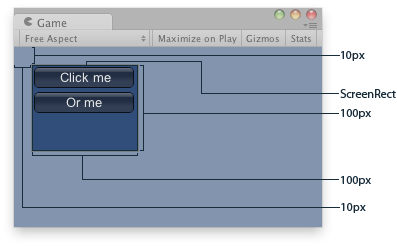
Explained Area of the example.
This function is very useful when mixing GUILayout code. It must be matched with a call to EndArea. BeginArea / EndArea cannot be nested.
Additional resources: GUILayout.EndArea
using UnityEngine;

public class ExampleScript : MonoBehaviour
{
    void OnGUI()
    {
        // Starts an area to draw elements
        GUILayout.BeginArea(new Rect(10, 10, 100, 100));
        GUILayout.Button("Click me");
        GUILayout.Button("Or me");
        GUILayout.EndArea();
    }
}
Parameters
| Parameter | Description |
|---|---|
| text | Optional text to display in the area. |
Description
Begin a GUILayout block of GUI controls in a fixed screen area.
By default, any GUI controls made using GUILayout are placed in the top-left corner of the screen.
If you want to place a series of automatically laid out controls in an arbitrary area, use GUILayout.BeginArea to define a new area for the automatic layouting system to use.
Explained Area of the example.
This function is very useful when mixing GUILayout code. It must be matched with a call to EndArea. BeginArea / EndArea cannot be nested.
Additional resources: GUILayout.EndArea
using UnityEngine;

public class ExampleScript : MonoBehaviour
{
    void OnGUI()
    {
        // Starts an area to draw elements
        GUILayout.BeginArea(new Rect(10, 10, 100, 100));
        GUILayout.Button("Click me");
        GUILayout.Button("Or me");
        GUILayout.EndArea();
    }
}
Parameters
| Parameter | Description |
|---|---|
| image | Optional texture to display in the area. |
Description
Begin a GUILayout block of GUI controls in a fixed screen area.
By default, any GUI controls made using GUILayout are placed in the top-left corner of the screen.
If you want to place a series of automatically laid out controls in an arbitrary area, use GUILayout.BeginArea to define a new area for the automatic layouting system to use.
Explained Area of the example.
This function is very useful when mixing GUILayout code. It must be matched with a call to EndArea. BeginArea / EndArea cannot be nested.
Additional resources: GUILayout.EndArea
using UnityEngine;

public class ExampleScript : MonoBehaviour
{
    void OnGUI()
    {
        // Starts an area to draw elements
        GUILayout.BeginArea(new Rect(10, 10, 100, 100));
        GUILayout.Button("Click me");
        GUILayout.Button("Or me");
        GUILayout.EndArea();
    }
}
Parameters
| Parameter | Description |
|---|---|
| content | Optional text, image and tooltip top display for this area. |
Description
Begin a GUILayout block of GUI controls in a fixed screen area.
By default, any GUI controls made using GUILayout are placed in the top-left corner of the screen.
If you want to place a series of automatically laid out controls in an arbitrary area, use GUILayout.BeginArea to define a new area for the automatic layouting system to use.
Explained Area of the example.
This function is very useful when mixing GUILayout code. It must be matched with a call to EndArea. BeginArea / EndArea cannot be nested.
Additional resources: GUILayout.EndArea
using UnityEngine;

public class ExampleScript : MonoBehaviour
{
    void OnGUI()
    {
        // Starts an area to draw elements
        GUILayout.BeginArea(new Rect(10, 10, 100, 100));
        GUILayout.Button("Click me");
        GUILayout.Button("Or me");
        GUILayout.EndArea();
    }
}
Parameters
| Parameter | Description |
|---|---|
| style | The style to use. If left out, the empty GUIStyle (GUIStyle.none) is used, giving a transparent background. |
Description
Begin a GUILayout block of GUI controls in a fixed screen area.
By default, any GUI controls made using GUILayout are placed in the top-left corner of the screen.
If you want to place a series of automatically laid out controls in an arbitrary area, use GUILayout.BeginArea to define a new area for the automatic layouting system to use.
Explained Area of the example.
This function is very useful when mixing GUILayout code. It must be matched with a call to EndArea. BeginArea / EndArea cannot be nested.
Additional resources: GUILayout.EndArea
using UnityEngine;

public class ExampleScript : MonoBehaviour
{
    void OnGUI()
    {
        // Starts an area to draw elements
        GUILayout.BeginArea(new Rect(10, 10, 100, 100));
        GUILayout.Button("Click me");
        GUILayout.Button("Or me");
        GUILayout.EndArea();
    }
}
Parameters
| Parameter | Description |
|---|---|
| text | Optional text to display in the area. |
| style | The style to use. If left out, the empty GUIStyle (GUIStyle.none) is used, giving a transparent background. |
Description
Begin a GUILayout block of GUI controls in a fixed screen area.
By default, any GUI controls made using GUILayout are placed in the top-left corner of the screen.
If you want to place a series of automatically laid out controls in an arbitrary area, use GUILayout.BeginArea to define a new area for the automatic layouting system to use.
Explained Area of the example.
This function is very useful when mixing GUILayout code. It must be matched with a call to EndArea. BeginArea / EndArea cannot be nested.
Additional resources: GUILayout.EndArea
using UnityEngine;

public class ExampleScript : MonoBehaviour
{
    void OnGUI()
    {
        // Starts an area to draw elements
        GUILayout.BeginArea(new Rect(10, 10, 100, 100));
        GUILayout.Button("Click me");
        GUILayout.Button("Or me");
        GUILayout.EndArea();
    }
}
Parameters
| Parameter | Description |
|---|---|
| image | Optional texture to display in the area. |
| style | The style to use. If left out, the empty GUIStyle (GUIStyle.none) is used, giving a transparent background. |
Description
Begin a GUILayout block of GUI controls in a fixed screen area.
By default, any GUI controls made using GUILayout are placed in the top-left corner of the screen.
If you want to place a series of automatically laid out controls in an arbitrary area, use GUILayout.BeginArea to define a new area for the automatic layouting system to use.
Explained Area of the example.
This function is very useful when mixing GUILayout code. It must be matched with a call to EndArea. BeginArea / EndArea cannot be nested.
Additional resources: GUILayout.EndArea
using UnityEngine;

public class ExampleScript : MonoBehaviour
{
    void OnGUI()
    {
        // Starts an area to draw elements
        GUILayout.BeginArea(new Rect(10, 10, 100, 100));
        GUILayout.Button("Click me");
        GUILayout.Button("Or me");
        GUILayout.EndArea();
    }
}
Parameters
| Parameter | Description |
|---|---|
| content | Optional text, image and tooltip top display for this area. |
| style | The style to use. If left out, the empty GUIStyle (GUIStyle.none) is used, giving a transparent background. |
Description
Begin a GUILayout block of GUI controls in a fixed screen area.
By default, any GUI controls made using GUILayout are placed in the top-left corner of the screen.
If you want to place a series of automatically laid out controls in an arbitrary area, use GUILayout.BeginArea to define a new area for the automatic layouting system to use.
Explained Area of the example.
This function is very useful when mixing GUILayout code. It must be matched with a call to EndArea. BeginArea / EndArea cannot be nested.
Additional resources: GUILayout.EndArea
using UnityEngine;

public class ExampleScript : MonoBehaviour
{
    void OnGUI()
    {
        // Starts an area to draw elements
        GUILayout.BeginArea(new Rect(10, 10, 100, 100));
        GUILayout.Button("Click me");
        GUILayout.Button("Or me");
        GUILayout.EndArea();
    }
}