Use audio filters
You can modify the output of Audio SourceA component which plays back an Audio Clip in the scene to an audio listener or through an audio mixer. More info
See in Glossary and Audio ListenerA component that acts like a microphone, receiving sound from Audio Sources in the scene and outputting to the computer speakers. More info
See in Glossary components by applying Audio EffectsAny effect that can modify the output of Audio Mixer components, such as filtering frequency ranges of a sound or applying reverb. More info
See in Glossary. These can filter the frequency ranges of the sound or apply reverb and other effects.
The effects are applied by adding effect components to the object with the Audio Source or Audio Listener. The ordering of the components is important, since it reflects the order in which the effects will be applied to the source audio. For example, in the image below, an Audio Listener is modified first by an Audio Low Pass Filter and then an Audio Chorus Filter.
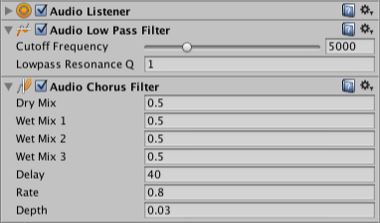
To change the ordering of these and any other components, open a context menu in the inspector and select the Move Up or Move Down commands. Enabling or disabling an effect component determines whether it will be applied or not.
Though highly optimized, some filters are still CPU intensive. Audio CPU usage can monitored in the profilerA window that helps you to optimize your game. It shows how much time is spent in the various areas of your game. For example, it can report the percentage of time spent rendering, animating, or in your game logic. More info
See in Glossary under the Audio Tab.
See the other pages in this section for further information about the specific filter types available.
AudioEffect