Vertex modifier Surface Shader example in the Built-In Render Pipeline
Important: The Built-In Render Pipeline is deprecated and will be made obsolete in a future release.
It remains supported, including bug fixes and maintenance, through the full Unity 6.7 LTS lifecycle.
The Universal Render Pipeline (URP) doesn’t support surface shaders. For more information on how to replace surface shaders in URP, refer to Convert custom shaders for URP compatibility.
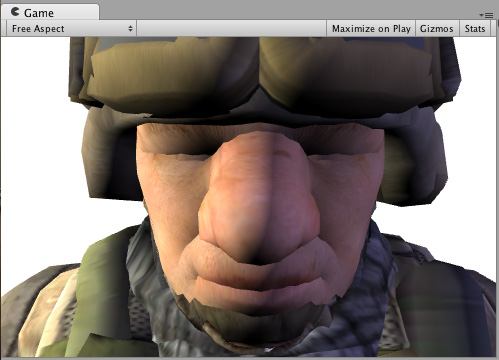
It is possible to use a “vertex modifier” function that will modify the incoming vertex data in the vertex Shader. This can be used for things like procedural animation and extrusion along normals. Surface Shader compilation directive vertex:functionName is used for that, with a function that takes inout appdata_full parameter.
Here’s a Shader that moves vertices along their normals by the amount specified in the Material:
  Shader "Example/Normal Extrusion" {
    Properties {
      _MainTex ("Texture", 2D) = "white" {}
      _Amount ("Extrusion Amount", Range(-1,1)) = 0.5
    }
    SubShader {
      Tags { "RenderType" = "Opaque" }
      CGPROGRAM
      #pragma surface surf Lambert vertex:vert
      struct Input {
          float2 uv_MainTex;
      };
      float _Amount;
      void vert (inout appdata_full v) {
          v.vertex.xyz += v.normal * _Amount;
      }
      sampler2D _MainTex;
      void surf (Input IN, inout SurfaceOutput o) {
          o.Albedo = tex2D (_MainTex, IN.uv_MainTex).rgb;
      }
      ENDCG
    }
    Fallback "Diffuse"
  }