Nest prefab instances in other prefabs
You can include prefab instances inside other prefabs. Prefab instances included in other prefabs are called nested prefabs. Nested prefabs keep their links to their own prefab assets, while also forming part of another prefab asset.
You can add nested prefabs in prefab editing mode, or from the Hierarchy view.
Add a nested prefab in prefab editing mode
- Select the prefab you want to edit, and open prefab editing mode.
- Drag another prefab into the Hierarchy or Scene view. You can also add any overrides to these prefab instances.
Add a nested prefab from the Hierarchy
You can add a prefab instance as a child of another prefab in the Hierarchy view.
- In the Hierarchy, select the dropdown arrow next to the prefab you want to edit.
- Drag a prefab from the Project window into the prefab’s hierarchy.
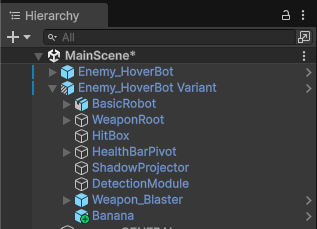
The nested prefab is applied as an override to the parent prefab asset, indicated by a green plus icon. You can optionally apply these override changes permanently to the parent prefab asset. For more information, refer to Apply overrides to the prefab asset.