Renderer Shader User Value sample
Use the Renderer Shader User Value sample in your URP or HDRP project to experience the implementation and effects of the RSUV feature through different preset scenes.
Import the sample
- Create or use a project based on URP or HDRP.
- Open the Package Manager window.
- In the package list, find and select the package corresponding to your current render pipeline (Universal or High Definition).
- Select the Samples tab.
- Find Renderer Shader User Value Sample and select Import.
Sample contents
The sample includes two scenes and some helpers to streamline the process of packing/unpacking data with RSUV.
| File | Description | Path |
|---|---|---|
Agora.unity and LookDev.unity
|
Each scene contains a Sample Description GameObject explaining in detail how it works and how to set it up properly. See the scene details in the next sections. | Assets/Samples/<your render pipeline>/<version>/Renderer Shader User Value Samples/Scenes |
HelpersRSUV.cs |
Contains C# functions to help pack data into a uint. (CPU side). | Assets/Samples/Scriptable Render Pipeline Core/<version>/RendererShaderUserValue_Common/Scripts |
HelpersRSUV.hlsl |
Contains HLSL functions to decode data directly in a shader graph Custom Function node. | Assets/Samples/Scriptable Render Pipeline Core/<version>/RendererShaderUserValue_Common/Scripts/CustomFunctions |
LookDev scene
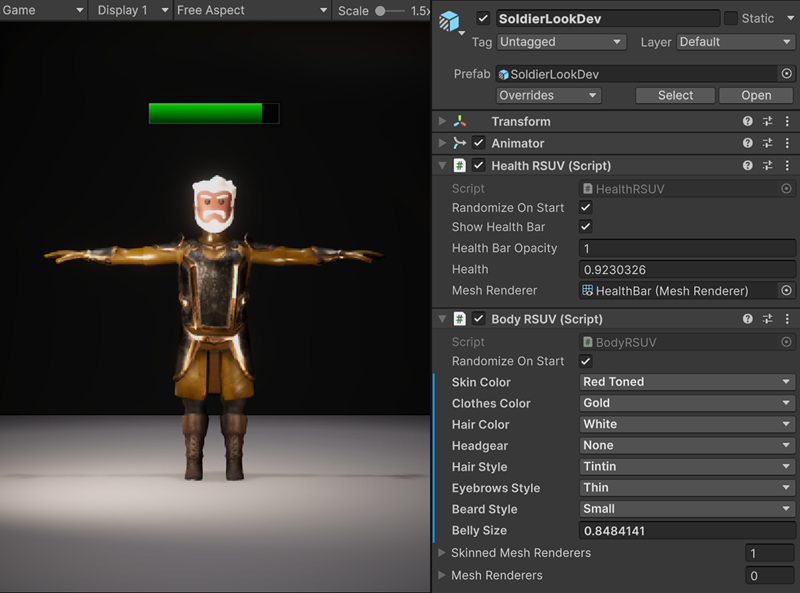
This scene features an animated soldier with one simple idle animation and two components dedicated to pass data to the skinned mesh renderer. Those components use the RSUV feature and allow you to customize the rendering of the soldier through different techniques:
The Health RSUV component uses a simple quad outside the soldier geometry. The health value and bar opacity are passed with RSUV. The health of the character is renderered in the shader by manipulating UVs and sampling a gradient.
- The Body RSUV component allows to customize the material with different methods, for example:
- Color palette sampling based on UVoffset.
- Showing/hiding vertices based on vertex colors (set in DCC software like blender).
- Inflating vertices from a central point to change the belly size.
Agora scene
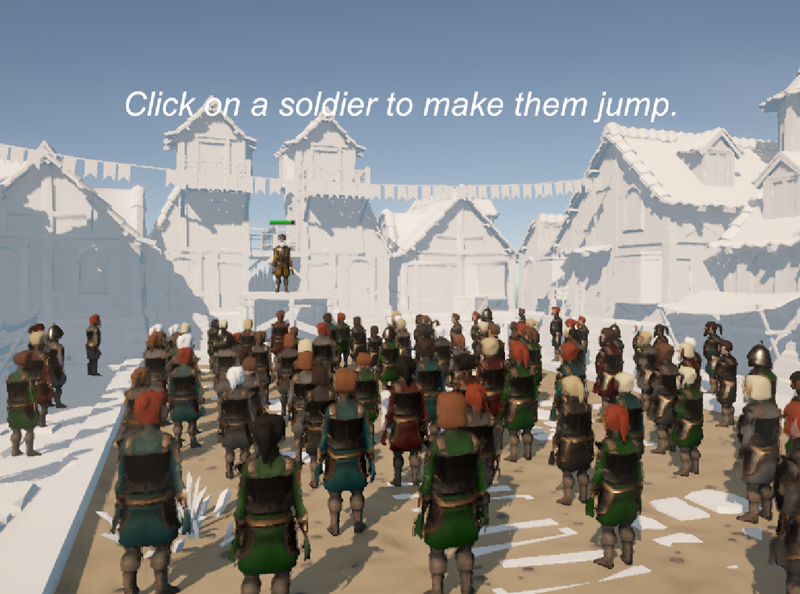
This scene includes 100 instances of the soldier from the LookDev scene.
- The soldiers have randomized material feature on start, so they always look more or less different.
- When you click on a soldier in Play mode, you make them jump, which is also done with RSUV.
- The scene leverages GPU Resident Drawer (GRD), which allows the SRP Batcher to handle the hundred drawcalls in one batch without breaking.
In this scene, the soldier uses a simple MeshRenderer and a Vertex Animation 2D Texture Array instead of the animator and SkinnedMeshRenderer combo because GRD is not compatible with animators and skinned meshes. Having multiple instances of them would break the batching, even with RSUV.
This version of the soldier with Mesh Renderer and Vertex Animation Texture (VAT) uses only one draw call per material (so only 4 draw calls for the whole scene) and is suitable to render crowds, for example. For that to work, make sure GRD is properly set up.
Also, the VAT is a texture array and not a single texture, which allows to change the animation index to target another texture in the texture array. Here, one texture is for the idle animation, and another one is for the jump animation.