Version: Unity 6.0 (6000.0)
Language : English
Tilemaps
Create a tile palette

Introduction to tilemaps
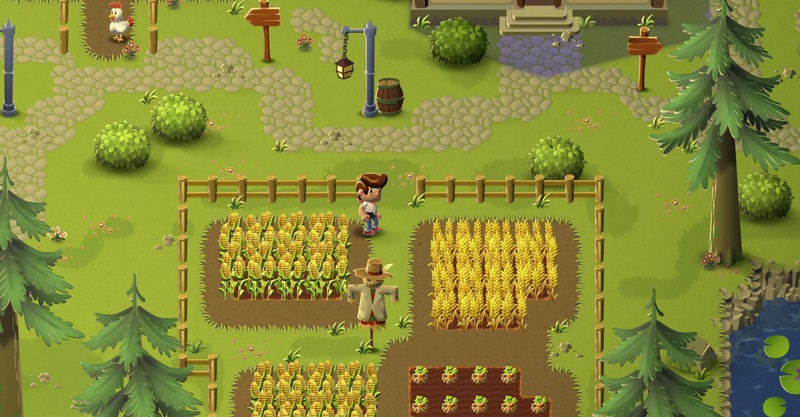
An example of a 2D farming game that uses rectangular tilemap. The environment is laid out on a rectangular grid.

Build the game world and levels of your 2D project by painting tiles onto the sceneA Scene contains the environments and menus of your game. Think of each unique Scene file as a unique level. In each Scene, you place your environments, obstacles, and decorations, essentially designing and building your game in pieces. More info
See in Glossary
.

Note: To use tilemaps, make sure the 2D TilemapA GameObject that allows you to quickly create 2D levels using tiles and a grid overlay. More info
See in Glossary
Editor package is installed in your project. For more information, refer to set up your project for 2D games.

To paint with tiles, follow these steps:

  1. Create a tile palette, which is a collection of tile assets you paint with. Tile assets are rectangular, isometric, or hexagonal spritesA 2D graphic objects. If you are used to working in 3D, Sprites are essentially just standard textures but there are special techniques for combining and managing sprite textures for efficiency and convenience during development. More info
    See in Glossary
    .
  2. Create a tilemap, which is the area you paint the tiles onto, then paint your tiles. For more information, refer to Paint tiles into the scene.

Render Pipeline Compatibility

Tilemaps are supported by all render pipelinesA series of operations that take the contents of a Scene, and displays them on a screen. Unity lets you choose from pre-built render pipelines, or write your own. More info
See in Glossary
that support 2D projects.

Types of tilemap

Unity supports the tilemaps with the following tile layouts:

  • Rectangular. This is the default.
  • Hexagonal. This type of tilemap is often used for strategy games. You can align the hexagons so they have a point at the top, or a flat edge at the top.
  • Isometric. This type of tilemap uses a 2D grid to create the illusion of 3D height and depth.
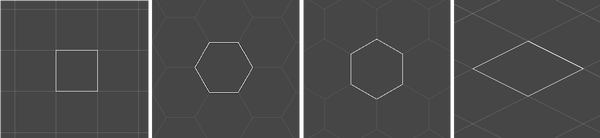
A rectangular tilemap, a flat top hexagonal tilemap, a point top hexagonal tilemap, and an isometric tilemap

Additional resources

Tilemaps
Create a tile palette