OpenXR Hand Subsystem Manager component
The OpenXRHandSubsystemManager component manages the lifecycle of the XRHandSubsystem and its updater, which are created by the OpenXR Hand Tracking feature. Use this component to control when the hand subsystem starts and stops.
Overview
By default, the OpenXR Hand Tracking feature automatically creates and starts the hand subsystem when the OpenXR session begins. The OpenXRHandSubsystemManager component serves two purposes:
- Start and stop control: Ties the subsystem lifecycle to the component's enabled state. Enabling the component starts the subsystem; disabling it stops the subsystem.
- Deferred creation: When the Auto Start Subsystem setting on the Hand Tracking Subsystem feature is unchecked, the subsystem is not created at startup. You can then use this component to create and start the subsystem at a later time, for example, after the user grants a required permission. Refer to Deferred initialization section for details.
Setup
Add the OpenXRHandSubsystemManager component to a GameObject in your scene.
Tip
The HandVisualizer sample includes a Hand Debug Visualizer prefab that already has the OpenXRHandSubsystemManager component attached. You can use this prefab as a starting point.
Deferred initialization
To defer hand tracking until a condition is met (such as a user granting permission):
- Open Project Settings > XR Plug-in Management > OpenXR.
- Click the gear icon next to Hand Tracking Subsystem and uncheck Auto Start Subsystem.
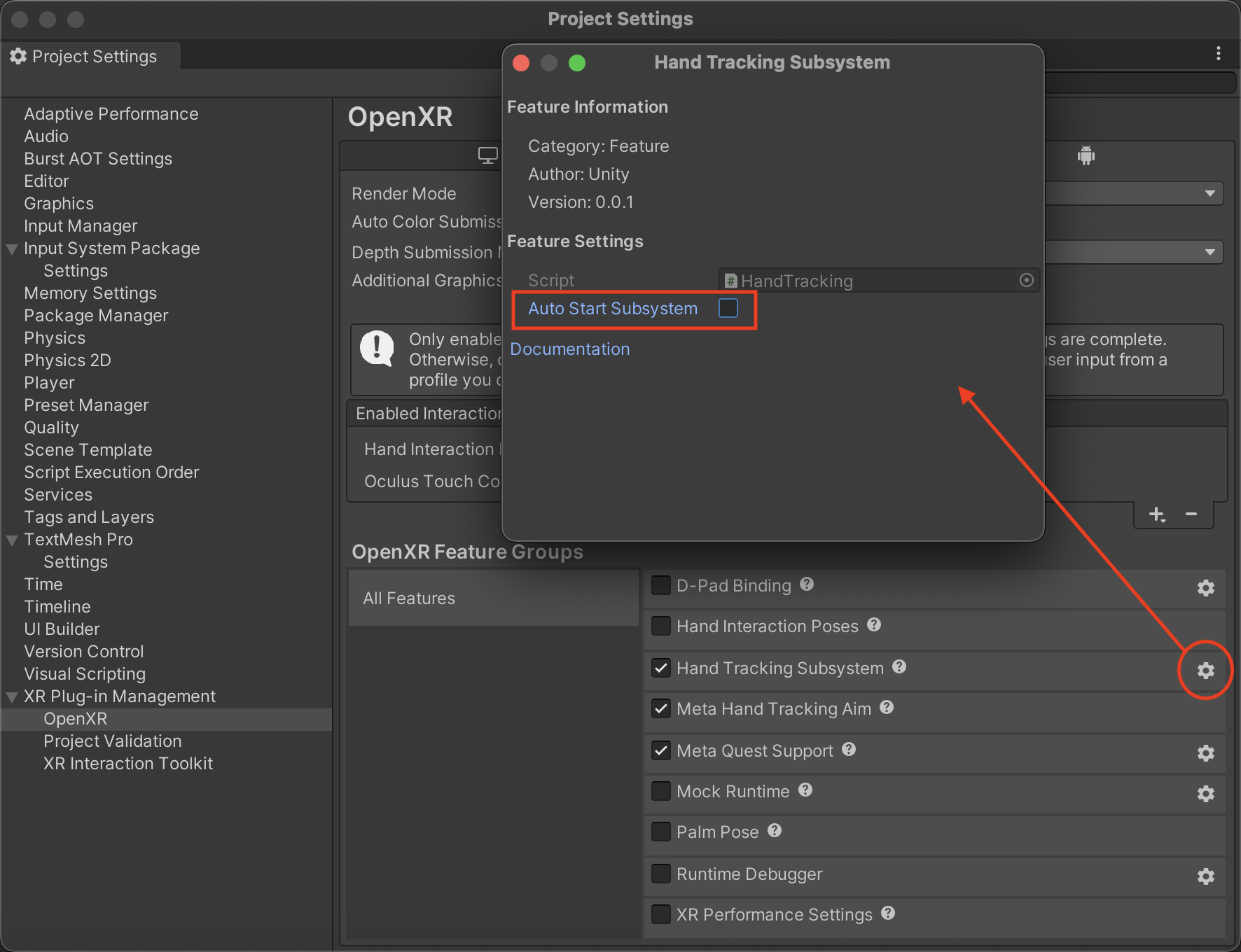
Configure OpenXR Hand Tracking feature to disable Auto Start Subsystem - Add an
OpenXRHandSubsystemManagercomponent to your scene. Because the subsystem is not created at startup, the component begins in a disabled state. - In your code, enable the component when you are ready to start hand tracking:
// After permission is granted or your setup condition is met:
handSubsystemManager.enabled = true;
Toggle hand tracking at runtime
You can toggle hand tracking on and off at any time by enabling and disabling the component:
#if UNITY_OPENXR_PACKAGE

using UnityEngine;
using UnityEngine.XR.Hands.OpenXR;

/// <summary>
/// A sample demonstrating how to use the <see cref="OpenXRHandSubsystemManager"/>
/// to start and stop hand tracking based on platform-specific permission requests.
/// </summary>
public class SubsystemManagerSample : MonoBehaviour
{
    [SerializeField]
    OpenXRHandSubsystemManager handSubsystemManager;

    void Awake()
    {
        if (handSubsystemManager == null)
        {
            handSubsystemManager =
                FindAnyObjectByType<OpenXRHandSubsystemManager>();
        }
    }

    void Start()
    {
        // Make some platform-specific permission requests
    }

    /// <summary>
    /// Called when permission for hand tracking is granted.
    /// </summary>
    public void OnPermissionGranted()
    {
        // Start hand tracking
        handSubsystemManager.enabled = true;
    }

    /// <summary>
    /// Called when permission for hand tracking is denied.
    /// </summary>
    public void OnPermissionDenied()
    {
        // Stop hand tracking
        handSubsystemManager.enabled = false;
    }
}
#endif // UNITY_OPENXR_PACKAGE