Set default inputs for a Sub Graph
To set the default inputs for a Sub Graph, use one of the following approaches:
- For uniform defaults, for example a color or single coordinate, set the default value in the Graph Inspector window.
- For varying defaults, for example a full set of texture coordinates, use a Branch On Input Connection node.
Set uniform defaults
After you add an input to a Sub Graph, follow these steps:
- In the Sub Graph, select the property in the Blackboard window.
- In the Graph Inspector window, select Node Settings, then set Default Value.
When you add the Sub Graph to a parent Shader Graph, the input port of the Sub Graph node uses the default value if the port isn't connected.
Set varying defaults
Note
You can't use the Branch On Input Connection node with a Streaming Virtual Texture property. For more information, refer to Using Streaming Virtual Texturing in Shader Graph.
After you add an input to a Sub Graph, follow these steps:
- In the Sub Graph, select the property in the Blackboard window.
- In the Graph Inspector window, select Node Settings, then enable Use Custom Binding.
- Enter a name in the Label field. This label appears on the input in the parent shader graph.
- Right-click in the Sub Graph workspace to open the context menu, then select Create Node > Utility > Logic > Branch On Input Connection to add a Branch On Input Connection node.
- Connect the property to the Input port of the Branch On Input Connection node. The node now outputs different values depending on whether the parent shader graph connects a node to the input.
- Connect the property to the Connected port. If the parent shader graph connects a node to the input, the Branch On Input Connection node uses that value.
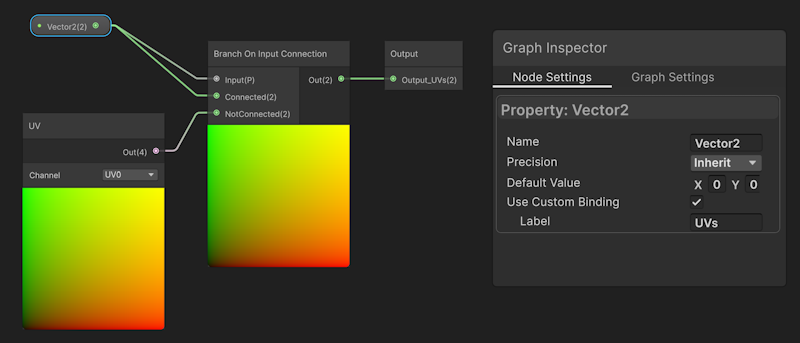
- Connect another node to the NotConnected port, for example a UV node. If the parent Shader Graph doesn't connect a node to the input, the Branch On Input Connection node uses this as the default input.
- Connect the output of the Branch On Input Connection node to the rest of your sub graph.
Note
The preview in the Branch On Input Connection node always uses the NotConnected value.
Example
The following sub graph inputs the default UV0 coordinates of the mesh if the parent Shader Graph doesn't connect a node to the input.