System Inspector reference
When you select a system in the Systems window, the Systems Inspector on the right side of the window displays its information in three tabs:
- Queries: Displays the queries that the selected system runs, and the list of components related to each query, along with the system's access rights (Read or Read & Write).
- Relationships: Displays the entities that the system matches, plus any scheduling constraints that the system has.
- Dependencies: Displays the components that the system depends on for reading and writing.
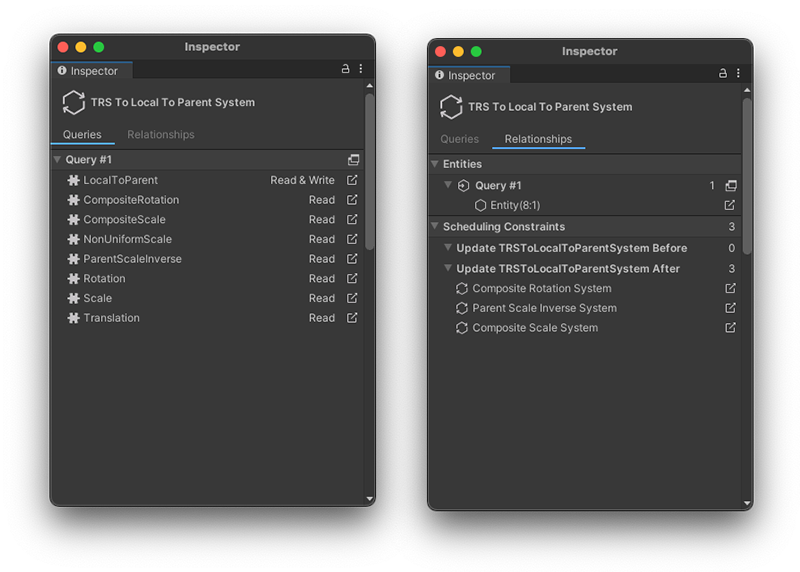
Systems Inspector: Queries (left), Relationships (middle), Dependencies (right)
Queries tab
The Queries tab displays the queries that the selected system runs, plus their components. This view also displays the system's access rights to the components (Read or Read & Write). Click on the icon to the right of a component name ( ), to change the selection to that component. Unity also opens the Component Inspector where possible.
Relationships tab
The Relationships tab has two sections:
- Entities: Lists the entities that the system matches, ordered by query. If there are a lot of entities to display, a Show All button is available. When you select Show All, Unity displays a list of the matching entities in a Query window.
- Scheduling Constraints: Lists the systems that are affected by any C# attributes that you’ve added to constrain the system. The selected system updates before the systems in the Before grouping, and after the systems listed in the After grouping
Dependencies tab
The Dependencies tab displays the component types that the selected system declares as job dependencies. It has two sections:
- Read Dependencies: Lists the components that the system registers a read dependency on. These are components the system's jobs read from.
- Write Dependencies: Lists the components that the system registers a read-write dependency on. These are components the system's jobs write to.