Observer abort in Behavior
Observer abort monitors the assigned conditions during running and interrupts behaviors when those conditions become true.
When an observer triggers, the following sequence occurs:
- Observer triggers and interrupts its abort target.
- Parent composite restarts (
OnEnd()>OnStart()). - Composite re-evaluates from child 0.
- Parent composite remains running; status doesn't propagate upward.
Local restart in TryInOrder (example)
In this scenario, EnemyInRange becomes true when the agent patrols:
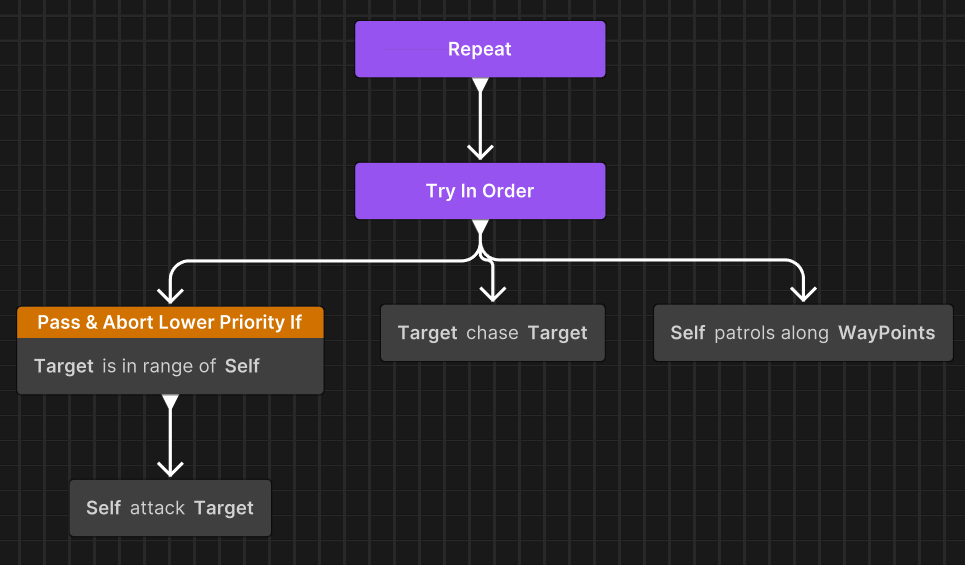
- Patrol is interrupted immediately.
- TryInOrder ends and restarts (OnEnd -> OnStart).
- TryInOrder re-evaluates from child 0 (ConditionalGuard).
- As the condition is now true, Attack begins to run.
- The Repeat node doesn't restart. It observes that TryInOrder is still running.
Notes:
- Conditions are evaluated once per graph tick as long as the parent composite is active.
- The evaluation happens before any node
OnUpdateis called. - When an observer condition is met during evaluation, the parent composite:
- Ends immediately.
- Recursively ends all its running child nodes (calling all running node
OnEnd). - Restarts in the same frame.
- The parent calls
OnEnd,OnStart, andOnUpdatein that order.
Observer scope and hierarchy limitations
Observers affect only the siblings of their immediate parent composite. They don't affect:
- Nodes in ancestor composites.
- Nodes in sibling composites at the same hierarchy level.
- Nodes in child composites.
This means an observer can interrupt only branches that share the same parent composite.
Frame-based condition evaluation
Observer conditions are evaluated once per graph tick (typically once per frame), not continuously during task execution. However, if multiple tasks complete within a single frame, observer conditions aren't re-evaluated between those completions. This can delay interruption by one frame.
Mitigation strategies
Use one or more of the following to ensure timely interruption:
- Use a
WaitFramenode for scenarios that must wait and check condition. - Use
Status.Runningfor actions that must check conditions frequently and allow the graph to tick multiple times. - Avoid chaining many instant-complete tasks when observers need rapid response.
ConditionalGuard execution modes
ConditionalGuard nodes support two running modes that determine whether observer behavior is available: Action and Modifier.
In the Action mode, the node performs a simple inline condition check. No observer behavior is supported.
In the Modifier mode, the node wraps a child node and provides full observer functionality.
When a ConditionalGuard node is placed as a direct child of Sequence or TryInOrder, it automatically switches to Modifier mode to enable observer behavior.
Important
Currently, no manual override is available for this behavior. The system determines the running mode based entirely on the node’s placement in the graph.
Available observer nodes
Unity Behavior provides several nodes with observer capabilities.
| Node | Purpose |
|---|---|
| Priority Abort | Priority abort node dedicated for priority-based interruption. |
| Conditional Guard (Modifier) | Conditional check with observer support. |
| Repeat While | Repeat while condition is true with observer support. |
| Conditional Branch | Branch on condition with observer support. |
Note
The observer feature is only available when using a Sequence or TryInOrder composite as parent.
Observer types
Unity Behavior provides four observer types that determine how and when a node interrupts its own running or lower-priority branches.
None
The None abort type provides no observer behavior. It's the default behavior for Condition Guard/Branch and Repeat While nodes.
- Condition is evaluated only when entering the node.
- The conditions aren't evaluated at the beginning of graph tick for observer abort purposes.
- Can't interrupt lower-priority branches.
Self
The Self observer type monitors conditions while this branch is running. It's useful for maintaining validity of ongoing operations or ensuring prerequisites remain met during execution.
- Monitors conditions while this branch is running.
- Aborts if condition is no longer satisfied..
- Doesn't trigger if the branch isn't currently running.
Example with ConditionalGuard
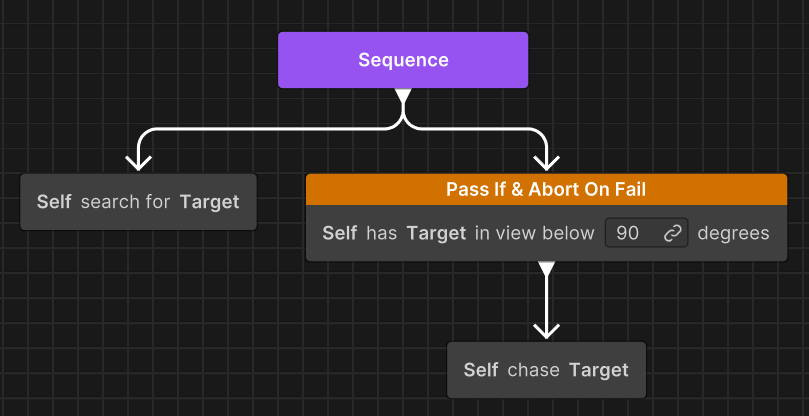
The artificial intelligence (AI) chases a target while maintaining line of sight. The guard continuously checks Can See Target during the chase. If the target breaks line of sight (condition becomes invalid), the guard aborts the chase and the Sequence restarts. This allows the AI to transition to a search behavior.
Lower Priority
The Lower Priority observer type enables priority-based interruption. It's useful in priority-based behaviors where high-priority actions must interrupt low-priority ones.
- Monitors conditions while lower-priority siblings are running.
- Aborts them if condition becomes satisfied.
- The parent composite re-evaluates from the beginning, allowing higher-priority branches to execute.
- Doesn't trigger if this node's own branch is currently running.
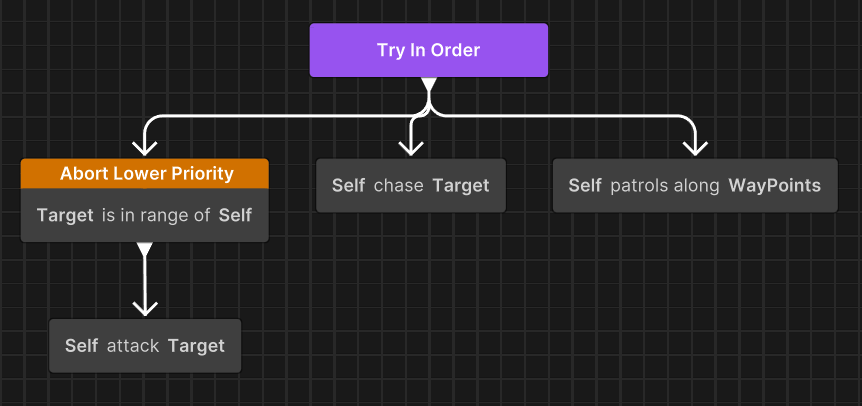
The Lower Priority observer type shows the following behavior:
- While
Patrolis running, ifEnemyInRangebecomes true -> Patrol interrupted ->TryInOrderrestarts -> Attack runs. - While
Chaseis running, ifEnemyInRangebecomes true -> Chase interrupted ->TryInOrderrestarts -> Attack runs. - Monitors conditions as long as
TryInOrderis running andAttackEnemy's branch is not running.
Both
The Both observer type combines Self and Lower Priority monitoring, providing bidirectional reactivity. It's useful for behaviors that need to both maintain their own validity while running and interrupt lower-priority tasks when opportunities arise.
- Monitors conditions as long as the parent Composite is running.
- Aborts own execution when conditions become invalid (Self behavior).
- Aborts lower-priority siblings when conditions become satisfied (Lower Priority behavior).
- The parent composite re-evaluates from the beginning.
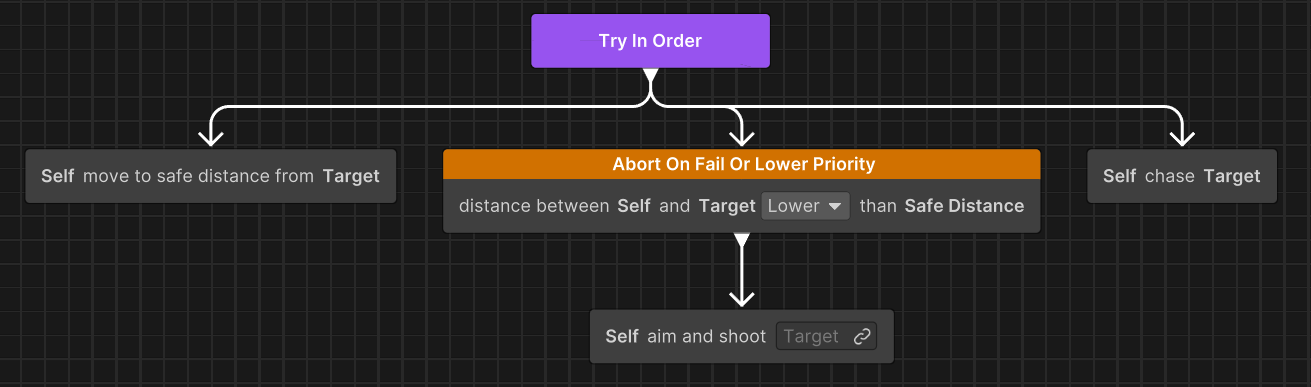
The Both observer type shows the following behavior:
- Interrupts
Chasewhen enemy enters range (Lower Priority). - Interrupts
Attackwhen target is too close (Self).