Domain reloading issues
The Domain Reload view displays the results of a Roslyn analyzer that detects code issues that can cause unexpected or non-deterministic behavior if domain reload on entering Play mode is disabled in your project (as it is by default). Domain reloading can impact project iteration times (in particular, the time it takes to enter and exit Play mode), so it’s best practice to fix all the issues, and then keep domain reload off.
Domain reload overview
For an overview of what domain reload is and the effects of keeping it off, refer to Enter Play mode without domain reload.
The Roslyn analyzer searches the project’s code for types with static fields that would keep their value between different Play mode runs unless reset.
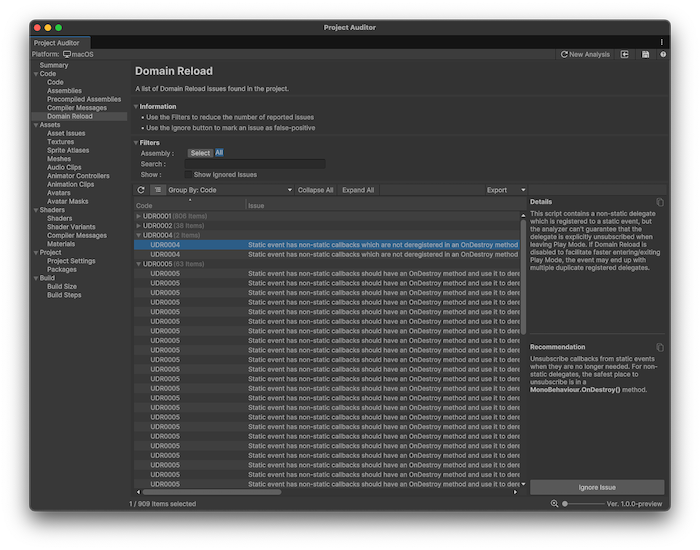
Project Auditor raises warning diagnostics if a type has any static fields, automatic properties, or events that are not decorated with either the [AutoStaticsCleanup] or the [NoAutoStaticsCleanup] attribute. The analyzer emits warnings with the UAL prefix.
Display domain reload issues
To display issues in the Domain Reload view, you must enable the Use Roslyn Analyzers setting in the Preferences window. The use of Roslyn analyzers can increase Project Auditor’s analysis time, so it’s disabled by default.
To allow Project Auditor to use Roslyn analyzers:
- Open the Preferences window (Edit > Preferences (macOS: Unity > Settings)).
- Open the Project Auditor preferences.
- Enable Use Roslyn Analyzers.
Resolve domain reload issues
For information on the exact warning codes generated by the analyzer and the appropriate resolution for each of them, refer to Automatic reset of static state.