Removing unused override data
An override on a prefab might become unused in the following situations:
- The override’s target object is invalid.
- The override’s property path is unknown. This might happen if you delete a public field definition or rename it. To preserve overrides when renaming fields, you can use
FormerlySerializedAsAttribute.
Unity stores the unused override data in the scene file, which means that if you restore the deleted script or field definition, Unity reapplies the override data. Unity doesn’t automatically clean up unused data because you might have moved the object or property the data refers to temporarily or in error. It’s best practice to clean up unused override data to ensure that scene files only contain relevant data, which makes version control and collaboration easier.
Remove unused overrides
To check for and remove unused overrides, perform the following steps:
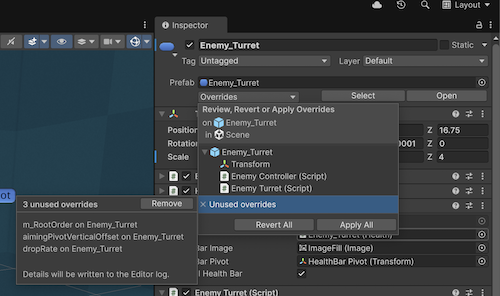
- In the prefab instance Inspector, select Overrides.
- Select Unused overrides. If the prefab instance doesn’t have any unused overrides, this section is unavailable.
- The Unused overrides panel displays a list of the unused overrides. Select Remove to remove them.
Unity writes details of the removed overrides to the Editor log.
You can also remove unused overrides from the Hierarchy:
- Right-click on a prefab instance and select Prefab > Remove Unused Overrides.
- Right-click on the scene name and select Prefab > Remove Unused Overrides to remove all unused overrides in the entire scene.
A dialog appears to confirm the removal of the overrides.