Search box
Use the search box at the top of the list panel in the Package Manager window to find any packages, feature sets, or samples that match the text you enter.
The Package Manager window updates the list as you enter search text, displaying every matching package, feature set, or sample for the context you selected in the navigation panel.
Note: You can search for Unity packages and feature sets, Asset Store packages, and samples. The list context you choose defines where the Package Manager searches:
| List context | Where the Package Manager searches |
|---|---|
| All Packages | Feature sets and packages installed in your project. Includes local, git, and embedded packages, and packages installed from any registry. Also includes any packages from the Asset Store that you added from the My Assets context. |
| Updates | The list of packages that have updates to apply. |
| All Samples | All available samples from the packages installed in your project, not just the ones you imported. |
| Errors and Warnings | The list of packages with issues. |
| Unity Registry | The list of packages and feature sets on the Unity registry. |
| My Assets | The list of Asset Store packagesA bundled collection of assets or tools available for purchase or download on the Unity Asset Store, compressed and stored as an asset package (.unitypackage extension) or a UPM package. You can manage your packages from the Asset Store either on the online store or through the Package Manager window. More infoSee in Glossary available with your Unity account. |
| Built-in | The list of built-in packages on the Unity registry. |
| Services | The list of integrated servicesA Unity facility that provides a growing range of complimentary services to help you make games and engage, retain and monetize audiences. More info See in Glossary you can install. |
| My Registries | Any scoped registry defined for your project. |
Important: The Package Manager window recalls your search terms on a per-context basis. For example, if you set a search term in All Packages, the Package Manager window filters that list. If you then select any other context, the Package Manager window resets the search and lists all packages for that context. But if you then return to All Packages, the Package Manager window restores your search term and filters the All Packages list again.
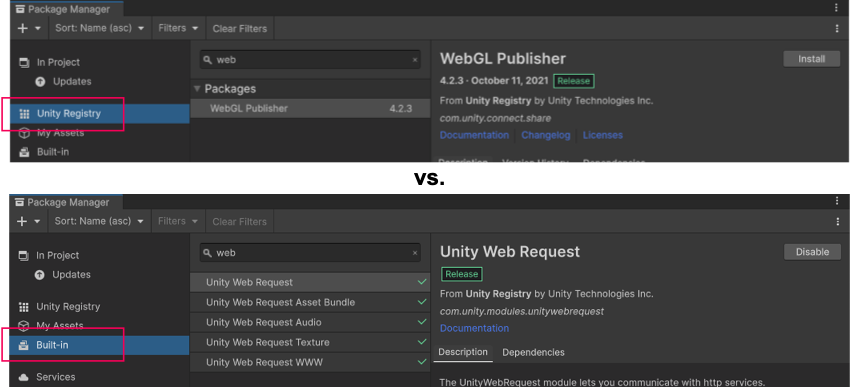
To illustrate this per-context search scope further, if you enter the same search term in separate contexts, you will get different results. For example, if you choose the Unity Registry context then type web in the search box, the results will be different if you then choose the Built-in context and search for the same term:
You can search for a package or a feature set either by:
- Its display name (as it appears at the top of the details panel for packages).
- Its name (ID) (Unity packages and feature sets only), which is the registered package name that begins with com.unity.
You can search for a sample using the following fields:
- Its display name (as it appears at the top of the details panel for samples).
- Its description (as it appears in the details panel).
- The display name of the package that hosts the sample.
- The technical name of the package that hosts the sample.
- The author of the package that hosts the sample.
Your search text can match the beginning, middle, or end of the string. The Package Manager window updates the list dynamically.