Introduction to lightmaps and baking
Lightmapping is the process of pre-calculating the brightness of surfaces in a Scene, and storing the result in a Texture called a lightmap for later use.
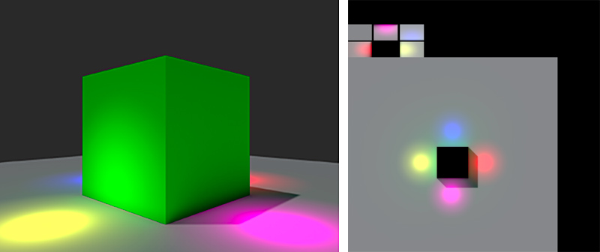
Lightmaps can include both direct and indirect light. This lighting texture can be used together with surface information like color (albedo) and relief (normals) by the Shader associated with an object’s material.
The data baked into lightmaps cannot change at runtime. Real-time lights can be overlaid and used additively on top of a lightmapped scene, but cannot interactively change the lightmaps themselves.
With this approach, we trade the ability to move our lights at gameplay for a potential increase in performance, suiting less powerful hardware such as mobile platforms.
Unity provides more than one light baking backend. You can bake lightmaps with the Unity Compute Light Baker, or with the Progressive Light Baker using either its Progressive GPU or Progressive CPU backend. For more information, refer to Choose a light baking backend.
For advice on setting up a light baker, see Lightmapping: Getting started.
Structure of a lightmap
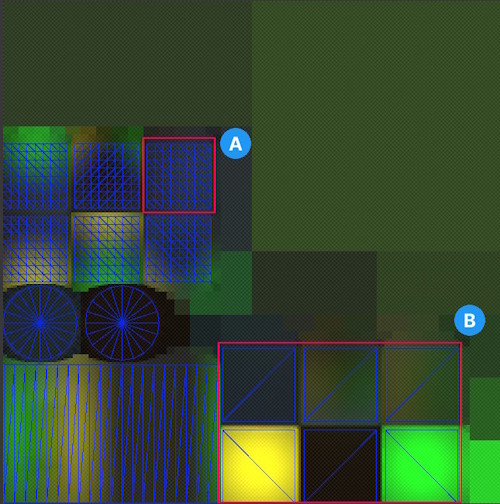
- A: A UV chart. A distinct shape in the lightmap, for example one face of a cube. Each UV chart has a margin around it that separates it from other UV charts.
- B: A UV layout. The set of UV charts for one mesh, for example the six faces of a cube. Each UV layout has padding around it, to separate it from other UV layouts that Unity packs into the same UV atlas.
Light baking backends
To select the light baking backend for your project, use the Default Light Baker setting in the Graphics settings window. To compare the available backends and choose one, refer to Choose a light baking backend.
The Unity Compute Light Baker
The Unity Compute Light Baker produces lightmaps, Light Probes, and Adaptive Probe Volume data. It’s built on the lighting tech stack in the Scriptable Render Pipelines (SRP) Core package, using Unity Compute shaders, and uses the Unified Ray Tracing API, which supports both compute-emulated and hardware-accelerated ray tracing.
The Unity Compute Light Baker is currently opt-in, and is available in the Universal Render Pipeline (URP) and the High Definition Render Pipeline (HDRP) only. Some lighting settings behave differently with this backend, so you might need to adjust your lighting setup when you switch to it. For more information, refer to Unity Compute Light Baker.
The Progressive Light Baker
The Progressive Light Baker has two backends: Progressive GPU and Progressive CPU.
Important: The Progressive CPU Lightmapper is deprecated and will be removed in a future release.
Use the Unity Compute Light Baker or the Progressive GPU Lightmapper instead. Baked lighting might look different after you change backend, so you might need to adjust your lighting setup.
For more information, refer to Choose a light baking backend and Unity Compute Light Baker.
The Progressive Light Baker is a fast path-tracing-based lightmapper system that provides baked lightmaps and Light Probes with progressive updates in the Editor. It requires non-overlapping UV charts with small area and angle errors, and sufficient margin between UV charts.
For an in-depth video showing the interactive workflow, see Unity’s video walkthrough: In Development - Progressive Lightmapper (YouTube).